

One of the surprises of this year's Consumer Electronics Show was a smart toothbrush from Colgate, which, as it turns out, was designed to be an Apple Store exclusive.
The new $100 Colgate Smart Electronic Toothbrush is both Colgate's first smart iPhone-connected brush and the first personal hygiene product you can get right from an Apple Store.
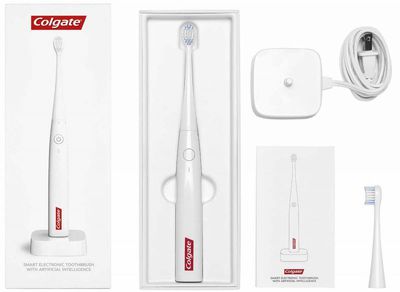
Toothbrushes that connect to your iPhone have become a thing over the course of the last couple of years, and you can now get smart brushes from most of the major brands, including Philips and Oral-B. I'm no stranger to smart toothbrushes -- I've previously reviewed the Oral-B SmartSeries, the Sonicare FlexCare Platinum Connected, and the Sonicare DiamondClean Smart, and for the last couple of weeks, I've been testing the Colgate Smart Electronic Toothbrush.
Colgate's Smart Toothbrush is the simplest smart toothbrush that I've tested so far, but as you'll see in my review below, there are some shortcomings to be aware of if you're considering this brush.
Design and Features
Colgate partnered with Kolibree for the Smart Electronic Toothbrush, and the brush itself appears to be a Kolibree design because it's almost identical to the $129 Kolibree Ara. This Kolibree mirror is the first higher-end toothbrush that Colgate's come out with, so it's different from all other Colgate brushes on the market, which are typically not priced over $10.
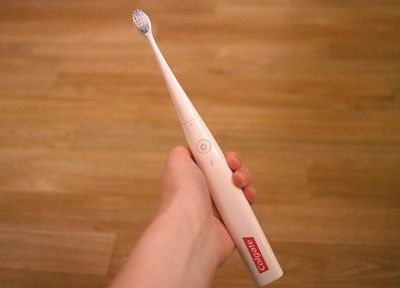
Design wise, the brush is made from a lightweight white plastic material, and it consists of two pieces: a removable and replaceable brush head and the vibrating base that the brush head fits on. The brush head pops onto the base of the toothbrush and then twists to lock in place.
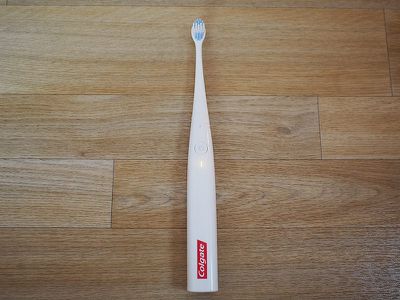
There's single button on the base of the Colgate Smart that turns it on or turns it off, and that's the extent of the functionality, too. It's on or it's off. There are no modes or sensitivity levels to switch between, so you can't alter brushing length (it goes for two minutes), brushing intensity, or any other parameter.
That's fine if you just want a simple brushing experience, but if you want a softer brushing experience, a longer brushing experience, pressure detection, or special modes like gum care or whitening, the Colgate Smart can't deliver.
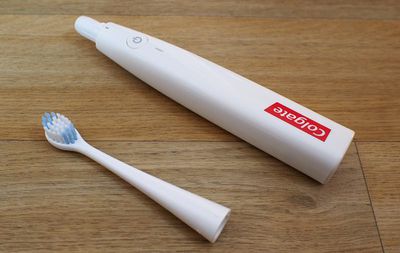
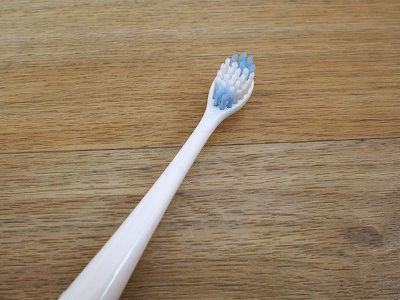
There are also no brush head options. The Colgate Smart has a single brush head, and all replacement brush heads are the same style. Design wise, it's smaller and wider than my Sonicare brush heads, and it's a bit longer than Oral-B brush heads.
It's a stiff brush, but these kinds of electric toothbrushes are often better for your teeth and gums than manual brushing because there's no need to apply pressure or scrub to get your teeth clean. The Colgate Smart is leagues better than a standard manual brush, but compared to my Philips Sonicare, I didn't feel like it worked as well.
For comparison's sake, the Kolibree brush that the Colgate Smart is modeled after vibrates 15,000 times per minute, while the Sonicare DiamondClean brush vibrates 62,000 times per minute and the Oral-B SmartSeries vibrates 48,000 times per minute. I don't know how much this matters, but I can feel a difference in brushing experience and the cleanliness of my teeth when using the Colgate Smart vs. the Sonicare.
If you're using a manual brush, the Colgate Smart is going to get your teeth cleaner, but if you're already using a higher-end electric toothbrush from Sonicare or Oral-B, the Colgate Smart is going to be something of a downgrade with less vibration, fewer options, and no choice when it comes to brush head.
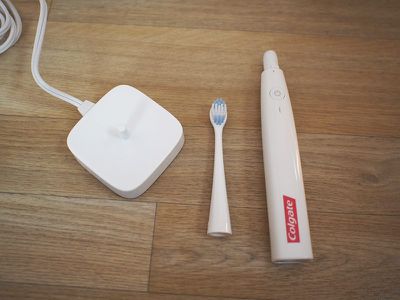
Some people will prefer having less choice and fewer options to have to worry about. With just an on/off button and a single kind of brush head, the Colgate Smart has a certain appealing simplicity to it.
The Colgate Smart is much lighter than my other toothbrushes and it doesn't feel as well made, which is to be expected because my DiamondClean is priced over $200 and the Oral-B model I have on hand cost $140. It's still stylish, easy to clean, and ergonomic in the hand, though.
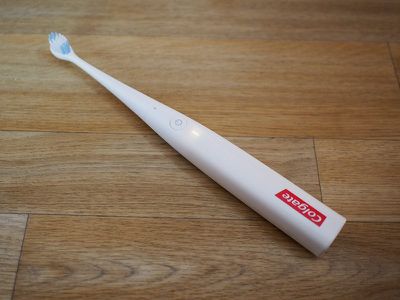
Inside of the Colgate Smart, there's an accelerometer that's able to detect the position of the brush in your mouth, which allows it to determine whether or not you're thoroughly brushing your teeth.
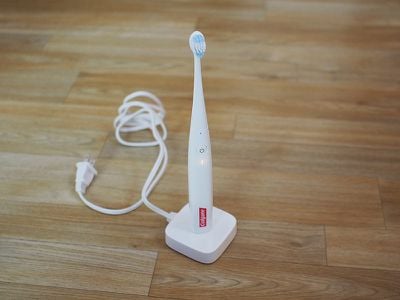
A matching plastic base comes with the Colgate Smart and is used to charge it. Though so light that it barely feels like a battery is inside, the brush can last for two weeks before needing to be recharged.
iPhone Connectivity and App
The Colgate Smart app also appears to be a mirror of the app that the Kolibree smart brushes use. Pairing the toothbrush to the iPhone was a quick and simple process, and while I did see a Bluetooth disconnection or two during my time testing the Colgate Smart, it was always quick to reconnect and I had no glaring connection problems.
There are a few different modes in the Colgate app that are designed to walk you through a thorough brushing experience or encourage you to brush longer. Coach+, for example, displays a 3D model of a set of teeth and it lights up with each area that you need to clean. It has you brush 16 different zones, spending approximately eight seconds on each section.
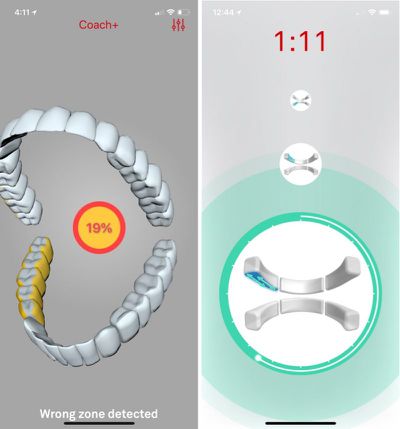
The brush itself, as previously mentioned, has an accelerometer so it can tell where you're brushing. Using the accelerometer to detect my brushing was a hit or miss on the left side of my mouth. Despite brushing properly on that side, the app didn't feel like I was holding the brush in the right position, so half of the time, it would tell me that I was in the wrong zone and it wouldn't count it as adequate brushing.
Almost every time I brushed, I had to adjust my grip on and reposition the brush to get it to register, and by the time I did that, it had moved on to a new section. That resulted in a frustrating experience where the app was telling me I hadn't brushed well enough, while also not giving me extra brushing time to make it up at the end. If it's going to tell me I missed a spot, it should add extra brushing time so I can properly cover all of the sections of my mouth.
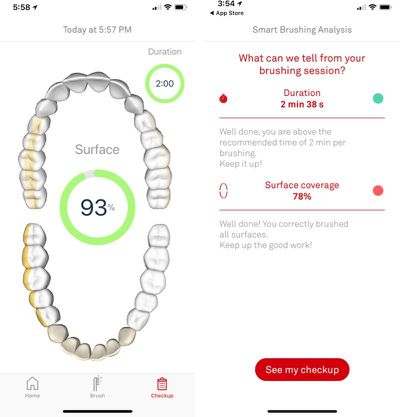
Though the brush uses an accelerometer to determine where it is in your mouth, there is no pressure sensitivity, so it's not going to know when you're pressing too hard. In fact, it doesn't even know when it's touching a tooth since it relies entirely on brush position. It's a system that works well for the most part, but has flaws.
Along with the Coach+ brushing mode, there's also a "Coach" mode that's supposed to be personalized, but over the course of testing the brush, this mode never updated and was the same as the standard brushing mode for me. There are also two games, which are focused on getting you to brush for a full two minutes rather than monitoring where you're brushing, so that's a good alternative for a more relaxed brushing experience or for children.
You don't have to have the Colgate app open when you brush if you don't want to. Even when the app is closed, the brush will track where in your mouth you brushed and for how long, and it will log it the next time your iPhone is nearby.
If you brush offline, the brush will pause four times for each quadrant of your mouth (top left, top right, bottom left, and bottom right) so you're not spending too much time in one area.
The main page of the app has a weekly average featuring the length of your average brushing session, your brushing frequency, and your overall surface coverage, and it will show how much coverage you achieved when you last brushed your teeth. If you swipe to the right, you can also see how you did during past brushing sessions.
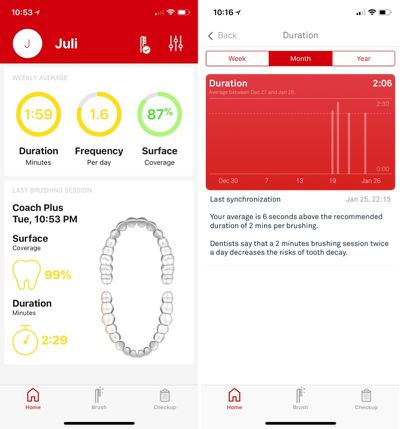
You can also tap the "Duration," "Frequency," and "Surface" readings to see more detailed graphs of your brushing habits over the past week, month, and year.
Other app features include a battery reading, a help section, and access to the Colgate shop where you can purchase additional brush heads. Brush heads need to be replaced every three months and cost $19 for a pack of three.
Bottom Line
The Colgate Smart Electronic Toothbrush is going to improve your brushing habits over a manual toothbrush with its timed brushing to motivate you to spend more time on your teeth and its ability to detect problem areas that aren't getting enough attention, but I didn't find that the brushing experience was as robust as I get with other comparable brushes from Sonicare and Oral-B.
If you already use an electric toothbrush from a company like Sonicare and Oral-B and have good brushing habits, there's no reason to switch to the Colgate Smart Electronic Toothbrush. If you have a manual brush and like the simplicity of it but want to add smart features, that's something the Colgate Smart can deliver.
Colgate's partnership and rebranding of the Kolibree toothbrush is the company's first foray into the higher-end toothbrush market, and there's still some work to be done. Detection of brush position could use some improvement as it was inaccurate for me at times, and the app itself could use a brushing mode with an option to make up any missed areas to achieve better brushing. On the plus side, the in-app games may encourage better brushing in children.
Because the Colgate Smart is a straightforward electronic toothbrush designed to be as simple as possible, there are no different modes to choose from and there are no brush head options. That's great if you want something easy, but it's not as full-featured or as powerful as similar smart brushes from Philips and Oral-B, and in my opinion, it doesn't quite measure up to brushes that have more to offer.
How to Buy
You can purchase the Colgate Smart Electronic Toothbrush from the online Apple Store for $99.95.
Note: Colgate provided GeekWebGuides with a Colgate Smart Electronich Toothbrush for the purpose of this review. No other compensation was received.



























![Apple Pulls Keynote, Pages and Numbers From App Store [Update: Back]](https://images.macrumors.com/t/Okb7kitB_gNr6qe5Pex9nQIysD8=/112x112/article-new/2026/01/Apple-Creator-Studio-iWork-suite.jpg)


















Top Rated Comments
Like, I'd rather have a smart towel that tracked how wet/dry it was, provided data of how long it takes to go from wet to dry, and notified me when it was dry or when it had been wet for too long and thus risked mildew. Or, how about a smart bobblehead that detected when i got home and started bobbling on it's own? Or, how about a smart cordless drill? All things higher on the list than toothbrush.
Things lower on the list than toothbrush are: smart napkin holder; smart doorstop; smart tape dispenser.
Bottom line, especially for learning to brush, or making sure you’re brushing correctly, this is a great tool. I would say kids, and those who may not have had a parent to teach them how to brush correctly would be a great market for this.