
iShowFast Review: USB 3.0 and Lightning Flash Drive Makes Secure File Transfers Between iOS and PCs Easy - GeekWebGuides
Skip to Content

iShowFast Review: USB 3.0 and Lightning Flash Drive Makes Secure File Transfers Between iOS and PCs Easy

by

Last year, popular accessory company Sanho and its HYPER brand launched the iStick, a flash drive with both USB and Lightning connectors to make it easy to transfer files between iOS devices and computers. A Kickstarter campaign for the iStick raised over $1.1 million, with the device coming in capacities ranging from 8 GB to 128 GB.

Building on the success of the iStick, HYPER by Sanho has worked with Taiwanese firm iCirround to bring a next-generation version, the MFi-certified iShowFast, to the United States. By upgrading the USB connectivity to USB 3.0, the iShowFast is up to 14 times faster than the iStick and SanDisk's similar iXpand flash drives, offering read speeds of up to 140 MB/second over USB and 30 MB/second over Lightning.
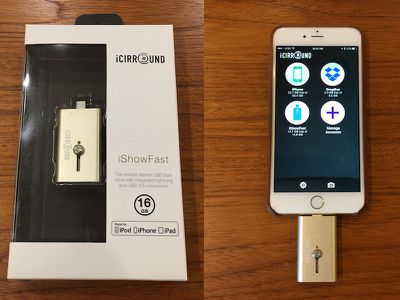
ishowfast
As it has done with a number of its other products, HYPER by Sanho is launching iShowFast via an Indiegogo campaign, but backers shouldn't expect an extended production timeline with potential stumbling blocks pushing delivery out even further than anticipated. iShowFast is already in production and ready to go, with HYPER by Sanho set to start shipping orders out as soon as the $50,000 Indiegogo campaign ends next month.

We've had a few days to play with an iShowFast stick, and while it's a pretty straightforward product that operates essentially identically to the iStick, it was good to see the device is indeed ready for launch in its retail packaging and to be able to try it out with its companion app for managing files on iOS devices.

The design of the iShowFast is clean and simple, with a gold aluminum body that is close to but not quite identical to the gold color Apple uses on its devices. A prominent slider button on the iShowFast makes it easy to switch between Lightning and USB connectors, although this cap-less design leaves one of the connectors unprotected when the drive is carried around in a pocket or bag.
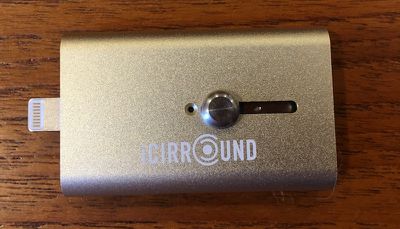
ishowfast_closeup
A blue LED next to the slider flashes briefly when the drive is connected to an iOS device or computer to confirm the connection and then occasionally as data is accessed on the drive.
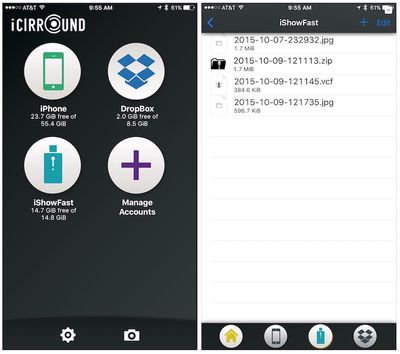
ishowfast_app_1
The iShowFast app for iOS is a simple utility that allows users to manage their files on both the flash drive and on the iOS device itself, as well as a linked Dropbox account. The usual file management tools are included, allowing users to delete, copy, move, share, and zip files, and password protection is supported. The app can also pull in items from the user's photo albums, music libraries, and clipboard, and offers one-step backup of the contacts stored on the device.
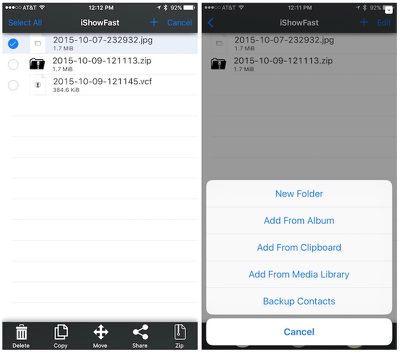
ishowfast_app_2
The main screen of the iShowFast app includes access to the device's camera functionality, making it easy to capture photos and videos and save them to the phone's local storage, the iShowFast stick, or Dropbox.
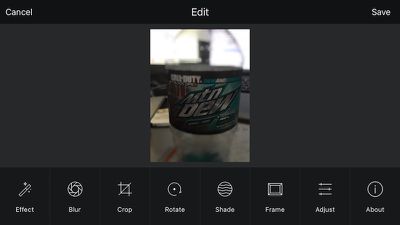
ishowfast_effects
For photos, the iShowFast app includes basic photo filters and editing from Camera360, making it easy to apply various effects, blurs, lens flare, and framing options while also supporting cropping, rotation, and a number of other image adjustments.
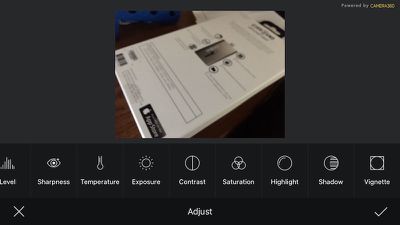
ishowfast_adjust
Overall, we found the iShowFast to work as advertised, offering a simple method for transferring files between iOS devices and computers and some nice basic camera integration and support for Dropbox. Given the ubiquity of wireless file transfers these days with Wi-Fi networking, AirDrop, iCloud, and more, many users won't have a need for the iShowFast. But for those who want or need to physically transfer files with support for password protection, the iShowFast looks like a solid option.

iShowFast's Indiegogo campaign kicks off today, offering early-bird backers and backers who previously supported the iStick campaign 40 percent off the eventual retail prices of the iShowFast.

$49 - iShowFast (16GB) for Early Birds & iStick Kickstarter backers
$59 - iShowFast (16GB). Regular retail price will be $80.
$60 - iShowFast (32GB) for Early Birds & iStick Kickstarter backers
$79 - iShowFast (32GB). Regular retail price will be $100.
$89 - iShowFast (64GB) for Early Birds & iStick Kickstarter backers
$99 - iShowFast (64GB). Regular retail price will be $150.
$149 - iShowFast (128GB) for Early Birds & iStick Kickstarter backers
$199 - iShowFast (128GB). Regular retail price will be $250.

The first batch of 3000 sticks will go out next month soon after the Indiegogo campaign ends, with the remainder of the orders going out in December.

Note: GeekWebGuides received no compensation for this review.

Top Rated Comments

144 months ago

Good question. Apple's product description seems to indicate that this device ('http://www.apple.com/shop/product/MD822AM/A/lightning-to-sd-card-camera-reader') is a single-purpose device. It's for transferring photos from an SD card into an iDevice. They don't mention whether it is possible to use it in any other capacity (transfer files from the device to SD, or transferring other kinds of files.)

It would be interesting to find out if an app could enable its use for these additional purposes, but I suspect Apple wouldn't allow such an app on the App Store in the first place.
There is not a public or private API to access the sd card reader :( - the only way I know to access it is to mount it with a jailbroken iPad. I wonder why it isn't possible to access it via a sandbox app though - I guess root privileges are needed.

I personally feel like it's a very big missed opportunity. Even just having a private API that allowed imports from the sd card reader and/or usb camera kit would be amazing for businesses using their own personal app via enterprise certificates.

I'd still like to know how these company's can access information from a lightning device but no one has created an app (available on the App Store or not) to grab files from an sd card / usb plugged in via the camera kits....I'm definitely missing some details on how this is possible and I'd love to know what it is :p
Score: 2 Votes (Like | Disagree)
canesalato Avatar
144 months ago
I don't want to stick my thumb drive into their computer, I don't know what else it's been doing (seriously!).

Gary
....I understand...
Score: 1 Votes (Like | Disagree)
koruki Avatar
144 months ago
Just download Photosync from the App store, it works much better over wifi from PC, Mac, webbrowser everything. Costs $1

If you need to travel and need movies for your iPad get a Western Digital wireless drive, 1-2TB for that price.
Score: 1 Votes (Like | Disagree)
144 months ago


* People don't always know in advance what they're going to need. I use a 16GB phone and it works just fine for everything I do with it. If I should decide at some future date that I want to start transporting movies, I'm not going to suddenly drop another $900 to buy a new phone when I can spend $150 (or even $250 MSRP) for off-line storage.
Doing your research and future proofing on certain things would be much much more efficient. You could sell your phone and upgrade to a 64GB for about 150. Or... from the get go you could have not chosen a 16GB phone, and for 100 more gotten a 64GB phone. These, and many other options, are much much better than using one of these to store movies.
Score: 1 Votes (Like | Disagree)
pilot1226 Avatar
144 months ago
The only reason I could see wanting this is if I wanted to keep movies on a Flash Drive in the event I had no data access (like on an Airplane, etc.) and my kids wanted to watch a movie on the flight. Otherwise, that's what Cloud Storage is for. It's not like it's hard to get, I have probably over 1 TB for free between Dropbox, Box, and OneDrive.
Score: 1 Votes (Like | Disagree)

Popular Stories

iPhone Duo Trio

Here's What Apple's Apps Look Like on the iPhone Duo

Tuesday October 20, 2026 11:12 am PDT by
With just three days to go until the iPhone Duo is released, Apple is getting ready for the launch. Behind the scenes, the App Store now has screenshots of Apple's built-in apps running on the Duo. We've seen some apps in marketing materials, but images of the ones we haven't seen give us an idea of what it will be like using the iPhone Duo day to day. Many apps are shown in landscape...
Apple Creator Studio iWork suite

Apple Pulls Keynote, Pages and Numbers From App Store [Update: Back]

Thursday October 22, 2026 11:01 am PDT by
Apple has temporarily removed Keynote, Pages, and Numbers from the App Store, just after releasing an update that added iPhone Duo support and a new Intelligent Assistant. It is not clear if the apps were removed intentionally, or if it is a bug. Apple has not said when the apps will be reinstated, but if it was in error, they should return soon. Update: The Mac versions are back without...
M5 MacBook Pro

RIP, MacBook Ultra

Monday October 19, 2026 9:37 am PDT by
Apple today sent out invites for an experience in Los Angeles on Wednesday, October 28, and the "Pro and tell" tagline on the invitation likely means that the rumored MacBook models with touch-enabled OLED displays will stick with MacBook Pro branding instead of the once-rumored "MacBook Ultra" name. The long-rumored "iPhone Ultra" ended up being named iPhone Duo, so speculation that Apple...
Latest Stories
Happy 25th Anniversary, iPod
26 minutes ago
iPhone Duo Demand Reportedly Exceeds Apple's Expectations
3 hours ago
iPhone Duo Launch Begins as First Orders Reach Customers
9 hours ago
1Password for Agents Keeps Your Passwords Hidden From AI
10 hours ago
iPhone Duo 24 Hours Later: Your Questions Answered
11 hours ago
Apple's iWork Apps Get 'Intelligent Assistant' and iPhone Duo Support
11 hours ago
Apple is Apparently Considering a Slightly Larger iPhone Duo
11 hours ago
Giant iPhone Duo Displays Coming to Four Apple Stores
13 hours ago
Apple Pulls Keynote, Pages and Numbers From App Store [Update: Back]
13 hours ago
Apple Updates More Apps With iPhone Duo Support
14 hours ago
Apple Will Label Apps 'Made for iPhone Duo' in App Store
17 hours ago
Amazon Takes $49 Off iPad With Prices Starting at $399.99
17 hours ago
F1 on Apple TV Now Available in Dolby Atmos
18 hours ago
Apple Reveals More Than 50 Apps That Will Be Updated for iPhone Duo
18 hours ago
Apple Blocks Certificates That Could Help Attackers Fake Websites
20 hours ago
Giant iPhone Duo Installations Spotted at Apple Fifth Avenue
20 hours ago
iPhone Duo 2 Prototypes Include Under-Display Face ID
21 hours ago
Tesla App Gains iPad and iPhone Duo Support
1 day ago
Apple Reportedly Boosts iPhone Duo Orders by 44%
1 day ago
Fortnite Returning to Australian App Store After Court Ruling
1 day ago
Apple Ordered to Open iPhone to Rival App Stores in Australia
1 day ago
Apple Suppliers Face Hurdles Cutting Circuit Board Emissions
1 day ago
Things Updated for iPhone Duo With Adaptive Layout
1 day ago
Simplicity and Siri AI Are HomeView's Killer Features, Apple Says
1 day ago
iPhone Duo Reviewers Really Miss Face ID
1 day ago
Does the iPhone Duo Run Hot? Here's What Reviews Found
1 day ago
Apple Music's New Look is Now Live on Apple's Website
1 day ago
Anthropic Launches Claude Duet, a Proactive AI Agent
1 day ago
What 32,000 Folds Did to the iPhone Duo's Hinge
1 day ago
iPhone Duo's Hidden FaceTime Camera Takes 'Trash' Photos
2 days ago









































