
Review: Kensington's SD5000T Thunderbolt 3 Dock Packs Some Neat Security and Convenience Features - GeekWebGuides
Skip to Content

Review: Kensington's SD5000T Thunderbolt 3 Dock Packs Some Neat Security and Convenience Features

by

Earlier this week, Kensington launched its entry into the Thunderbolt 3 dock market with its SD5000T Thunderbolt 3 Docking Station, an enterprise-focused accessory that incorporates a couple of unique features in the form of a Kensington lock slot and the ability to mount the dock to the rear of VESA-compatible displays for "Zero Footprint Mounting" with a separate bracket accessory.

I've since had a chance to spend some time with the SD5000T, so I've been able to test it out to see how it stacks up against the competition.
kensington sd5000t dock
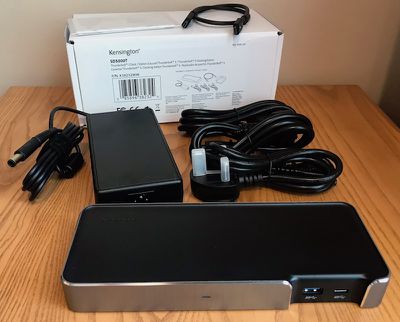
The dock arrived in a plain white box with a product label on it, which Kensington tells me is the B2B packaging. Retail units will obviously have fancier packaging.

Inside the box was the dock itself, a large power brick identical to ones used by many of the other Thunderbolt 3 docks, and a 0.5-meter Thunderbolt 3 cable. Kensington also includes three separate power cables with compatibility for the major US, UK, and mainland European standards.

The SD5000T is fairly attractive, constructed primarily of matte black plastic with a band of brushed aluminum with chamfered top edges around all four sides of the dock except for the two front USB ports. The gap in the aluminum band around the USB ports provides a bit of visual interest without being overly distracting.

kensington sd5000t dock setup
Kensington's dock has a horizontal design very similar to most other Thunderbolt 3 docks on the market, measuring about 8.5 inches wide by about 3.35 inches deep by just about an inch high and weighing just over three quarters of a pound. A small Kensington word mark is molded into the plastic on the top left rear corner of the dock, but it's a subtle inclusion that doesn't distractingly stand out like the branding on some other docks.

Setup is a breeze, requiring the power brick be plugged in and connected to the dock and the Thunderbolt cable connected from one of the ports on the back of the dock to the computer. Any other cables for peripherals and displays are easily connected to the dock. When the dock is powered on, a subtle blue light shines on the front to indicate its status. The SD5000T supports a full 85 watts of charging over Thunderbolt 3, so it can power even a 15-inch MacBook Pro over the same cable used to pass data and video.

I own a number of displays, most of which are VESA-compatible, but none of them will work with Kensington's Zero Footprint Mounting solution, and that's the problem with this feature. All of my VESA displays require that you remove the foot from the display and attach a separate backplate that includes the VESA mounting holes.

If you use these displays sitting on a desk as I and many other people do, you can't also mount Kensington's dock on the back of the display. There are, however, some displays on the market that do include accessible VESA mounting holes even with the display's foot attached, so if you have one of those monitors this would be a great way to get the dock off of your desk.

As with the other Thunderbolt 3 docks I've looked at, I tested Kensington's dock with a 2016 MacBook Pro and a pair of LG UltraFine 5K displays over Thunderbolt 3, one connected via the dock and the other hooked up directly to the MacBook Pro. The display connected via the SD5000T worked just fine, utilizing its full 5K Retina resolution at 60 Hz. Alternatively, you can connect a pair of 4K displays to the dock, one over Thunderbolt 3/USB-C and one over DisplayPort. Other standards like HDMI and VGA can also be used with appropriate DisplayPort adapters.

kensington sd5000t dock front
The SD5000T includes a trio of USB ports running at 5 Gbps, one Type-A and one Type-C on the front and one Type-A on the rear. It's a pretty typical number of USB ports for docks like this and a Type-C option is a nice inclusion, but I still wish Kensington and other manufacturers would match OWC's five USB ports for maximum flexibility.

Connecting a fast USB 3.1 Gen 2 external SSD to the MacBook Pro through the dock yields read and write speeds of around 350 and 320 MB/s respectively through both the Type-C and Type-A ports on the dock, on par with 5 Gbps USB ports on other Thunderbolt 3 docks I've tested.

kensington tb3 usbc speed
That's a bit slower than 420/410 MB/s speed seen when the SSD is connected directly to a 5 Gbps MacBook and can't compare to the ~500 MB/s speeds seen when connecting it directly to the 10 Gbps MacBook Pro, but it's still plenty speedy for most uses.

kensington sd5000t dock rear
Other ports on the rear of the dock include Gigabit Ethernet and separate 3.5 mm audio in and out ports. Kensington's famous lock slot is also included, and while it's not really necessary in my home office, institutional customers will no doubt appreciate the added security.

At a list price of $350, Kensington's SD5000T comes in at the high end of Thunderbolt 3 docks, matching Belkin's dock and priced $50 higher than similar offerings from OWC, Elgato, and CalDigit. While general consumers may find it hard to justify the high-end pricing, institutional customers could be more willing to spend a bit more to get features like the Kensington lock slot and VESA mounting option (mounting plate sold separately for $9.99), as well as a three-year warranty that more closely aligns with typical replacement cycles than the shorter warranties offered on competing docks.

The Kensington SD5000T is available now from Kensington for $349.99, but B&H Photo is currently offering it at a discounted price of $299.95. B&H Photo does not yet have the dock in stock, however, and it is expecting orders to ship out around June 30.

Note: Kensington provided the SD5000T Docking Station to GeekWebGuides free of charge for the purposes of this review. No other compensation was received. GeekWebGuides is an affiliate partner with B&H and may earn commissions on purchases made through links in this article.


Top Rated Comments

Vjosullivan Avatar
122 months ago
Why don't companies understand why people purchase docks?
Why doesn't Apple understand why people purchase docks?
Score: 5 Votes (Like | Disagree)
122 months ago
Why doesn't Apple care why people purchase docks?
Fixed that :-)
Score: 3 Votes (Like | Disagree)
RedTomato Avatar
122 months ago
As mentioned in the review, for $350 I'd expect more than 3 USB ports - which require 2 different cables to use all 3.

Docks have one job - provide lots of ports. This is a big, expensive, dock. So provide lots of ports. At the moment it's being beaten by cheap $5 USB 3 hubs. I don't particularly want to be strapping another hub onto a dock onto my laptop.
Score: 3 Votes (Like | Disagree)
BornAgainMac Avatar
122 months ago
Why don't companies understand why people purchase docks?
Score: 2 Votes (Like | Disagree)
MoJoRo Avatar
122 months ago
Seriously, why do none of these include an SD card slot?
Score: 2 Votes (Like | Disagree)
m0pheu5 Avatar
122 months ago
And why do none of these docks ever have two HDMI or display ports built in? Such a simple, but useful thing.
Score: 1 Votes (Like | Disagree)

Popular Stories

iPhone Duo Trio

Here's What Apple's Apps Look Like on the iPhone Duo

Tuesday October 20, 2026 11:12 am PDT by
With just three days to go until the iPhone Duo is released, Apple is getting ready for the launch. Behind the scenes, the App Store now has screenshots of Apple's built-in apps running on the Duo. We've seen some apps in marketing materials, but images of the ones we haven't seen give us an idea of what it will be like using the iPhone Duo day to day. Many apps are shown in landscape...
Apple Creator Studio iWork suite

Apple Pulls Keynote, Pages and Numbers From App Store [Update: Back]

Thursday October 22, 2026 11:01 am PDT by
Apple has temporarily removed Keynote, Pages, and Numbers from the App Store, just after releasing an update that added iPhone Duo support and a new Intelligent Assistant. It is not clear if the apps were removed intentionally, or if it is a bug. Apple has not said when the apps will be reinstated, but if it was in error, they should return soon. Update: The Mac versions are back without...
M5 MacBook Pro

RIP, MacBook Ultra

Monday October 19, 2026 9:37 am PDT by
Apple today sent out invites for an experience in Los Angeles on Wednesday, October 28, and the "Pro and tell" tagline on the invitation likely means that the rumored MacBook models with touch-enabled OLED displays will stick with MacBook Pro branding instead of the once-rumored "MacBook Ultra" name. The long-rumored "iPhone Ultra" ended up being named iPhone Duo, so speculation that Apple...
Latest Stories
iPhone Duo Demand Reportedly Exceeds Apple's Expectations
2 hours ago
iPhone Duo Launch Begins as First Orders Reach Customers
8 hours ago
1Password for Agents Keeps Your Passwords Hidden From AI
9 hours ago
iPhone Duo 24 Hours Later: Your Questions Answered
10 hours ago
Apple's iWork Apps Get 'Intelligent Assistant' and iPhone Duo Support
10 hours ago
Apple is Apparently Considering a Slightly Larger iPhone Duo
11 hours ago
Giant iPhone Duo Displays Coming to Four Apple Stores
12 hours ago
Apple Pulls Keynote, Pages and Numbers From App Store [Update: Back]
12 hours ago
Apple Updates More Apps With iPhone Duo Support
13 hours ago
Apple Will Label Apps 'Made for iPhone Duo' in App Store
16 hours ago
Amazon Takes $49 Off iPad With Prices Starting at $399.99
16 hours ago
F1 on Apple TV Now Available in Dolby Atmos
17 hours ago
Apple Reveals More Than 50 Apps That Will Be Updated for iPhone Duo
17 hours ago
Apple Blocks Certificates That Could Help Attackers Fake Websites
19 hours ago
Giant iPhone Duo Installations Spotted at Apple Fifth Avenue
19 hours ago
iPhone Duo 2 Prototypes Include Under-Display Face ID
20 hours ago
Tesla App Gains iPad and iPhone Duo Support
1 day ago
Apple Reportedly Boosts iPhone Duo Orders by 44%
1 day ago
Fortnite Returning to Australian App Store After Court Ruling
1 day ago
Apple Ordered to Open iPhone to Rival App Stores in Australia
1 day ago
Apple Suppliers Face Hurdles Cutting Circuit Board Emissions
1 day ago
Things Updated for iPhone Duo With Adaptive Layout
1 day ago
Simplicity and Siri AI Are HomeView's Killer Features, Apple Says
1 day ago
iPhone Duo Reviewers Really Miss Face ID
1 day ago
Does the iPhone Duo Run Hot? Here's What Reviews Found
1 day ago
Apple Music's New Look is Now Live on Apple's Website
1 day ago
Anthropic Launches Claude Duet, a Proactive AI Agent
1 day ago
What 32,000 Folds Did to the iPhone Duo's Hinge
1 day ago
iPhone Duo's Hidden FaceTime Camera Takes 'Trash' Photos
2 days ago
iPhone Duo Has 'Edge Light' Feature That Debuted on Macs Last Year
2 days ago








































