

For many computer users, pairing a laptop with one or more external displays offers the ideal combination of portability and productivity. But if you're like me, you might miss that expansive screen real estate when you disconnect your displays and head out with just your laptop. That's where the Monduo 16-Inch Pro Duo comes in, offering a pair of 16-inch displays that fan out on either side of your laptop's screen to give you millions more pixels to work with even while you're out on the road.
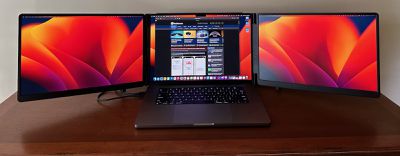
The $800 Monduo Pro Duo isn't the only dual portable external display accessory on the market, but of the major ones I've seen it comes the closest to approaching the high-end specs of the built-in displays on Apple's notebooks. Optimized for 16-inch laptops like Apple's larger MacBook Pro, the Pro Duo's displays each measure in at a very similar 16 inches, with 100% DCI-P3 color support, 2560 ✕ 1600 resolution on each display, 500 nits of brightness, and variable refresh up to 144Hz.
The MacBook Pro's display is of course a bit higher-end with mini-LED, a higher resolution and pixel density, and 10-bit vs. 8-bit color, but the Monduo Pro Duo stacks up very well compared to other available options.
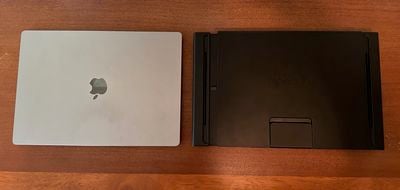
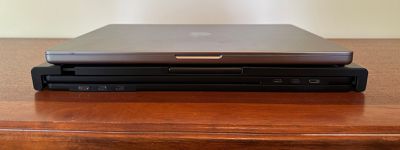
Perhaps the biggest question before even setting the Pro Duo up is whether this is practical to take with you, and I did find that to be the case. It measures in at 15.3 inches (38.8 cm) wide, 9.6 inches (24.4 cm) high, and 1.1 inches (2.8 cm) thick when folded up, and it weighs 4.2 pounds (1.9 kg). That gives it a bit larger footprint than my 16-inch MacBook Pro while being slightly lighter, but it's nearly twice as thick. Still, if you have a spacious computer bag with a couple of compartments as I do, there's a chance the Pro Duo could slide right in there.
Setup
Setting up the Monduo Pro Duo is pretty straightforward, as it consists of a single unit with the two displays that fold out to the sides. The main support unit is expandable horizontally, allowing you to mount it onto your laptop's display and slide it snugly against the display for a good fit. The areas that contact your laptop are padded to prevent damage, and there's a fold-down kickstand on the rear of the center section to help support the Pro Duo.
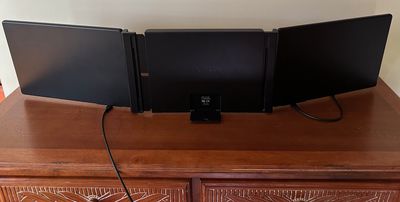
The two displays of the Pro Duo connect to your laptop using included cables, and Monduo offers several options to match your setup needs. Each of the two displays includes a pair of USB-C ports and a mini HDMI port. For users connecting both displays over USB-C, there are two USB-C to USB-C cables each with a 90-degree connector on one end to work with the downward-facing ports on the Pro Duo displays. One cable measures 30 cm while the other measures 88 cm, offering flexibility if you need to run both cables to the same side of your laptop.
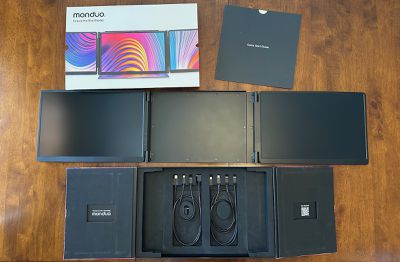 Unpacking the Pro Duo
If you only have one available USB-C port on your laptop, the second Pro Duo display can instead be connected over HDMI thanks to an 88 cm mini-HDMI to HDMI cable with 90-degree connector. If you opt for that setup, you'll also need to connect a USB-C power cable to that display panel, and you can use either the included USB-C to USB-C power cable or the included 90-degree USB-C adapter with your own cable.
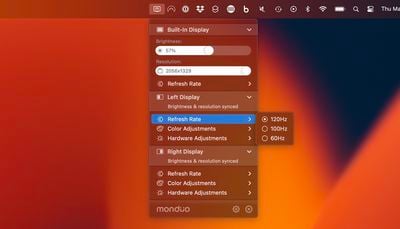
Once everything is physically connected, you'll need to download the Monduo app, which manages the display drivers to support high-resolution options and synchronization with the built-in display. The app also offers quick menu bar access to make changes to brightness and resolution, as well as color and hardware adjustments, for each of the Pro Duo's displays. Each Pro Duo display also includes an on-screen menu and a couple of hardware buttons to help you make adjustments to settings like brightness and contrast, sharpness, gamma, color modes, and more.
Display Performance
The Pro Duo's displays aren't on the level of the MacBook Pro's, but they're quite solid. The 16-inch displays are a nice match to the MacBook Pro, especially when many popular competitors are offering displays in the 10–12-inch range.
The pixel density on the Pro Duo displays is a bit lower than that of the MacBook Pro (2560 ✕ 1600 for the Pro Duo vs. 3456 ✕ 2234 for the MacBook Pro), but with display scaling you can ensure that things look pretty uniform across all three of your displays. You just won't get full Retina quality on the Pro Duo displays.
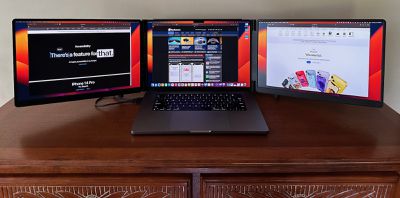
For example, I typically run my MacBook Pro at the "More Space" resolution of 2056 ✕ 1329, and by checking off the option to match resolution, the Pro Duo displays will automatically run at 2080 ✕ 1300 due to the slightly different size and aspect ratio compared to the built-in display, but on-screen contents will appear at the same size across all three displays.
I found the 500-nit brightness of the Monduo Pro Duo displays to be perfectly adequate for normal usage. They have a bit more of a matte finish than the MacBook Pro's display, which helps to reduce glare.
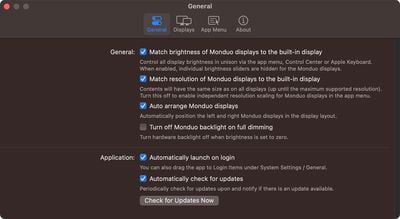
The macOS drivers from Monduo offer the ability to match the brightness, refresh rate, resolution, and scaling to match the internal MacBook Pro display, as well as handle auto arrangement of the Pro Duo displays. The Monduo menu bar app also lets you set those options individually if you prefer.
Everyday Usage
I found that the easiest setup with my 16-inch M1 Pro MacBook Pro was to simply use dual USB-C connections while using MagSafe to keep things charged up. Once you've gone through the initial setup and figured out how everything connects and works, it only takes maybe 30 seconds to get up and running in your temporary workspace. As with other external displays, macOS will generally remember your window arrangement and pop everything into place once the two displays are connected, though that's not always 100% reliable due to the quirks of macOS.
If you need to be completely untethered, you can just run the whole setup off of your MacBook Pro's battery, but be warned that it will chew through your available power quite quickly. My fully charged 16-inch M1 Pro MacBook Pro generally lasts about three hours while driving the Pro Duo under normal usage before it warns me that I need to plug in. So it's not going to work as an all-day on-the-go solution, but you can absolutely run the whole setup for a while without access to external power.
As you might expect with two big 16-inch displays hanging off the sides off your laptop, this setup really needs to be used on a large, solid surface for stability. The resulting setup is quite wide and just isn't very practical to use on a lap or other soft or uneven surface. Beyond the sheer width of the setup, using it on any sort of soft surface will transmit and amplify any wiggling motion out to the external displays, making it pretty impractical.
Wrap-up
Overall, I've found the Monduo Pro Duo to be a great companion for when I need to set up shop somewhere outside of my home for an extended period of time, such as on a working vacation or even waiting several hours at the dealership for my car to be worked on. For shorter periods of usage, I probably wouldn't bother toting the Pro Duo along and hooking it up, but others might find themselves perfectly willing to do that.
At $799, the Monduo 16-Inch Pro Duo isn't the cheapest option out there, but if you're a road warrior who wants to bring lots of screen real estate with you on your travels, this is the best option I've seen. If you're interested in checking it out in more detail or picking one up, you can do so at Monduo's website.
Note: Monduo provided MacRumors with the 16-Inch Pro Duo for the purpose of this review. No other compensation was received.



















Top Rated Comments