
Review: Pixie's ARKit-Enabled Item Trackers Are Neat, But Still Feel Like They're in Beta - MacRumors
Skip to Content

Review: Pixie's ARKit-Enabled Item Trackers Are Neat, But Still Feel Like They're in Beta

by

Apple's augmented reality developer framework, known as ARKit, launched within iOS 11 on September 19. The debut turned hundreds of millions of iPhones into advanced AR-capable devices in the span of a few days, leading to the first wave of ARKit apps on the iOS App Store.
pixie hands on 4
One of these apps is called "Pixie," which existed prior to ARKit with its own proprietary AR technology, but the company updated its main app and "Pixie Point" trackers with Apple's technology last month. I've been testing Pixie's new ARKit-enabled tracking devices for about a week, and so far the app's augmented reality solution to finding lost items has provided a fun and engaging experience for item rediscovery, when it works.

Unfortunately, my experience with Pixie was too often plagued by a low-quality app guidance system and inconsistent success in its main function, making the whole package feel like a beta product for a better iteration down the line.
pixie hands on 5
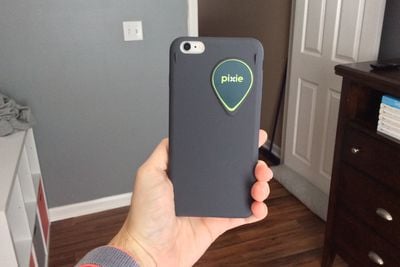
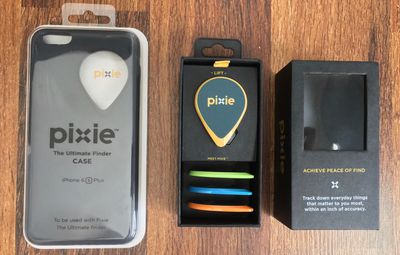
Like other Bluetooth trackers, you attach Pixie Points onto items you might lose frequently, or simply fear losing in the future. For Pixie's tracking technology to work reliably, one of the Points has to be attached to your iPhone via an included silicone-like case.

The Pixie Point sits embedded in the top right of the case's back, and this coupled with the slippery feel of the case made me more conscious of how I was holding my iPhone and how close it was to falling from my hand at times. You could also use the Point's adhesive backing to stick it directly to your iPhone, but for obvious reasons I preferred not do that.
pixie hands on 6

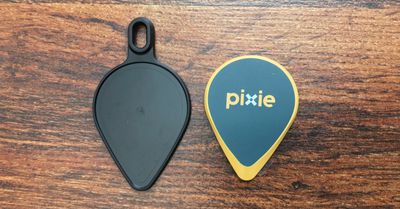
Pixie includes a keychain accessory in the box

The Pixie app's setup process begins by syncing the Point you want attached to your iPhone, and then continuing with any other Points. For me, each point had to be updated individually out of the box, greatly lengthening the time from opening the package to having all four Points synced, updated, and attached to an item.

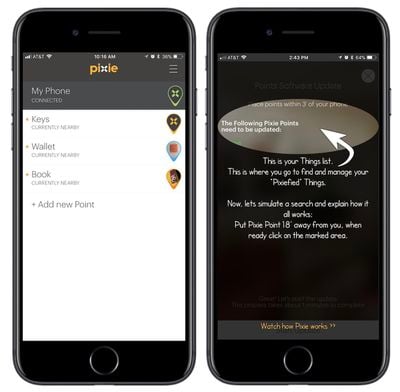
After each Point is added, the Pixie app's main screen looks similar to Tile's, with a list of Points, approximate location and distance of the last time they were seen, and a customizable image next to each. Similar to other Bluetooth tracking apps, you'll need to ensure Bluetooth on your iPhone is constantly on and allow Pixie to always access your location even when the app is closed.
pixie hands on 3
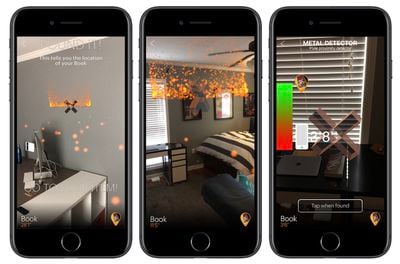
The actual discovery process that Pixie uses is its most interesting aspect; you start by tapping on a Pixie Point associated with your lost item (I used the accessory key ring for my keys, placed one in my wallet, and used the last as a sort of bookmark). After choosing which item is lost, Pixie asks you to hold your iPhone up at arms length, and then rotate in a circle so it can generate a scan of your environment and locate the lost Point.

When it works, Pixie is both a satisfying tool for people who consistently lose items, and a fun AR experience. You'll follow a series of floating bits of "Pixie Dust" and end up in a rotating sphere of lights with the Point somewhere in the vicinity. When close enough, your iPhone turns into a metal detector-like object, so you can scan around and play a game of hot-and-cold until you find the item.

Unfortunately in my experience, Pixie has worked flawlessly like this just 3-5 times, and has more consistently shown aberrations in its user interface, tracking technology, and reliability. Even when it works, the 15-25 seconds of spinning slowly in a circle each time you want to find something could lead to frustrations when you are in a hurry.
pixie hands on 1
For the app itself, Pixie's UI is inconsistent in text font and visual language, with some parts appearing aesthetically clean and simple (the main front-end menu) while other, more information heavy areas are clogged with unappealing Comic Sans-like fonts and cluttered elements (the initial setup screen, a few how-to pop-ups).

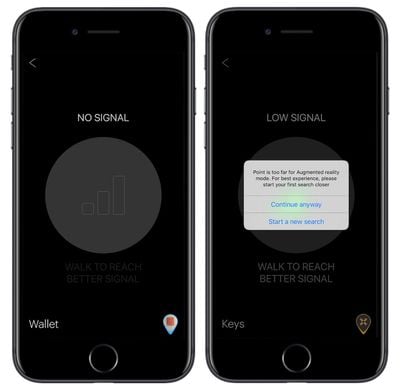
In my testing, I've come to discover that two floors somewhat impede Pixie's reliability, with the app unable to connect to a Pixie Point that I placed downstairs as I stood upstairs. The app usually got stuck at the connection screen, then asked me to walk around a little bit to get closer to the Point in question, eventually leading me downstairs and activating AR mode. While somewhat functional, it still felt like more of a hassle in my own house, where I could be consistently one floor away from a lost item. A handful of times, the app would also simply fail to connect at all while I stood above the lost Point on the bottom floor.
pixie hands on 2
One time, it did discover the Point, but it ended up leading me to the location on the second floor right above where the actual Point was located below. Pixie says items can be discovered within 30-50 feet indoors (and 150 feet outdoors), but certain physical obstructions -- and verticality -- appear to still thwart the Points. I tried with all three of the included Pixie Points that were sent to me, and came across similar findings for each. I asked the Pixie team and they said that they have noted "rare" issues with multi-story households, and a maintenance update is being worked on to fix this issue.

In terms of long range discovery, Pixie's app is a bit barebones. You'll be presented with a generalized last known location on a map and a "search for it now" button, which hinges on your location to the item being within Pixie's 150 feet of outdoor Bluetooth range to work. So, if you're constantly losing things outside of your home, Tile's anonymous lost-and-found community is far more of a useful and precise resource.

As of now, I'd say the same is true for Pixie's in-home tracking technology as well. Using ARKit to find your wallet when you're rushing out of the house, or to locate where your Apple TV remote fell between the cushions, is an enticing concept that Pixie offers, but only on a basic level. There's a likely chance the app and trackers will see steady improvements over time once developers -- not just Pixie's -- realize ARKit's full potential. For now, Pixie just feels like a novelty in beta.

Pixie collections start at $39.99 for a 2-pack, then increase to $74.99 for a 4-pack (what this review covers), and $139.99 for an 8-pack. Each collection requires one Point to be attached to your iPhone, so the cheapest tier at $39.99 means you can keep track of one other item. For more information on Pixie, check out the company's website here.


Tags: ARKit, Pixie

Top Rated Comments

earthTOmitchel Avatar
118 months ago
Sounds like an interesting idea that could potentially be taken by Trackr or tile. Both of those systems have the added advantage of a wider user base, as well as crowd sourcing abilities to find lost items located by other subscribers.

If this brand can get some development figured out though, it is potentially a great solution. Only issue keeping me away is the need for an external sensor attached to my phone.
Exactly, I really like the idea of it but it's sorely lacking in execution. Needing one of the points attached to your iPhone is definitely a major downside. It just doesn't look attractive from a visual standpoint -- which I'd be willing to compromise on if the app worked better.
Score: 2 Votes (Like | Disagree)
paulomagrani Avatar
118 months ago
Sounds like an interesting idea that could potentially be taken by Trackr or tile. Both of those systems have the added advantage of a wider user base, as well as crowd sourcing abilities to find lost items located by other subscribers.

If this brand can get some development figured out though, it is potentially a great solution. Only issue keeping me away is the need for an external sensor attached to my phone
For sure, the good point here is to assemble the BLE4.0 beacon tracker + AR + Sound Alert, into the case. That for sure would be very nice. Specially if the protective case could lock the access to the SIM Card (4G Lte) giving a deep layer of security with special screws in order to have more time search and find the lost iPhone, while some one should has to teardown this special security case.
Score: 1 Votes (Like | Disagree)
840quadra Avatar
118 months ago
Sounds like an interesting idea that could potentially be taken by Trackr or tile. Both of those systems have the added advantage of a wider user base, as well as crowd sourcing abilities to find lost items located by other subscribers.

If this brand can get some development figured out though, it is potentially a great solution. Only issue keeping me away is the need for an external sensor attached to my phone.
Score: 1 Votes (Like | Disagree)

Popular Stories

iPhone Duo Trio

Here's What Apple's Apps Look Like on the iPhone Duo

Tuesday October 20, 2026 11:12 am PDT by
With just three days to go until the iPhone Duo is released, Apple is getting ready for the launch. Behind the scenes, the App Store now has screenshots of Apple's built-in apps running on the Duo. We've seen some apps in marketing materials, but images of the ones we haven't seen give us an idea of what it will be like using the iPhone Duo day to day. Many apps are shown in landscape...
Apple Creator Studio iWork suite

Apple Pulls Keynote, Pages and Numbers From App Store [Update: Back]

Thursday October 22, 2026 11:01 am PDT by
Apple has temporarily removed Keynote, Pages, and Numbers from the App Store, just after releasing an update that added iPhone Duo support and a new Intelligent Assistant. It is not clear if the apps were removed intentionally, or if it is a bug. Apple has not said when the apps will be reinstated, but if it was in error, they should return soon. Update: The Mac versions are back without...
M5 MacBook Pro

RIP, MacBook Ultra

Monday October 19, 2026 9:37 am PDT by
Apple today sent out invites for an experience in Los Angeles on Wednesday, October 28, and the "Pro and tell" tagline on the invitation likely means that the rumored MacBook models with touch-enabled OLED displays will stick with MacBook Pro branding instead of the once-rumored "MacBook Ultra" name. The long-rumored "iPhone Ultra" ended up being named iPhone Duo, so speculation that Apple...
Latest Stories
iPhone Duo Launch Begins as First Orders Reach Customers
4 hours ago
1Password for Agents Keeps Your Passwords Hidden From AI
5 hours ago
iPhone Duo 24 Hours Later: Your Questions Answered
5 hours ago
Apple's iWork Apps Get 'Intelligent Assistant' and iPhone Duo Support
6 hours ago
Apple is Apparently Considering a Slightly Larger iPhone Duo
6 hours ago
Giant iPhone Duo Displays Coming to Four Apple Stores
7 hours ago
Apple Pulls Keynote, Pages and Numbers From App Store [Update: Back]
8 hours ago
Apple Updates More Apps With iPhone Duo Support
9 hours ago
Apple Will Label Apps 'Made for iPhone Duo' in App Store
12 hours ago
Amazon Takes $49 Off iPad With Prices Starting at $399.99
12 hours ago
F1 on Apple TV Now Available in Dolby Atmos
13 hours ago
Apple Reveals More Than 50 Apps That Will Be Updated for iPhone Duo
13 hours ago
Apple Blocks Certificates That Could Help Attackers Fake Websites
15 hours ago
Giant iPhone Duo Installations Spotted at Apple Fifth Avenue
15 hours ago
iPhone Duo 2 Prototypes Include Under-Display Face ID
16 hours ago
Tesla App Gains iPad and iPhone Duo Support
20 hours ago
Apple Reportedly Boosts iPhone Duo Orders by 44%
20 hours ago
Fortnite Returning to Australian App Store After Court Ruling
20 hours ago
Apple Ordered to Open iPhone to Rival App Stores in Australia
21 hours ago
Apple Suppliers Face Hurdles Cutting Circuit Board Emissions
21 hours ago
Things Updated for iPhone Duo With Adaptive Layout
21 hours ago
Simplicity and Siri AI Are HomeView's Killer Features, Apple Says
22 hours ago
iPhone Duo Reviewers Really Miss Face ID
1 day ago
Does the iPhone Duo Run Hot? Here's What Reviews Found
1 day ago
Apple Music's New Look is Now Live on Apple's Website
1 day ago
Anthropic Launches Claude Duet, a Proactive AI Agent
1 day ago
What 32,000 Folds Did to the iPhone Duo's Hinge
1 day ago
iPhone Duo's Hidden FaceTime Camera Takes 'Trash' Photos
1 day ago
iPhone Duo Has 'Edge Light' Feature That Debuted on Macs Last Year
1 day ago
Apple Support App Updated for iPhone Duo's Larger Display
1 day ago









































