

Samsung at CES unveiled the T7 Touch SSD, a follow-up to its super popular T5 SSD. The T7 Touch is now available for purchase, and Samsung sent us a 500GB model for review purposes.
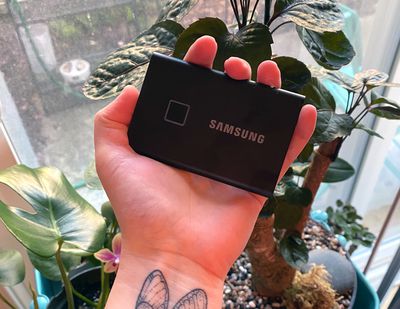
Design wise, the T7 Touch SSD is just about palm size, measuring in at 3.35 inches long, 2.24 inches wide, and 0.31 inches thick. It weighs just two ounces, so it's small enough to tuck into a bag or even a pocket. Compared to an object, it's just about credit card sized, though thicker.
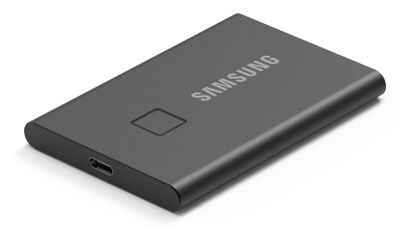
Available in silver or black aluminum, the T7 looks similar to the T5 with flat sides, a USB-C port, and Samsung branding, but there's also a square-shaped fingerprint sensor on the top that can be used to prevent other people from accessing the SSD.
According to Samsung, the SSD can withstand drops up to two meters high, so it should be safe in the event that it gets accidentally dropped. I didn't test dropping the SSD, but I did tuck it into a backpack and carry it around for a week with no issues.
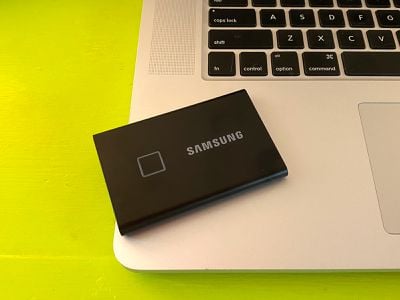
Samsung says there's Dynamic Thermal Guard technology included to minimize heat, and the SSD didn't get beyond warm while I used it.
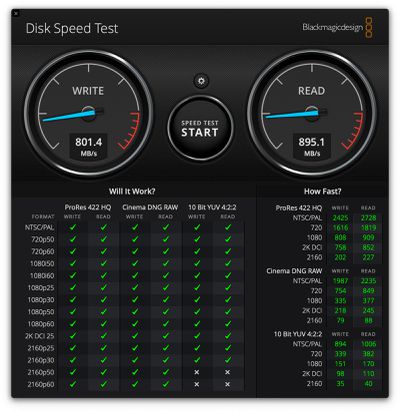
The T7 Touch features USB 3.2 Gen 2 and PCIe NVMe support for read/write transfer speeds of up to 1,050MB/s and 1,000MB/s, respectively, which makes it twice as fast as the T5 SSD. With the 500GB model that I have, I didn't quite hit maximum transfer speeds, presumably because I'm using an older 2016 MacBook Pro.
I did see read speeds of close to 900MB/s and write speeds of 800MB/s, which is still super fast. Transferring a 50GB folder with thousands of photos took just about four minutes, which is quite a bit faster than the other SSDs I own. Getting maximum speeds requires an NVMe SSD and a USB port that supports USB 3.2 Gen 2 - expect slower transfer speeds on older machines without these features.
When transferring files of various sizes, I noticed that with extended file transfers, there's some throttling of the speed, perhaps due to thermal concerns. Smaller files in the range of 5 or 10GB transfer over quite fast, but speeds slow a bit with larger file sizes. I didn't find this to be a dealbreaker, but it's something to be aware of if you're constantly working with very large file sizes.
Samsung provides both a USB-C to USB-C cable and a USB-C to USB-A cable with the T7 Touch, making it compatible with any computer, whether it uses USB-C or USB-A.
The unique feature of the T7 Touch is the included fingerprint sensor, which locks it down. The fingerprint sensor works as any fingerprint sensor does, reading a fingerprint to identify ownership. As with other fingerprint sensors, the T7 Touch can have issues identifying a fingerprint when a finger is damp or cold, but for the most part, it worked well in my testing.
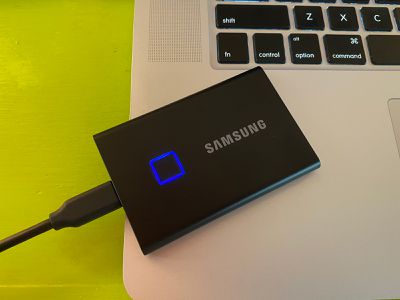
In lieu of the fingerprint sensor, the T7 Touch can be unlocked with a password, and setting up the fingerprint sensor and password requires Samsung's Portable SSD software, which can be downloaded from Samsung's website for free.
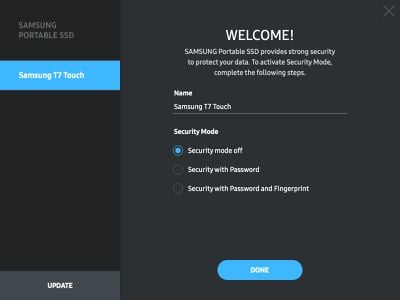
After getting the software up and running, there are options to turn security mode off, add security with password, or add security with password and fingerprint. Setting up the fingerprint sensor requires creating a password and then following a prompt to place a finger on the SSD multiple times, much like the way a fingerprint sensor works on the iPhone. Multiple fingerprints are supported so more than one person can access a drive, but I just used a single finger.
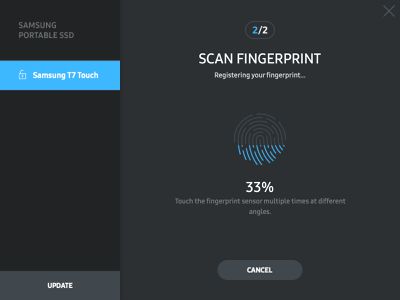
Once the fingerprint sensor is set up, plugging the SSD into the computer will require a fingerprint or password to unlock it, with the files not visible until the SSD is unlocked. On a computer with the Samsung software enabled, plugging in the SSD opens up the software automatically and opens up the fingerprint reader interface. On a computer without the software, the encrypted content of the SSD remains invisible until you use a finger to unlock it.
During my testing, the SSD worked flawlessly on all of the computers that I plugged it into, reading my fingerprint and unlocking in just a second or two so I could use it wherever I was. Ejecting the SSD locked it back up again, making sure it was only accessible when I wanted it to be.
Without a fingerprint, the T7 Touch has no files that are able to be opened except for Samsung's software, which is a bit of a negative. If it's lost, there's no way to leave a message for someone with a name and an email address. Make sure not to forget the password to the drive either - there's no way to reset it that I found.
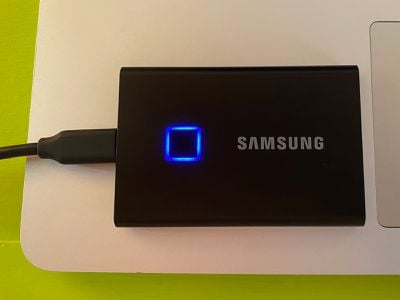
An LED built into the fingerprint sensor lets you see whether it's locked or unlocked, if the SSD is connected to power, and if files are transferring. When plugged in and locked, for example, the blue LED flashes as an instruction to place a finger on it, and it's also useful to see when file transfers are happening.
Bottom Line
I'm not sure the fingerprint sensor adds a ton of value to the Portable SSD T7 Touch from Samsung, but its compact size, the reliability of the brand, and the super fast transfer speeds make it a worthwhile choice for those in need of an external SSD.
I like the idea of having the SSD locked and encrypted, making my files inaccessible to others should I lose the T7 Touch or should someone else try to access it without permission. The Samsung T7 Touch is a solid option for anyone looking for a portable SSD, especially those who are privacy minded.
For those who would prefer a similar drive without a fingerprint sensor, Samsung has a standard T7 SSD coming in the future, which should be a bit more affordable when it launches.
How to Buy
Samsung's Portable SSD T7 Touch can be purchased from Samsung's website or from Amazon, with prices starting at $130 for the 500GB model. A 1TB model is available for $230, and a 2TB model is available for $400.
Note: Samsung provided GeekWebGuides with a 500GB Portable SSD T7 Touch for the purpose of this review. No other compensation was received.
























![Apple Pulls Keynote, Pages and Numbers From App Store [Update: Back]](https://images.macrumors.com/t/Okb7kitB_gNr6qe5Pex9nQIysD8=/112x112/article-new/2026/01/Apple-Creator-Studio-iWork-suite.jpg)






















Top Rated Comments
:p
Hard pass.
I would much rather have a external SSD that integrates directly with BitLocker on Windows and FileVault on macOS instead of relying on third-party software. As both BitLocker and FileVault can be accelerated if the proper optimisations are done on the firmware of these external devices I see no real reason to relay on anything that is not native to the operating system in this day and age.
Sadly from my experience with the previous generation Samsung T5 (why did they skip T6?) it does not feature support for accelerated BitLocker or FileVault so the transfer speeds get greatly reduced when you decide to encrypt them using the native tools in Windows and macOS which is a shame. It's still rather speedy for a external device when utilising USB3.x but it's sad to see how much the throughput drops when Samsung could have easily made them compatible with BitLocker and FileVault accelerated encryption.
I'm eager to get rid of my spinning drives. I was hoping to see 4TB SSD drives.
The main feature of this Titan Ridge controller is DP 1.4 capability instead of DP 1.2 on Alpine Ridge found in the 2016 and 2017 MBPs. Even then I believe only 2018 and newer 15” and 16” MBPs have full 1.4 capability (4K120p, 5K60p and 8K30p without compression).