
Transcend JetDrive Lite 330 Review - MacRumors
Skip to Content

Review: Transcend's 1TB JetDrive Lite 330 Adds Convenient Removable Storage to Your MacBook Pro

by

Last week, Transcend launched a 1TB version of its JetDrive Lite 330 expansion card for the 14-inch and 16-inch MacBook Pro, giving users a convenient way to add significant amounts of storage to their machines without any extra bulk. I've had a chance to spend some time with the new card, and while there are limitations for some of the things you might want to do with it, the JetDrive Lite 330 can be a very handy addition to your setup.
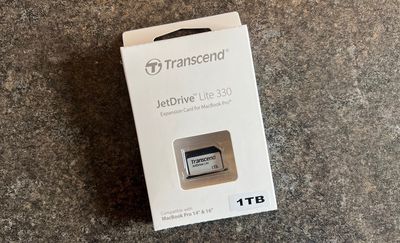
transcend jetdrive box
While the JetDrive Lite 330 is at its heart simply an SD card, the novel aspect of it is that it's designed to specifically fit flush with the ‌MacBook Pro‌'s edge, allowing you to essentially leave the card inserted at all times without having to worry about the card or the slot being damaged from pressure being put on a normal-sized SD card that sticks out a bit.

The JetDrive Lite 330 has a thin plastic face that rests up against the edge of the ‌MacBook Pro‌, and it provides just enough of a surface to get a fingernail behind it to remove the card. It's a simple but great design that all but guarantees the card will stay in place throughout day-to-day usage, packing your machine in and out of a bag, and more.
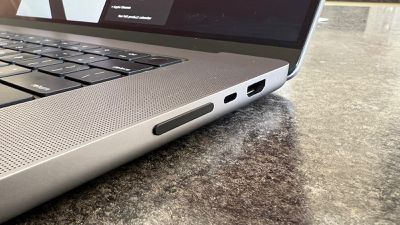
transcend jetdrive inserted
Transcend says the JetDrive Lite 330 card offers read speeds of up to 95 MB/s and write speeds of up to 75 MB/s per second, and I came close to that in my testing, with Blackmagic Speed Test registering roughly 90 MB/s and 75 MB/s respectively. That's of course well over an order of magnitude slower than the internal SSD on a ‌MacBook Pro‌ or even a Thunderbolt or USB 3.1+ external drive, but for certain tasks, it's definitely sufficient.
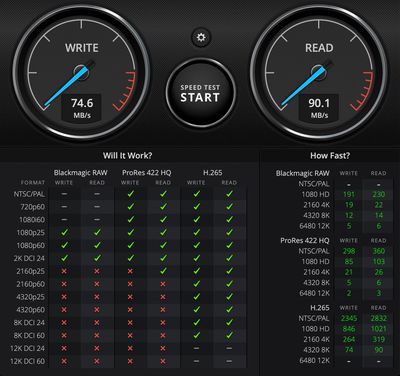
transcend jetdrive speed test
Given the transfer speeds, you definitely can't use the JetDrive Lite 330 as a boot drive or anything where you're rapidly reading and writing data. It's simply not designed for those tasks, but it's ideal as some extra onboard storage for documents, media, and other types of data.

One popular use case for the JetDrive Lite is as an onboard Time Machine backup drive, and the new 1 TB capacity option makes this a more reasonable solution than ever. My 16-inch ‌MacBook Pro‌ has a 1 TB SSD, but only about 230 GB is currently used. It's frequently recommended that your Time Machine drive be at least two or three times as large as the drive you're backing up, in order to have enough room to save a sufficient amount of history, so this new 1 TB JetDrive Pro 330 is perfect for me as a test case.

It should be obvious, but it's important to note that onboard Time Machine storage isn't an ideal solution, as if your Mac is lost or stolen, so is your backup. I back up to an Apple Time Capsule at home (offsite backups would be even safer to protect against larger losses such as a fire or home burglary), but I'm currently doing a lot of international travel and the JetDrive Lite is a great way to tide me over with some sort of backup without needing an online service or potentially cumbersome external drive solutions.

Setting the JetDrive Lite up as a Time Machine drive was incredibly simple, with the card being recognized as a standard drive in Finder immediately after insertion, and then showing up in Time Machine settings as an available backup destination. Once I selected it and initiated Time Machine, it took a little over 80 minutes to complete the initial backup. Subsequent backups have taken no more than a minute or two as Time Machine looks for changes and pushes 500 MB or so onto the card.

Overall, backups are actually much faster and smoother than my usual Time Machine backups over Wi-Fi to the spinning hard drive of my Time Capsule at home. Browsing through Time Machine backups is also smoother.
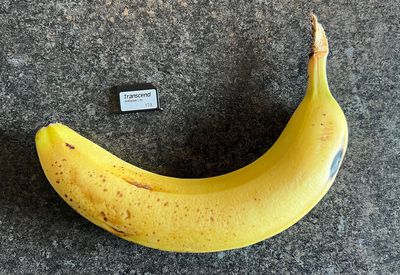
transcend jetdrive bananaBanana for scale

Once I'm done with my international travels and back to regularly backing up at home, I'll be able to make more use of the JetDrive Lite 330 for general storage, perhaps bringing some music and photos over that currently live on external drives. Having all of that accessible right from my Mac without having to worry about carrying external drives is nice.

Apple charges $400 to double the storage on a ‌MacBook Pro‌ from 1 TB to 2 TB, and of course a single speedy 2 TB drive has certain benefits over this JetDrive Lite solution, but the reverse is also true. The JetDrive Lite offers additional flexibility as it can be easily added after the fact and can be removed as needed for safe storage or transfer to another machine.

The 1 TB JetDrive Lite 330 is available now for $249.99 from Amazon, and for those who don't need as much storage, there are cheaper 512 GB, 256 GB, and 128 GB options also available.

In addition to the latest 14-inch and 16-inch ‌MacBook Pro‌ models from 2021, the JetDrive Lite 330 is also compatible with 13-MacBook Pro models (Late 2012 through Early 2015 generations), and Transcend offers other JetDrive Lite products to fit various 2010–2017 MacBook Air and 2012–2015 ‌MacBook Pro‌ models with different SD card slot designs.

Transcend offers a JetDrive Toolbox app for Mac and Windows that supports a couple of functions like tools for recovering deleted files and automatically unmounting and remounting the card depending on your machine's standby status in order to save power, but unfortunately, it's not compatible with M1-based Macs.

Note: Transcend provided MacRumors with the JetDrive Lite 330 for the purpose of this review. No other compensation was received. MacRumors is an affiliate partner with Amazon. When you click a link and make a purchase, we may receive a small payment, which helps us keep the site running.


Top Rated Comments

Jack Neill Avatar
59 months ago

Banana for scale is 💯
Americans will do anything to avoid using the metric system...
Score: 27 Votes (Like | Disagree)
ANDJOE Avatar
59 months ago
Banana for scale is 💯
Score: 18 Votes (Like | Disagree)
59 months ago
WOW. $249 for a 1TB SD Card. You can get an external 1TB drive for $49.

recession is coming.

https://finance.yahoo.com/news/jpmorgan-ceo-warns-powerful-forces-164626735.html?fr=sycsrp_catchall
Score: 9 Votes (Like | Disagree)
Analog Kid Avatar
59 months ago
I was about to write off this entire article, but the banana scale pulled it out of the fire!

🍌📏
Score: 7 Votes (Like | Disagree)
TinyMito Avatar
59 months ago
$249 for SD Card, why not just upgrade the internal to 1TB?
Score: 7 Votes (Like | Disagree)
59 months ago

WOW. $249 for a 1TB SD Card. You can get an external 1TB drive for $49.
I tried that but both Western Digital and Apple denied my warranty when I tried to fit the HD in the slot on the MacBook.
Score: 6 Votes (Like | Disagree)

Popular Stories

M5 MacBook Pro

RIP, MacBook Ultra

Monday October 19, 2026 9:37 am PDT by
Apple today sent out invites for an experience in Los Angeles on Wednesday, October 28, and the "Pro and tell" tagline on the invitation likely means that the rumored MacBook models with touch-enabled OLED displays will stick with MacBook Pro branding instead of the once-rumored "MacBook Ultra" name. The long-rumored "iPhone Ultra" ended up being named iPhone Duo, so speculation that Apple...
iPhone Duo Trio

Here's What Apple's Apps Look Like on the iPhone Duo

Tuesday October 20, 2026 11:12 am PDT by
With just three days to go until the iPhone Duo is released, Apple is getting ready for the launch. Behind the scenes, the App Store now has screenshots of Apple's built-in apps running on the Duo. We've seen some apps in marketing materials, but images of the ones we haven't seen give us an idea of what it will be like using the iPhone Duo day to day. Many apps are shown in landscape...
apple pro tell logo

Apple Announcing New Products Next Week: 'Pro and Tell'

Monday October 19, 2026 9:05 am PDT by
Apple's Greg Joswiak today hinted at new product announcements coming next week, sharing a social media post that says "Can't wait to pro and tell next week." Rumors suggest Apple is planning to debut the new MacBook Pro with an OLED touchscreen display, an M6 entry-level MacBook Pro, an M6 iMac, an iPad mini with an OLED display. Can't wait to pro and tell next week....
Latest Stories
Apple's iWork Apps Get 'Intelligent Assistant' and iPhone Duo Support
32 minutes ago
Apple is Apparently Considering a Slightly Larger iPhone Duo
37 minutes ago
Giant iPhone Duo Displays Coming to Four Apple Stores
2 hours ago
Apple Pulls Keynote, Pages and Numbers From App Store [Update: Back]
3 hours ago
Apple Updates More Apps With iPhone Duo Support
3 hours ago
Apple Will Label Apps 'Made for iPhone Duo' in App Store
6 hours ago
Amazon Takes $49 Off iPad With Prices Starting at $399.99
7 hours ago
F1 on Apple TV Now Available in Dolby Atmos
7 hours ago
Apple Reveals More Than 50 Apps That Will Be Updated for iPhone Duo
8 hours ago
Apple Blocks Certificates That Could Help Attackers Fake Websites
9 hours ago
Giant iPhone Duo Installations Spotted at Apple Fifth Avenue
10 hours ago
iPhone Duo 2 Prototypes Include Under-Display Face ID
10 hours ago
Tesla App Gains iPad and iPhone Duo Support
14 hours ago
Apple Reportedly Boosts iPhone Duo Orders by 44%
14 hours ago
Fortnite Returning to Australian App Store After Court Ruling
15 hours ago
Apple Ordered to Open iPhone to Rival App Stores in Australia
15 hours ago
Apple Suppliers Face Hurdles Cutting Circuit Board Emissions
15 hours ago
Things Updated for iPhone Duo With Adaptive Layout
16 hours ago
Simplicity and Siri AI Are HomeView's Killer Features, Apple Says
16 hours ago
iPhone Duo Reviewers Really Miss Face ID
21 hours ago
Does the iPhone Duo Run Hot? Here's What Reviews Found
23 hours ago
Apple Music's New Look is Now Live on Apple's Website
23 hours ago
Anthropic Launches Claude Duet, a Proactive AI Agent
1 day ago
What 32,000 Folds Did to the iPhone Duo's Hinge
1 day ago
iPhone Duo's Hidden FaceTime Camera Takes 'Trash' Photos
1 day ago
iPhone Duo Has 'Edge Light' Feature That Debuted on Macs Last Year
1 day ago
Apple Support App Updated for iPhone Duo's Larger Display
1 day ago
Amazon Sweetens the Deal on Entry-Level 16-Inch MacBook Pro With $570 Off
1 day ago
iPhone Duo Tips Over on MagSafe Stands When Unfolded
1 day ago
Apple Music's New Look Officially Announced
1 day ago









































