
Apple Depicts Advanced Multitouch Gesturing Control Panel in Mac OS X - MacRumors
Skip to Content

Apple Depicts Advanced Multitouch Gesturing Control Panel in Mac OS X

In case there were any doubts that Apple was exploring the use of advanced multitouch gestures under Mac OS X, a recent Apple patent application authored by Wayne Westerman (of Fingerworks) shows mockups of a Mac OS X gesturing control panel with options to configure standard trackpad, basic multitouch, and advanced multitouch settings:

012620 gesture5 400

Apple's notebooks already contain what we presume to be "basic multitouch" with two-finger scroll, rotate, and zoom, but "advanced multitouch" has not yet been seen in shipping products.

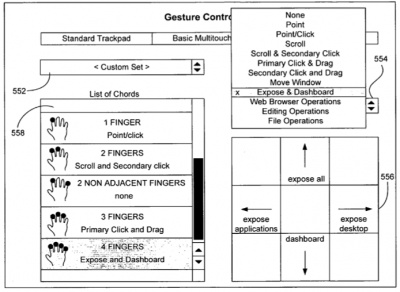
The patent application depicts how one could customize these advanced gestures for Expose and Dashboard, by using four finger swipes up/down/left/right:
012018 gesture2 400

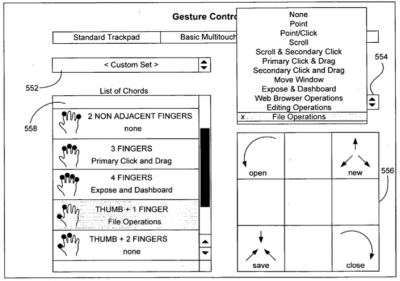
File operations, such as Open, New, Save and Close using gestures based on your Thumb and Forefinger:
012018 gesture3 400

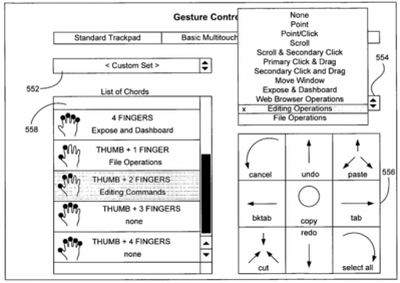
And even editing operations such as Copy, Cut, Paste, Undo, Select All, Tab, and Cancel using gestures based on your Thumb and Two Fingers:
012019 gesture4 400

They also claim to be able to distinguish between various combinations of fingers, including adjacent and non-adjacent finger presses. In particular, they point out that the pinky finger when applied sideways to the trackpad (as in the bottom of a fist) generates a unique pattern and could be used for its own customizable functionality: such as adjusting volume or putting the computer to sleep.

Over the past few years, numerous multitouch patent applications have been revealed Apple's ongoing work on gesture computing. Apple has been making small and steady steps at introducing the multitouch interface -- first in the iPhone, and now in the MacBook Air. Apple is expected to expand this basic multitouch functionality to the remainder of their notebook product line.


Popular Stories

iOS 26

iOS 26.4 Adds Two New Features to CarPlay

Tuesday March 24, 2026 1:55 pm PDT by
iOS 26.4 was released today, and it includes a couple of new features for CarPlay: an Ambient Music widget and support for voice-based chatbot apps. To update your iPhone 11 or newer to iOS 26.4, open the Settings app and tap on General → Software Update. CarPlay will automatically offer the new features so long as the iPhone connected to your vehicle is running iOS 26.4 or later....
Apple Business hero

Apple Unveils 'Apple Business' All-in-One Platform

Tuesday March 24, 2026 8:53 am PDT by
Apple today announced Apple Business, a new all-in-one platform that unifies device management, productivity tools, and customer outreach features. The service is designed to be a consolidated replacement for several of Apple's existing business-focused offerings, including Apple Business Essentials, Apple Business Manager, and Apple Business Connect. It provides organizations with a single...
AirPods Pro Firmware Feature

Apple Releases New Firmware for AirPods Pro 3, AirPods Pro 2 and AirPods 4

Tuesday March 24, 2026 12:31 pm PDT by
Apple today released new firmware for the AirPods Pro 2, AirPods Pro 3, and the AirPods 4. The firmware has a version number of 8B39, up from 8B34 on the AirPods Pro 3, 8B28 on the AirPods Pro 2, and 8B21 on the AirPods 4. There is no word on what's included in the firmware, but Apple has a support document with limited notes. Most updates are limited to bug fixes and performance...















