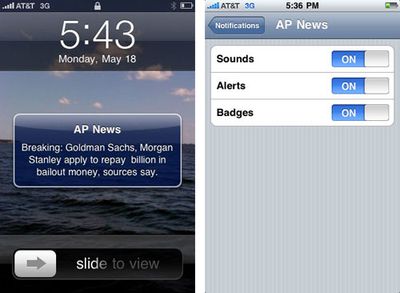
iPhone Push Notification Settings and Screenshots
Apple began
high volume testing of the upcoming Push notification system for iPhone applications earlier this week. The system offers 3rd party applications the ability to push notifications to the user even when they are not the running application.
Each application will ask for permission to provide push notifications upon launch. Once authorized, you can customize the type of notifications you wish to receive: sounds, alerts, and/or badges. Alerts provide an SMS-like pop up dialog while badges simply add a number to the corner of the app's icon. An additional gallery of screenshots is provided by MyAppleGuide.
The Push notification system will accompany the iPhone 3.0 release which is scheduled this summer.
Popular Stories
iOS 26.4 was released today, and it includes a couple of new features for CarPlay: an Ambient Music widget and support for voice-based chatbot apps.
To update your iPhone 11 or newer to iOS 26.4, open the Settings app and tap on General → Software Update. CarPlay will automatically offer the new features so long as the iPhone connected to your vehicle is running iOS 26.4 or later....
Apple today announced Apple Business, a new all-in-one platform that unifies device management, productivity tools, and customer outreach features.
The service is designed to be a consolidated replacement for several of Apple's existing business-focused offerings, including Apple Business Essentials, Apple Business Manager, and Apple Business Connect. It provides organizations with a single...
Apple today released new firmware for the AirPods Pro 2, AirPods Pro 3, and the AirPods 4. The firmware has a version number of 8B39, up from 8B34 on the AirPods Pro 3, 8B28 on the AirPods Pro 2, and 8B21 on the AirPods 4.
There is no word on what's included in the firmware, but Apple has a support document with limited notes. Most updates are limited to bug fixes and performance...