
Google Latitude Web App for iPhone Now Available - MacRumors
Skip to Content

Google Latitude Web App for iPhone Now Available

by
203424 google latitude

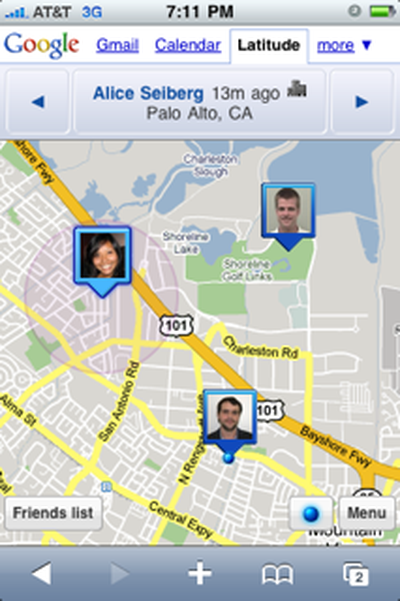
Google today announced that it has launched Google Latitude for the iPhone and iPod touch. Google Latitude, which runs as a web app in Safari, utilizes GPS and Wi-Fi geolocation to display the real-time location of a user's friends and to allow others to track their location. Privacy settings allow users to customize which contacts are permitted to see their location.

To try Google Latitude, type google.com/latitude into your iPhone's browser. And if you miss the experience of launching the app directly from your home screen, you can add a bookmark to the home screen by opening Latitude in Safari and tapping the + icon > Add to Home Screen > Add.

Google also reveals that Apple requested that Latitude be offered as a web app rather than a standalone application in order to reduce confusion with the standard Maps application available on the iPhone.

We worked closely with Apple to bring Latitude to the iPhone in a way Apple thought would be best for iPhone users. After we developed a Latitude application for the iPhone, Apple requested we release Latitude as a web application in order to avoid confusion with Maps on the iPhone, which uses Google to serve maps tiles.

Finally, Google notes that due to Apple's restriction on background applications, Google Latitude is unable to provide continuous location updates as it does on other mobile platforms, although it does automatically refresh locations upon launching and while open.

Google Latitude for the iPhone and iPod touch requires iPhone OS 3.0 and is now available in the US, UK, Canada, Australia, and New Zealand, and it has plans to extend the service to other countries in the near future.


Related Forum: iPhone

Popular Stories

iOS 26

iOS 26.4 Adds Two New Features to CarPlay

Tuesday March 24, 2026 1:55 pm PDT by
iOS 26.4 was released today, and it includes a couple of new features for CarPlay: an Ambient Music widget and support for voice-based chatbot apps. To update your iPhone 11 or newer to iOS 26.4, open the Settings app and tap on General → Software Update. CarPlay will automatically offer the new features so long as the iPhone connected to your vehicle is running iOS 26.4 or later....
Apple Business hero

Apple Unveils 'Apple Business' All-in-One Platform

Tuesday March 24, 2026 8:53 am PDT by
Apple today announced Apple Business, a new all-in-one platform that unifies device management, productivity tools, and customer outreach features. The service is designed to be a consolidated replacement for several of Apple's existing business-focused offerings, including Apple Business Essentials, Apple Business Manager, and Apple Business Connect. It provides organizations with a single...
AirPods Pro Firmware Feature

Apple Releases New Firmware for AirPods Pro 3, AirPods Pro 2 and AirPods 4

Tuesday March 24, 2026 12:31 pm PDT by
Apple today released new firmware for the AirPods Pro 2, AirPods Pro 3, and the AirPods 4. The firmware has a version number of 8B39, up from 8B34 on the AirPods Pro 3, 8B28 on the AirPods Pro 2, and 8B21 on the AirPods 4. There is no word on what's included in the firmware, but Apple has a support document with limited notes. Most updates are limited to bug fixes and performance...















