As rumors of an Apple tablet reach a frenzy, there's no shortage of opinions of what Apple could or should do in an upcoming tablet device. One major question that has remained is the input method that Apple will choose to adopt for the tablet. This became the most obvious issue when you start holding 10-inch tablets as we did at CES. Traditional soft keyboards simply don't scale well in size. Gizmodo summarizes and explores the problem well:
I had a chance to play with a few different sizes of tablets at CES, nearly all of which had traditional onscreen keyboards -- in particular, the Android 2.0 keyboard, which is aesthetically different but functionally almost identical to iPhone OSes. None of them worked, at least in the way that I wanted them to, for one reason: they were too big. Seven-inch tablets were too large to comfortably thumb-type on, while 10-inch tablets made text input all but impossible.
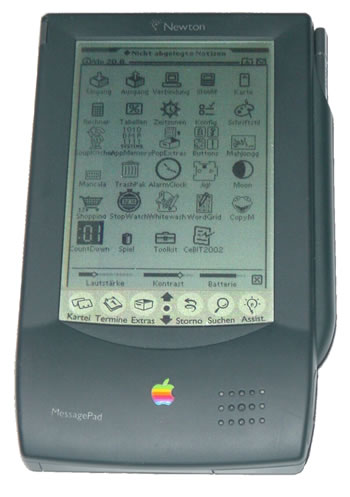
This exact issue dates back to when Apple first introduced the Newton MessagePad, which offered handwriting recognition as its primary input. One of the main benefits of handwriting recognition was the fact that it could be used while standing and holding a slate-type device. As device sizes shrank over the years and chiclet keyboards, and subsequently touch-screen keyboards, took over, the issue has been mostly forgotten.
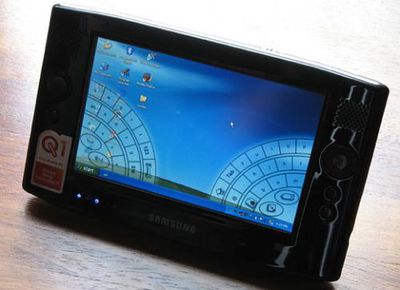
2006 Samsung UMPC with Dialkeys
The simplest (and arguably the most likely) solution will be for Apple to split the touch keyboard in some way. This is the same solution (DialKeys) that Microsoft adopted when they introduced their UMPC devices in 2006. Halves of the touch keyboard would sit along the left and right edges of the screen to be more accessible to your thumbs while holding the device with both hands.
A more intriguing solution, however, would be the reintroduction of handwriting recognition in at least a limited form alongside a more robust multi-touch keyboard. While much has been said of an old handwriting patent application that reemerged in November, the claims in that patent date back from Newton days and the provided image is clearly a depiction of the Newton MessagePad (image), complete with up/down arrows in the toolbar.
Instead, the most interesting multi-touch patent that has emerged from Apple in recent years is one that dates from February 2008, and describes a comprehensive multi-touch system which incorporates touch controls and proximity sensors to allow the device to handle a multitude of different input types, including stylus-less handwriting recognition:
Apparatus and methods are disclosed for simultaneously tracking multiple finger and palm contacts as hands approach, touch, and slide across a proximity-sensing, multi-touch surface. Identification and classification of intuitive hand configurations and motions enables unprecedented integration of typing, resting, pointing, scrolling, 3D manipulation, and handwriting into a versatile, ergonomic computer input device.
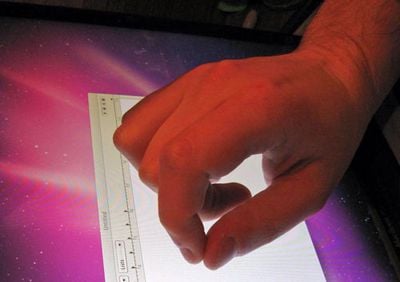
FingerWorks founder Wayne Westerman describes a system where the "pen grip detection module" checks to see if the hand imprint on the multi-touch screen matches up with that of holding an imaginary pen. If so, the movements are interpreted as digital ink and can be used for drawing, signatures or even handwriting recognition. This would go along nicely with Steve Jobs' dislike of styluses.
To be honest, we're not sure how such a system would work in practice, and the remainder of the patent application is likely to be more relevant to Apple's actual plans. The advanced recognition and processing involved paints a picture of an intuitive multi-touch input device that adapts to the user's intent.