
With Apple having pushed out a new update to the Mac OS X Lion developer preview program, those with access to the new build have been looking for changes in an attempt to see what Apple has been working on over the past few weeks.
One minor point that caught our eye is a change in the user interface elements for selecting subpanes within System Preferences. In this latest build, the active subpane is denoted by a sunken, darker button that appears as if it has been pushed, as shown in the Expos & Spaces preference pane.
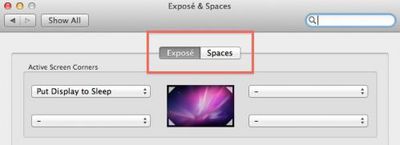
Current "button" style subpane selector with Expos active
Earlier builds of Mac OS X Lion had used a sort of slider animation where the active subpane was represented by a lighter colored button that confused many users when simply glancing at the pane without attempting to move the slider and thus having the animation to key on.

Earlier "slider" style subpane selector with Spaces active
In the face of that criticism, Apple appears to have rethought its mechanism for switching between subpanes and reverted back to a button style that appears more intuitive.
A similar change has been made in iCal, where an earlier slider-style navigator was rolled out to select among day/week/month/year views but has now been replaced by more traditional button-style selectors.

iCal selector buttons in latest Mac OS X Lion build

Thursday February 5, 2026 12:54 pm PST by Joe Rossignol
Apple turns 50 this year, and its CEO Tim Cook has promised to celebrate the milestone. The big day falls on April 1, 2026.
"I've been unusually reflective lately about Apple because we have been working on what do we do to mark this moment," Cook told employees today, according to Bloomberg's Mark Gurman. "When you really stop and pause and think about the last 50 years, it makes your heart ...
Thursday February 5, 2026 12:22 pm PST by Joe Rossignol
Apple plans to announce the iPhone 17e on Thursday, February 19, according to Macwelt, the German equivalent of Macworld.
The report, citing industry sources, is available in English on Macworld.
Apple announced the iPhone 16e on Wednesday, February 19 last year, so the iPhone 17e would be unveiled exactly one year later if this rumor is accurate. It is quite uncommon for Apple to unveil...
Friday February 6, 2026 3:06 pm PST by Juli Clover
In the iOS 26.4 update that's coming this spring, Apple will introduce a new version of Siri that's going to overhaul how we interact with the personal assistant and what it's able to do.
The iOS 26.4 version of Siri won't work like ChatGPT or Claude, but it will rely on large language models (LLMs) and has been updated from the ground up.
Upgraded Architecture
The next-generation...
Tuesday February 3, 2026 7:47 am PST by Joe Rossignol
While the iOS 26.3 Release Candidate is now available ahead of a public release, the first iOS 26.4 beta is likely still at least a week away. Following beta testing, iOS 26.4 will likely be released to the general public in March or April.
Below, we have recapped known or rumored iOS 26.3 and iOS 26.4 features so far.
iOS 26.3
iPhone to Android Transfer Tool
iOS 26.3 makes it easier...
Saturday February 7, 2026 9:26 am PST by Joe Rossignol
Apple today shared an ad that shows how the upgraded Center Stage front camera on the latest iPhones improves the process of taking a group selfie.
"Watch how the new front facing camera on iPhone 17 Pro takes group selfies that automatically expand and rotate as more people come into frame," says Apple. While the ad is focused on the iPhone 17 Pro and iPhone 17 Pro Max, the regular iPhone...
Bummer, I really liked the iOS-style scrollbars. My favorite thing about Lion is the inverted scrolling. It feels more natural on a touchpad once you get used to it.
Finally, Apple has made a significant change to one of the first user interface changes observed (https://www.geekwebguides.com/2010/10/25/mac-os-x-lion-notes-ios-scroll-bars-any-corner-resizing-dock-changes/) way back in October when Apple first demoed Mac OS X Lion: iOS-style scrollbars. Initial builds of Mac OS X Lion had featured scrollbars that overlaid the window's comments, appearing only when necessary and then disappearing after a brief period of time.
Apple has done away with that concept, returning to fixed scrollbars (http://images.macrumors.com/article/2011/04/29/163551-lion_scrollbar_non_overlay.jpg) along the right side of each window, although they do retain the dark iOS-like appearance. The refined scrollbars are present at all times and do not disappear after use.
No they haven't. Fading is now a user preference. You can have them fade automatically, stay all the time, or fade according to your input device.
















