
New Time Capsules Rather Than Apple's Servers to Act as Hub for iCloud Data Syncing? - MacRumors
Skip to Content

New Time Capsules Rather Than Apple's Servers to Act as Hub for iCloud Data Syncing?

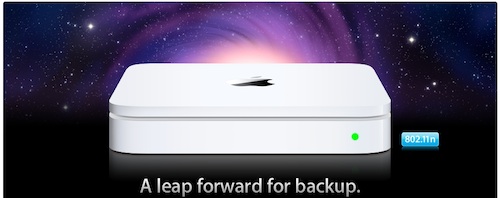
time capsule leap forward
Cult of Mac reports that it has received information indicating that revamped versions of Apple's Time Capsule wireless router/hard drive combination will serve as the hub for iCloud data syncing, with data stored directly on the device rather than on Apple's servers.

Our source didn't have any information about the hardware, but detailed how the Home Folder access system works. Files saved on your computer are backed up instantly to Time Capsule, which makes them available to remote Macs and iOS devices.

If you make any changes on any computer, those changes are updated through iCloud and stored on your Time Capsule. The Time Capsule archives and serves up your files even when your computers are off. When you get home and fire up your desktop computer or laptop, the files are automatically synced across your devices.

This service will also allow you to upload photos and videos from your iPhone or iPad to your Time Capsule. The media will be stored on the device and be made available for other devices to sync. iCloud is the "conduit" through which everything moves, the source said.

"Your computer gets backed up to Time Capsule anyways," said the source. "Now it'll serve up your content when you want it, where you want it, right there on your iOS device."

The source reports that this implementation of a local iCloud is "fully baked" and ready for deployment in future versions of Mac OS X and iOS, although there has been no hint of the functionality in developer seeds of Mac OS X Lion seen thus far. It is also unclear how such a system would integrate with the iCloud music streaming service, as a number of reports in the mainstream media suggested more of a true cloud-based system for that aspect of things, with Apple able to scan users' iTunes libraries and simply provide streaming access to those tracks from any device connected to the user's iCloud.

As noted by MyService, Apple's idea of a local cloud network dates back twenty years, with Steve Jobs having detailed some of the advantages of such a setup during a Q&A session at WWDC in 1997. (Discussion begins at around 13:10 mark.)


Cult of Mac's claims harken back to a report from The Loop's Jim Dalrymple back in mid-February in which he claimed that cloud-based strategy for a revamped MobileMe would in fact be focused on streaming data from users' machines rather hosting it directly on Apple's servers. A local cloud stored on a Time Capsule device would seem to be a middle-of-the-road solution offering much of what Dalrymple proposed while avoiding the need to keep a source computer awake and running for the service to function.

We'll certainly be learning more about iCloud tomorrow as Steve Jobs takes the stage for the keynote at this year's Worldwide Developers Conference at 10:00 AM Pacific Time / 1:00 PM Eastern Time. MacRumors will be providing live coverage of the keynote via MacRumorsLive and Twitter.


Popular Stories

iOS 26

iOS 26.4 Adds Two New Features to CarPlay

Tuesday March 24, 2026 1:55 pm PDT by
iOS 26.4 was released today, and it includes a couple of new features for CarPlay: an Ambient Music widget and support for voice-based chatbot apps. To update your iPhone 11 or newer to iOS 26.4, open the Settings app and tap on General → Software Update. CarPlay will automatically offer the new features so long as the iPhone connected to your vehicle is running iOS 26.4 or later....
Apple Business hero

Apple Unveils 'Apple Business' All-in-One Platform

Tuesday March 24, 2026 8:53 am PDT by
Apple today announced Apple Business, a new all-in-one platform that unifies device management, productivity tools, and customer outreach features. The service is designed to be a consolidated replacement for several of Apple's existing business-focused offerings, including Apple Business Essentials, Apple Business Manager, and Apple Business Connect. It provides organizations with a single...
AirPods Pro Firmware Feature

Apple Releases New Firmware for AirPods Pro 3, AirPods Pro 2 and AirPods 4

Tuesday March 24, 2026 12:31 pm PDT by
Apple today released new firmware for the AirPods Pro 2, AirPods Pro 3, and the AirPods 4. The firmware has a version number of 8B39, up from 8B34 on the AirPods Pro 3, 8B28 on the AirPods Pro 2, and 8B21 on the AirPods 4. There is no word on what's included in the firmware, but Apple has a support document with limited notes. Most updates are limited to bug fixes and performance...

Top Rated Comments

193 months ago
FAIL! If iCloud requires everyone to buy Time Capsule for it to work..
Score: 14 Votes (Like | Disagree)
193 months ago
Forgive me if I'm wrong and being silly, but why are new TCs needed for this? Couldn't this be implemented through a software update on older models?

And doesn't this sound more like 'Back to my Time Capsule' instead of iCloud?
Score: 13 Votes (Like | Disagree)
193 months ago
It's going to fail if people have to buy yet another component.

From a tech perspective it does seem ideal: localized cloud storage, backed-up to the web, accessible without the need for any other device to be running (such as the need to have your Mac powered up to access your iTunes library on the Apple TV). Throw in the fact that you'll be able to access that Time Capsule from anywhere and on any 3G or Wi-Fi network (assumed), and you've got a winner.

However, people will scoff at having to purchase another device. They better make it $99 if the want to sell any.

Will they eliminate Airport Extremes altogether and just offer one combo Time Capsule wireless access point/backup storage device? Since this is a completely new endeavor - a web-based personal server - I assume the product may get a new name.
Score: 9 Votes (Like | Disagree)
ivladster Avatar
193 months ago
uh

I hope you can plug a hard drive to AirPort Extreme and have an iCloud too. Really don't want to buy another router just for this.
Score: 9 Votes (Like | Disagree)
stridemat Avatar
193 months ago
The Time Capsule as your own personal server. It's been waiting to do this since it was introduced.
Score: 8 Votes (Like | Disagree)
193 months ago
I think this setup involving a TC to make things faster/smoother on the LOCAL NETWORK ONLY is genius.

If I want to play some music or movies via iCloud that I have stored in my home folder, I could stream them right off my own network so its faster and doesn't eat up my bandwidth cap.

But everything still needs to be really in the cloud too. What if I am a traveling sales person and my router at home shuts off for some reason, the HD fails, or another problem arises. I still need access to my files.

Plus, I bet Apple's servers will have much better upload speeds than my connection, so accessing "iCloud" on the go is going to be terrible unless I am getting the files off of Apple's servers.

And what if someone breaks into my house and steals my TC or there's a fire and it's destroyed. I have just lost all my files. That means I would need another backup solution. For me, the whole point of a cloud solution is so that I don't need to worry about losing my files again, which again the TC-only setup would fail at.

Now if iCloud is smart enough to figure out when I am at home and thus use my local storage (TC) or if I am outside and therefore use Apple's own servers, and it can do so seamlessly, now that's an improvement over DropBox and any other Cloud service.

At that point, Synching is not going to be an issue at home at all, since local speeds are super fast. And by the time I hit the road, I am sure that TC would have uploaded all the files in the background by then to the real iCloud.

So if this whole TC thing is that if you have a new one, it will make iCloud EVEN BETTER, then it's GENIUS.

If this whole TC thing IS the iCloud and you must have it on to share your files at all times, then its an EPIC FAIL.
Score: 6 Votes (Like | Disagree)















