

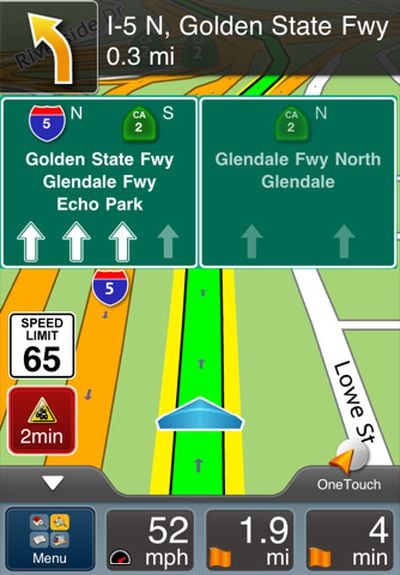
Magellan today released an update to its RoadMate North America and RoadMate USA apps for the iPhone, bringing an overhauled user interface, lifetime traffic and maps, and integration with Yelp and Google Local Search.
Magellan today announced a new version of its RoadMate North America App for iPhone is now available on the App Store. With major user interface enhancements designed for mobile routing, it is the first navigation app to integrate the popular Yelp! user-reviewed business listings. The new app also features Google local search and maps of the United States, Canada, and Puerto Rico, comes with free Lifetime map updates, and includes Magellan's Lifetime Traffic service that provides live traffic information and suggests alternate routes.
We had a brief chance to test out the new version and found the user interface revamp to be a pleasant one, offering a fair amount of customizability in terms of the data shown on-screen, while also providing a good perspective view of the route.

As for actual navigation, RoadMate did have some difficulties in our testing, attempting to direct us to a left turn across a raised median and unable to find a prominent local store through its POI database. Even when finding the store through the integrated Google Local Search, the app could only direct us to a point on a freeway in the general vicinity of the store, a route that would likely have left someone unfamiliar with the store's actual location confused and unable to find the store. To be fair, some of our other GPS apps struggled with the same left turn issue and lack of store listing in their POI databases, although several were able to plot correct routes to the store once the address was found via Google Local Search.
We were unable to put the app through a full battery of tests given a tight timeline ahead of the release, so it is unclear whether the issues we experienced were anomalies or symptomatic of broader issues with navigation in the Magellan system. But given some of the similar difficulties seen on other apps, it's fair to say that at least some experience with navigation issues is par for the course on turn-by-turn GPS navigation apps.
But navigation issues aside, we did find the new interface to be pleasing and informative, integrating trip distances and times with travel speed, speed limits, lane guidance, and traffic delays while still being able to display a solid map view, all on the iPhone's 3.5-inch screen that now checks in at smaller than the typical 4-inch or 5-inch display found on today's standalone GPS units.
RoadMate USA is priced at $49.99, while RoadMate North America adds coverage of Canada for an additional $10.




















Top Rated Comments
nice catch vjl
It should be noted that the App Store description of the USA version states that "For maps and traffic data, "lifetime" is defined as the life of the product or 3 years, whichever is reached first, or until Magellan no longer receives relevant map and traffic data."
I think they should be more upfront about "lifetime" really meaning a maximum of 3 years.
That said, I find most/all iOS navigation to be quite ugly (I currently use NAVIGON). There has to be a market for a good looking navigation app.