
OS X Lion's Resume Feature: A Cautionary Tale - MacRumors
Skip to Content

OS X Lion's Resume Feature: A Cautionary Tale

by

One of the big new features in the upcoming OS X Lion is auto-resume for all applications. The feature comes from iOS where the distinction between open and closed apps is blurred, as every app will resume right where you left off.
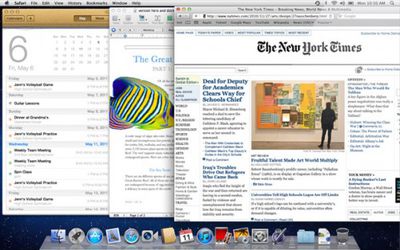
whatsnew resume screen
From Apple's OS X description of the Resume feature:

Now apps you close will reopen right where you left off, so you never have to start from scratch again. And when you install software updates, you no longer need to save your work, close your apps, and spend valuable time setting everything up again. With Resume, you can restart your Mac and return to what you were doing — with all your apps in the exact places you left them.

Jeremy Laurenson, however, writes about a potentially embarrassing situation he ran into while running OS X Lion. Laurenson reports that he and his wife had been watching his wife's delivery in Quicktime Player and later quit the application. In OS X Lion, this saved the state of the video and windows, leaving him a surprise when he later launched a movie for a colleague:

Imagine my surprise (and luckily nothing crazy was on screen) when I double-clicked to open a different video file to show a colleague and the ole “delivery video” popped right up as well.

Laurenson sees this causing "all kinds of issues" as people adjust to the new system.

Update: Alternatively, you can now turn Resume off in Lion as a global setting, but not per app. This setting was added recently:
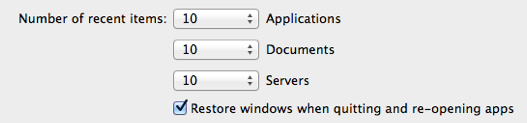

resume

Top Rated Comments

arn Avatar
193 months ago
obviously, swap "birth video" with "porn", and you see the possible large scale implications. :)

arn
Score: 44 Votes (Like | Disagree)
haruhiko Avatar
193 months ago
Luckily he didn't videotape the process of creating the baby. :D
Score: 29 Votes (Like | Disagree)
193 months ago
There goes all my porn watching activities.
Score: 22 Votes (Like | Disagree)
193 months ago
Maybe there should be a dialog box asking if you want to resume or restart an app, if that wouldn't be too much of a nuisance.
Yah, way too much of a nuisance! I hate dialogs that pop up like "Are you sure you want to quit?" YES, THAT'S WHY I ISSUED THE COMMAND! :p
Score: 19 Votes (Like | Disagree)
193 months ago
I think it's more of a cautionary tale of why you don't video your wife's freaking delivery. #notentertaining
Score: 19 Votes (Like | Disagree)
richard.mac Avatar
193 months ago
obviously, swap "birth video" with "porn", and you see the possible large scale implications. :)

arn
Luckily he didn't videotape the process of creating the baby. :D
rofl :D

you can turn off resume for all apps in the General preferences (unfortunately not a per app basis) or quit and discard windows (command+option+Q).. but i am just so used to quitting with command+Q.

i also found out a little trick in Lion; an applications saved state is stored in Saved Application State in the user library and locking a folder for one of the applications will keep its state from changing. so, lock it as a clean slate and the app will always launch as a clean slate.
Score: 15 Votes (Like | Disagree)

Popular Stories

iOS 26

iOS 26.4 Adds Two New Features to CarPlay

Tuesday March 24, 2026 1:55 pm PDT by
iOS 26.4 was released today, and it includes a couple of new features for CarPlay: an Ambient Music widget and support for voice-based chatbot apps. To update your iPhone 11 or newer to iOS 26.4, open the Settings app and tap on General → Software Update. CarPlay will automatically offer the new features so long as the iPhone connected to your vehicle is running iOS 26.4 or later....
Apple Business hero

Apple Unveils 'Apple Business' All-in-One Platform

Tuesday March 24, 2026 8:53 am PDT by
Apple today announced Apple Business, a new all-in-one platform that unifies device management, productivity tools, and customer outreach features. The service is designed to be a consolidated replacement for several of Apple's existing business-focused offerings, including Apple Business Essentials, Apple Business Manager, and Apple Business Connect. It provides organizations with a single...
AirPods Pro Firmware Feature

Apple Releases New Firmware for AirPods Pro 3, AirPods Pro 2 and AirPods 4

Tuesday March 24, 2026 12:31 pm PDT by
Apple today released new firmware for the AirPods Pro 2, AirPods Pro 3, and the AirPods 4. The firmware has a version number of 8B39, up from 8B34 on the AirPods Pro 3, 8B28 on the AirPods Pro 2, and 8B21 on the AirPods 4. There is no word on what's included in the firmware, but Apple has a support document with limited notes. Most updates are limited to bug fixes and performance...















