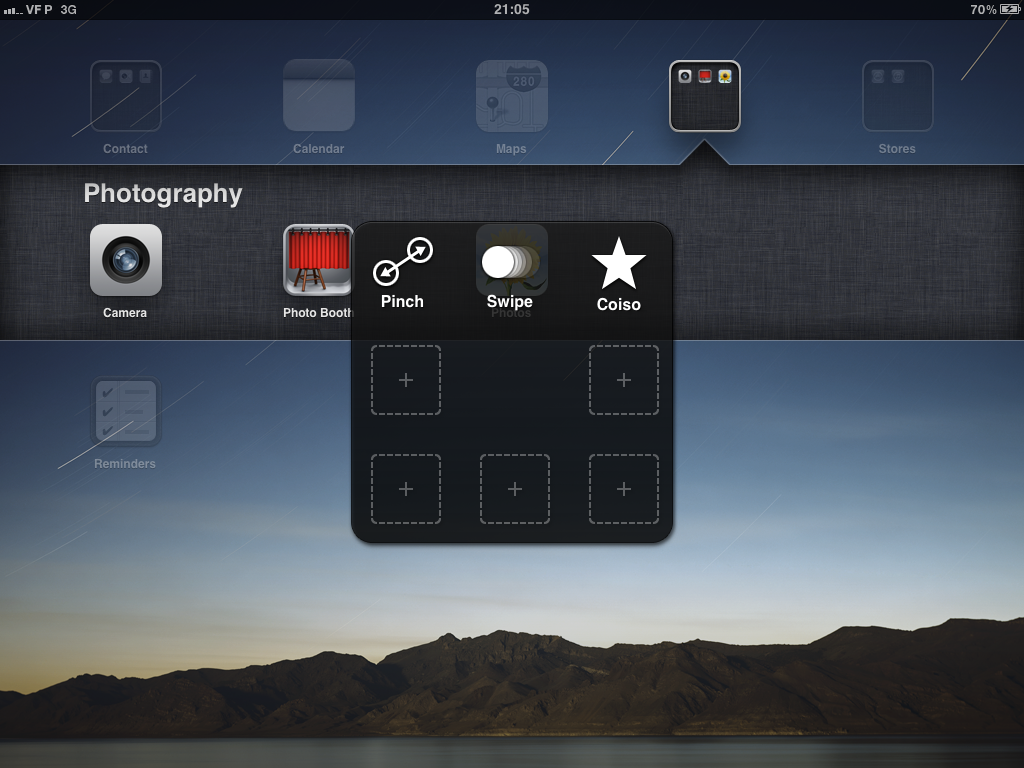
In the latest iOS 5 beta just released today, Apple has activated the new "Assistive Touch" features for the iPad. The Assistive Touch settings were in place in iOS's accessibility settings in previous betas, but is only now active. The new features are meant to provide additional interactivity for those who might have trouble using the traditional gestures and buttons on the iPad.
The new settings allow users to activate a menu overlay on the iPad with by pressing on a designated corner. The menu allows one-tap access to all of the iPad's functions including rotation, shaking, volume changes and even gestures. Known gestures such as pinch and swipe can be recalled by a tap, and custom gestures can even be recorded and played back on command.
iOS 26.4 was released today, and it includes a couple of new features for CarPlay: an Ambient Music widget and support for voice-based chatbot apps.
To update your iPhone 11 or newer to iOS 26.4, open the Settings app and tap on General → Software Update. CarPlay will automatically offer the new features so long as the iPhone connected to your vehicle is running iOS 26.4 or later....
Apple today announced Apple Business, a new all-in-one platform that unifies device management, productivity tools, and customer outreach features.
The service is designed to be a consolidated replacement for several of Apple's existing business-focused offerings, including Apple Business Essentials, Apple Business Manager, and Apple Business Connect. It provides organizations with a single...
Tuesday March 24, 2026 12:31 pm PDT by Juli Clover
Apple today released new firmware for the AirPods Pro 2, AirPods Pro 3, and the AirPods 4. The firmware has a version number of 8B39, up from 8B34 on the AirPods Pro 3, 8B28 on the AirPods Pro 2, and 8B21 on the AirPods 4.
There is no word on what's included in the firmware, but Apple has a support document with limited notes. Most updates are limited to bug fixes and performance...
I have no problems with these gestures, but in some instances I think I could use a few of this instead of the gestures. Perhaps could be more handy. Will have to see when it lands.
My 17-year old son has cerebral palsy. Her uses a wheelchair and has stiffness in his muscles but is intellectually on par with his peers. He has been using Mac laptops since he was 2 years old. I am hoping this feature will be of use to him, as he gets by just fine on his MacBook Pro using just his pinky finger for typing and trackpad use. Multi-finger swipes, pinches, and the like are not gestures he can easily manage.