
How To Disable Lion's 'Resume' Feature - MacRumors
Skip to Content

How To Disable Lion's 'Resume' Feature

by

lionrestore
Resume is one of the main new features to OS X Lion, one taken directly from iOS:

Now apps you close will reopen right where you left off, so you never have to start from scratch again. And when you install software updates, you no longer need to save your work, close your apps, and spend valuable time setting everything up again. With Resume, you can restart your Mac and return to what you were doing — with all your apps in the places where you left them.

Now, this feature might be all well and good, but what if you want your Mac to behave like it did in Snow Leopard? Resume can be easily disabled, but the option is fairly hidden.

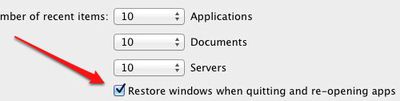
Head to System Preferences and select the General tab. At the bottom of that page is a checkbox labeled "Restore windows when quitting and re-opening apps." If you uncheck that, your apps will continue to behave as they did in Snow Leopard.

Hat tip OS X Daily.

Top Rated Comments

ovrlrd Avatar
192 months ago
This is the best tip and I am surprised it's not mentioned in the article:

Hate the new resume feature and how you end up with a bunch of old windows/tabs open when you launch Safari, QuickTime, or any app that uses Lion's new resume feature?

Well a simple three button keyboard shortcut will save you all the trouble:

⌥ + ⌘ + Q
(thats Option + Command + Q)

Simply press these keys when you want to quit an app and the next time you open it, the last opened windows/tabs will not be resumed and you will start with a fresh app.
Score: 14 Votes (Like | Disagree)
192 months ago


Resume is a really good feature, just not while using Safari.

I hope when you say that you're referring to 'online banking' ;)
Score: 13 Votes (Like | Disagree)
GenesisST Avatar
192 months ago
I hope when you say that you're referring to 'online banking' ;)

There's private browsing for 'online banking', so your wife doesn't your weird tastes in "bank accounts"... :D
Score: 10 Votes (Like | Disagree)
Tronic Avatar
192 months ago
I wish you could pick and choose what apps to use this for. There are certain programs I like to start fresh with whenever I close them. Ie firefox, iTunes, Photoshop.
Score: 9 Votes (Like | Disagree)
192 months ago
How is that "fairly hidden"?
Score: 8 Votes (Like | Disagree)
192 months ago
am i the only one that likes this feature?
Score: 6 Votes (Like | Disagree)

Popular Stories

iOS 26

iOS 26.4 Adds Two New Features to CarPlay

Tuesday March 24, 2026 1:55 pm PDT by
iOS 26.4 was released today, and it includes a couple of new features for CarPlay: an Ambient Music widget and support for voice-based chatbot apps. To update your iPhone 11 or newer to iOS 26.4, open the Settings app and tap on General → Software Update. CarPlay will automatically offer the new features so long as the iPhone connected to your vehicle is running iOS 26.4 or later....
Apple Business hero

Apple Unveils 'Apple Business' All-in-One Platform

Tuesday March 24, 2026 8:53 am PDT by
Apple today announced Apple Business, a new all-in-one platform that unifies device management, productivity tools, and customer outreach features. The service is designed to be a consolidated replacement for several of Apple's existing business-focused offerings, including Apple Business Essentials, Apple Business Manager, and Apple Business Connect. It provides organizations with a single...
AirPods Pro Firmware Feature

Apple Releases New Firmware for AirPods Pro 3, AirPods Pro 2 and AirPods 4

Tuesday March 24, 2026 12:31 pm PDT by
Apple today released new firmware for the AirPods Pro 2, AirPods Pro 3, and the AirPods 4. The firmware has a version number of 8B39, up from 8B34 on the AirPods Pro 3, 8B28 on the AirPods Pro 2, and 8B21 on the AirPods 4. There is no word on what's included in the firmware, but Apple has a support document with limited notes. Most updates are limited to bug fixes and performance...
















