Apple Sending Confirmation Emails To Combat App Purchase Fraud - MacRumors
Skip to Content

Apple Sending Confirmation Emails To Combat App Purchase Fraud

Apple has begun sending emails when AppleID's are used to make purchases on iOS devices not previously associated with the account. It is likely these emails are being used as one way to combat increasingly frequent app purchase fraud.
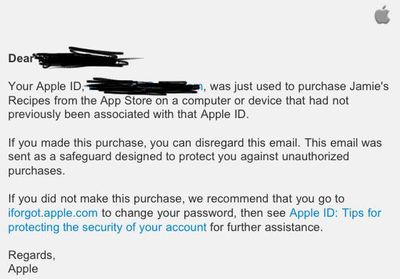
fraudprotectemail
MacRumors reader Michael had his iPhone replaced at an Apple Retail Store. After the first App Store purchase on the replaced phone, he received the above email. The email doesn't require confirmation of the purchase, but is instead a simple notification that a new device has been used and requests the user change their password if they don't recognize the activity.

Apple already requires credit card users to reenter the 3 or 4 digit CID number from the back of their credit card (front in the case of American Express) to authenticate the new device, however users with balances from iTunes Store Gift Cards aren't required to perform any special authentication other than entering their AppleID password.

Popular Stories

iOS 26

iOS 26.4 Adds Two New Features to CarPlay

Tuesday March 24, 2026 1:55 pm PDT by
iOS 26.4 was released today, and it includes a couple of new features for CarPlay: an Ambient Music widget and support for voice-based chatbot apps. To update your iPhone 11 or newer to iOS 26.4, open the Settings app and tap on General → Software Update. CarPlay will automatically offer the new features so long as the iPhone connected to your vehicle is running iOS 26.4 or later....
Apple Business hero

Apple Unveils 'Apple Business' All-in-One Platform

Tuesday March 24, 2026 8:53 am PDT by
Apple today announced Apple Business, a new all-in-one platform that unifies device management, productivity tools, and customer outreach features. The service is designed to be a consolidated replacement for several of Apple's existing business-focused offerings, including Apple Business Essentials, Apple Business Manager, and Apple Business Connect. It provides organizations with a single...
AirPods Pro Firmware Feature

Apple Releases New Firmware for AirPods Pro 3, AirPods Pro 2 and AirPods 4

Tuesday March 24, 2026 12:31 pm PDT by
Apple today released new firmware for the AirPods Pro 2, AirPods Pro 3, and the AirPods 4. The firmware has a version number of 8B39, up from 8B34 on the AirPods Pro 3, 8B28 on the AirPods Pro 2, and 8B21 on the AirPods 4. There is no word on what's included in the firmware, but Apple has a support document with limited notes. Most updates are limited to bug fixes and performance...


Top Rated Comments

EricNau Avatar
191 months ago
It's a step in the right direction, but seems incomplete without an easy way to contact Apple regarding a fraudulent charge.

Doesn't this email sort of send the message that "we know your account may have been jeopardized, but we don't want to help you fix it"? :confused:
Score: 4 Votes (Like | Disagree)
191 months ago
I got this months ago... not new like the others said.
Score: 3 Votes (Like | Disagree)
Epic Xbox Revie Avatar
191 months ago
This isn't new...:rolleyes:
Score: 3 Votes (Like | Disagree)
191 months ago
To all the folks that said they got these emails a while ago and that it isn't new:

Why didn't you send it in? :-)

Because it didn't seem news worthy?
Score: 2 Votes (Like | Disagree)
191 months ago
Does anybody know if it's possible to transfer your purchase history and account into a new username?

You can simply change your Apple ID on your account. You can't create a new account (with new ID) and transfer the purchases with it. Making a second account is a bad idea because they can not be merged together. Just change the Apple ID on your account to save you a lot of hassle.

Follow this link:
https://appleid.apple.com/cgi-bin/WebObjects/MyAppleId.woa/69/wa/directToSignIn?wosid=ex52wgHT0SbfvcBuEHQosM&localang=en_US

sign into your account, and where it says Apple ID, there should be a small 'edit' link in the right corner. Edit the Apple ID as you wish. (If no 'edit' then this means the ID is in use with, or has been in use with mobile me and can not be changed at all)

if you have devices, sign out of your iTunes account on all of them, and sign back in using your new ID.
Score: 2 Votes (Like | Disagree)
191 months ago
To all the folks that said they got these emails a while ago and that it isn't new:

Why didn't you send it in? :-)

Didn't think it was new worthy tbh... still not convinced it is...
Score: 2 Votes (Like | Disagree)

















