
Apple Updates Anti-Malware Definitions to Address Fake Flash Player Trojan - MacRumors
Skip to Content

Apple Updates Anti-Malware Definitions to Address Fake Flash Player Trojan

flash player trojan
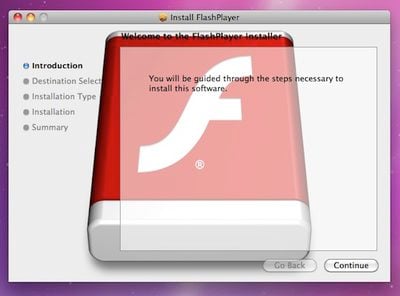
Fake Flash Player trojan installer

While things have been relatively quiet on the malware front for OS X since a raid on Russian payment processing firm ChronoPay appeared to have taken down MacDefender nearly two months ago, one new trojan horse did pop up earlier this month. As detailed by F-Secure, the trojan known as "OSX.QHost.WB.A" masquerades as a Flash Player installer but actually adds entries to a computer's hosts file to redirect users attempting to visit certain Google sites.

Once installed, the trojan adds entries to the hosts file to hijack users visiting various Google sites (e.g., Google.com.tw, Google.com.tl, et cetera) to the IP address 91.224.160.26, which is located in Netherlands.

The server at the IP address displays a fake webpage designed to appear similar to the legitimate Google site.

Search results on the fake Google pages actually lead to pop-up windows that load external content which was broken at the time of discovery but presumably consisted of advertisements of some sort. While the threat as implemented at the time of discovery was relatively mild, inexperienced users falling for the trojan could find themselves unaware of what had happened to their systems and how to fix the hijacked routing added by the malware.
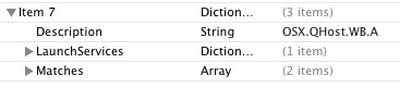
osx qhost wb a
Consequently, Apple earlier this week made its first significant addition to its "XProtect.plist" file since the spate of MacDefender variants surfaced in June. The XProtect.plist file contains malware definitions to enable users' systems to recognize and warn users of malicious downloads, a feature that debuted with Mac OS X Snow Leopard back in 2009.

The original anti-malware system required manual updates to account for new threats, and as such was updated only rarely by Apple as part of larger software updates. But with an Apple software update issued in response to the MacDefender threat earlier this year, Mac OS X systems are now able to make daily checks for updates to that file to ensure up-to-date protection against malware.


Popular Stories

iOS 26

iOS 26.4 Adds Two New Features to CarPlay

Tuesday March 24, 2026 1:55 pm PDT by
iOS 26.4 was released today, and it includes a couple of new features for CarPlay: an Ambient Music widget and support for voice-based chatbot apps. To update your iPhone 11 or newer to iOS 26.4, open the Settings app and tap on General → Software Update. CarPlay will automatically offer the new features so long as the iPhone connected to your vehicle is running iOS 26.4 or later....
Apple Business hero

Apple Unveils 'Apple Business' All-in-One Platform

Tuesday March 24, 2026 8:53 am PDT by
Apple today announced Apple Business, a new all-in-one platform that unifies device management, productivity tools, and customer outreach features. The service is designed to be a consolidated replacement for several of Apple's existing business-focused offerings, including Apple Business Essentials, Apple Business Manager, and Apple Business Connect. It provides organizations with a single...
AirPods Pro Firmware Feature

Apple Releases New Firmware for AirPods Pro 3, AirPods Pro 2 and AirPods 4

Tuesday March 24, 2026 12:31 pm PDT by
Apple today released new firmware for the AirPods Pro 2, AirPods Pro 3, and the AirPods 4. The firmware has a version number of 8B39, up from 8B34 on the AirPods Pro 3, 8B28 on the AirPods Pro 2, and 8B21 on the AirPods 4. There is no word on what's included in the firmware, but Apple has a support document with limited notes. Most updates are limited to bug fixes and performance...

Top Rated Comments

KnightWRX Avatar
191 months ago
Let's get this out of the way right now : This is not an OS X virus.
Score: 36 Votes (Like | Disagree)
Stridder44 Avatar
191 months ago
Awesome, I was not aware that it updated daily.

And yes, this is not a virus. This is malware.
Score: 11 Votes (Like | Disagree)
longofest Avatar
191 months ago
No, it's not a "virus". It's a trojan. You think it's good, but its bad. (heh... depending on if you think "flash" is "good").

A question I have though, is under what conditions should ANY software modify the hosts file? Should Apple even allow programs that have been granted administrative rights to alter the hosts file? There is only a very limited benvolent use case for such an action, and that very related to what they did here: some anti-ad or anti-spyware utilities modify a host file to redirect known ad-producing domains to a "safe" domain. I personally think any modification of the host file should be given a warning like this:

The program _____ is trying to update a core Mac OS X system file that is used to provide network connectivity. While online advertisement blocking programs may require legitimate use of this file, most others applications may represent an attempt to install malicious software onto your computer. Are you sure you want to allow program _____ to modify this file?
Score: 9 Votes (Like | Disagree)
BC2009 Avatar
191 months ago
Funny.... I updated Flash yesterday on my kids' Mac mini and I thought that writing a Trojan that masquerades as an update to Flash would be brilliant since Flash is updated so often and getting prompted that you need to update Flash to view a website is very common..... And then today, here it is.
Score: 8 Votes (Like | Disagree)
191 months ago
That's why you need to disable flash. :p

This has nothing to do with Flash.
Score: 8 Votes (Like | Disagree)
191 months ago
Been out of the loop for 10 weeks and MacRumors is getting my up to speed fast. I love this site.
Score: 8 Votes (Like | Disagree)















