
Apple Launches Store for Text Message/Alert Tones - MacRumors
Skip to Content

Apple Launches Store for Text Message/Alert Tones

by

alerttones
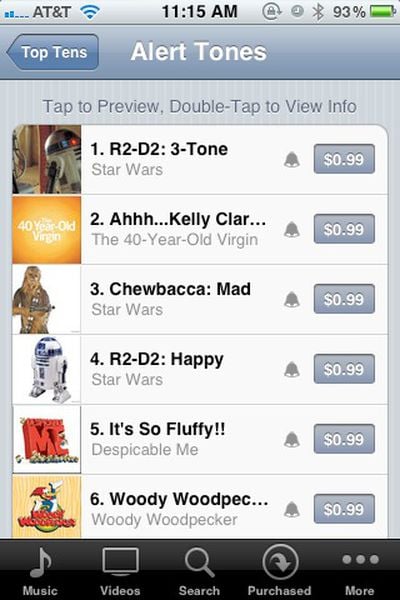
Apple has launched a new store within iTunes specifically for Ringtones and Alert or text message tones. Many of the new alert tones are dialogue clips and sound effects from famous movies including Star Wars and Jaws. The most popular tone at the moment is a beep-boop-beep from R2-D2.

The iTunes Store on your iPhone, iPad, or iPod touch now includes the Tone Store — an incredible spectrum of music ringtones and alert tones that can be assigned to any alert setting on your iPhone, iPad, or iPod touch.

Ringtones have been available for purchase for a while, but the Alert Tones are a brand new offering. For a long time, the limited selection of alert tones was a big complaint of iPhone owners, especially those with several iPhones in a single household.

Ringtones are $1.29 and alert tones are $0.99.

To get to the Tones Store, head to Settings/Sounds and select any of the tone options. Then click "Buy More Tones" at the top of that window.


Top Rated Comments

189 months ago
I'd rather find/convert my own. $1 for a 5 second sound? That's insane!
Score: 10 Votes (Like | Disagree)
189 months ago
For a long time, the limited selection of alert tones was a big complaint of iPhone owners, especially those with several iPhones in a single household.
#firstworldproblems
Score: 8 Votes (Like | Disagree)
justinfreid Avatar
189 months ago
Ok...

Ok...will there be any free tones? Can people upload homemade ones for download? How about being able to choose any MP3 as a notification?
Score: 7 Votes (Like | Disagree)
189 months ago
Sorry - I accidentally posted in this thread/news story from 1994 :rolleyes:
Score: 6 Votes (Like | Disagree)
189 months ago
Faq

FYI to everyone to asked. You can use ringtones as your text / alert tones (scroll down past the ‘alert tones’ list), so making your own text tone is the same process as making your own ringtone.

Also you can choose different sounds for:
Ringtone
Text Tone
New Voicemail
New Mail
Sent Mail
Tweet
Calendar Alerts
Reminder Alerts

And you can use your (homemade) ringtones for any of those as well.

edit: This all works on an iPhone 3GS.
Score: 6 Votes (Like | Disagree)
cosmokanga2 Avatar
189 months ago
In iOS5 all your ringtones can be used as ringtones and text tones. So, you can create both now, or use your 30 second ringtones for text tones. Pretty awesome!
Score: 5 Votes (Like | Disagree)

Popular Stories

iOS 26

iOS 26.4 Adds Two New Features to CarPlay

Tuesday March 24, 2026 1:55 pm PDT by
iOS 26.4 was released today, and it includes a couple of new features for CarPlay: an Ambient Music widget and support for voice-based chatbot apps. To update your iPhone 11 or newer to iOS 26.4, open the Settings app and tap on General → Software Update. CarPlay will automatically offer the new features so long as the iPhone connected to your vehicle is running iOS 26.4 or later....
Apple Business hero

Apple Unveils 'Apple Business' All-in-One Platform

Tuesday March 24, 2026 8:53 am PDT by
Apple today announced Apple Business, a new all-in-one platform that unifies device management, productivity tools, and customer outreach features. The service is designed to be a consolidated replacement for several of Apple's existing business-focused offerings, including Apple Business Essentials, Apple Business Manager, and Apple Business Connect. It provides organizations with a single...
AirPods Pro Firmware Feature

Apple Releases New Firmware for AirPods Pro 3, AirPods Pro 2 and AirPods 4

Tuesday March 24, 2026 12:31 pm PDT by
Apple today released new firmware for the AirPods Pro 2, AirPods Pro 3, and the AirPods 4. The firmware has a version number of 8B39, up from 8B34 on the AirPods Pro 3, 8B28 on the AirPods Pro 2, and 8B21 on the AirPods 4. There is no word on what's included in the firmware, but Apple has a support document with limited notes. Most updates are limited to bug fixes and performance...















