
One of the new features of iOS 5 is the ability to purchase alert tones from the iTunes Store. Users have long been able to purchase and create custom ringtones, but the ability to customize text tones is new.

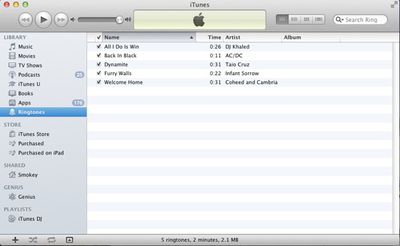
The process for creating custom alert tones is identical to creating custom ringtones. iOS 5 now offers the ability to select full-length ringtones as a text message alert. To create a custom Alert Tone, simply make a "ringtone" of the proper length (2-5 seconds) and select it as the text message alert in Settings/Sounds.
itunesringtones
Italian Apple site Melaspazio.it [Translation] noted process was the same as creating ringtones. There are a few ways to create custom ringtones. The easiest option is a dedicated app like Ringer from Pixel Research Labs. This $3.99 app, available on the Mac App Store, creates custom-length audio-files directly from the iTunes Library, including fade-ins and -outs. It converts them properly and sends them directly to iTunes for syncing.

For users who don't want to pay to create a custom ringtone, there is a free option. Simonblog has the full instructions with screenshots, but here's the summary:

- Select a song in iTunes, right-click it and select "Get Info"
- Click the Options tab and use the "Start Time" and "Stop Time" to control the exact length of the sound file you want. Close the Get Info window.
- Right-click the song and select "Create AAC Version"
- Right-click the newly created song and select "Show In Finder"
- Change the file extension from .m4a to .m4r
- Head back to iTunes and right-click the newly created song. Select "Delete" and then click "Remove" to remove the song from the iTunes Library -- but then select "Keep File" so the actual ringtone doesn't get deleted.
- Finally, head back to the Finder and double-click the .m4r file. It will automatically add itself to iTunes as a Ringtone, ready to be synced with your iPhone.

If you're going to use a file as a text tone, be sure to keep it short or you'll be hearing 30 seconds of AC/DC's Back In Black every time you get a text. GarageBand can be used to create custom ringtones as well.


Top Rated Comments

elisedriver Avatar
187 months ago
Better to have different tones from the wife or the mistress :D
Score: 3 Votes (Like | Disagree)
r2shyyou Avatar
187 months ago
If you're going to use a file as a text tone, be sure to keep it short or you'll be hearing 30 seconds of AC/DC's Back In Black every time you get a text.

Haha!
Score: 3 Votes (Like | Disagree)
kurosov Avatar
187 months ago
GarageBand is still the best method of creating custom tones.
Score: 2 Votes (Like | Disagree)
Rodimus Prime Avatar
187 months ago
Welcome to the 21st century Apple is what I have to say to this.
Score: 1 Votes (Like | Disagree)
surf2snow1 Avatar
187 months ago
now I won't have my dad ask me "was that my phone or yours" every time I get a text...

atleast someone's parents know how to text
Score: 1 Votes (Like | Disagree)
rutskiuk Avatar
187 months ago
iOS custom text tones

Spotted this one right away :D

These are the instructions I sent to my mates yesterday:

Tested the custom text tones facility on iOS5. Works a treat with iRinger. Go to http://www.iringer.net/ to get the latest version, import the file you want as a tone, export it as a text tone (CAF) then tick export to iTunes, click go, go to iTunes and drag the alert tone (from ringtones) onto your phone. On the phone go to settings > sounds > text tone > pick your new tone and tada! What's even better is that now if you look at your contacts and edit there is a custom field for text tone so you know who text you just from the alert :)
Score: 1 Votes (Like | Disagree)

Popular Stories

Apple Logo Zoomed

Tim Cook Teases Plans for Apple's Upcoming 50th Anniversary

Thursday February 5, 2026 12:54 pm PST by
Apple turns 50 this year, and its CEO Tim Cook has promised to celebrate the milestone. The big day falls on April 1, 2026. "I've been unusually reflective lately about Apple because we have been working on what do we do to mark this moment," Cook told employees today, according to Bloomberg's Mark Gurman. "When you really stop and pause and think about the last 50 years, it makes your heart ...
wwdc sans text feature

Apple Rumored to Announce New Product on February 19

Thursday February 5, 2026 12:22 pm PST by
Apple plans to announce the iPhone 17e on Thursday, February 19, according to Macwelt, the German equivalent of Macworld. The report, citing industry sources, is available in English on Macworld. Apple announced the iPhone 16e on Wednesday, February 19 last year, so the iPhone 17e would be unveiled exactly one year later if this rumor is accurate. It is quite uncommon for Apple to unveil...
Finder Siri Feature

Why Apple's iOS 26.4 Siri Upgrade Will Be Bigger Than Originally Promised

Friday February 6, 2026 3:06 pm PST by
In the iOS 26.4 update that's coming this spring, Apple will introduce a new version of Siri that's going to overhaul how we interact with the personal assistant and what it's able to do. The iOS 26.4 version of Siri won't work like ChatGPT or Claude, but it will rely on large language models (LLMs) and has been updated from the ground up. Upgraded Architecture The next-generation...
iOS 26

iOS 26.3 and iOS 26.4 Will Add These New Features to Your iPhone

Tuesday February 3, 2026 7:47 am PST by
While the iOS 26.3 Release Candidate is now available ahead of a public release, the first iOS 26.4 beta is likely still at least a week away. Following beta testing, iOS 26.4 will likely be released to the general public in March or April. Below, we have recapped known or rumored iOS 26.3 and iOS 26.4 features so far. iOS 26.3 iPhone to Android Transfer Tool iOS 26.3 makes it easier...
maxresdefault

Apple Shows Off a Key Reason to Upgrade to the iPhone 17

Saturday February 7, 2026 9:26 am PST by
Apple today shared an ad that shows how the upgraded Center Stage front camera on the latest iPhones improves the process of taking a group selfie. "Watch how the new front facing camera on iPhone 17 Pro takes group selfies that automatically expand and rotate as more people come into frame," says Apple. While the ad is focused on the iPhone 17 Pro and iPhone 17 Pro Max, the regular iPhone...















