
Turn Off Time-Zone Sensing To Improve iPhone Battery Life? - MacRumors
Skip to Content

Turn Off Time-Zone Sensing To Improve iPhone Battery Life?

by

Switching off automatic time-zone sensing in iOS 5 can improve iPhone battery life significantly, according to iDownloadBlog. The site claims that a bug in iOS 5's GM release causes the GPS-enabled location tracking connected to the automated time-zone function to run constantly. This unnecessary use of the GPS circuitry may drain the battery exceptionally quickly.

To fix the alleged bug and avoid the battery drain, head to the Settings app in iOS 5 and tap Location Services and then scroll to "System Services" at the bottom of that window. Then switch off "Setting Time Zone".
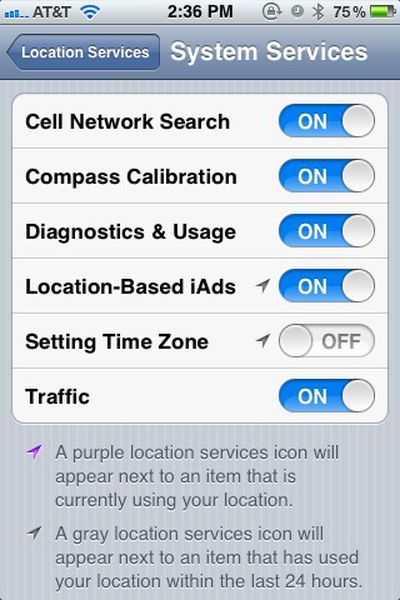
locationservices
It's not an official bug yet, though Apple is reportedly working on iOS 5's battery life issues. Anecdotal evidence suggests flipping this switch may significantly improve battery life.


Top Rated Comments

Macopotamus Avatar
188 months ago
Doesn't work, despite every tech website on the face of the earth claiming it does.

What DOES work is turning off just about every feature that is new to iOS 5. It's obviously just a bug that Apple will fix ASAP because the betas didn't drain like this.
Score: 11 Votes (Like | Disagree)
Tronic Avatar
188 months ago
Tried it last week and haven't seen it make a difference
Score: 9 Votes (Like | Disagree)
188 months ago
iMessage too, anything else?
Turn on airplane mode. ;)
Score: 7 Votes (Like | Disagree)
188 months ago
I tried something this morning that seemed to help tremendously, i turned off the compass calibration. Havent gone below 90% all day.

What does this feature do? Don't we calibrate the compass by waving the phone around like a madman?
Score: 6 Votes (Like | Disagree)
bushido Avatar
188 months ago
i always love those suggestions:

turn off 3G
turn off wifi
turn off location service
turn off push nots
turn off weather

what u have left is a phone without any usefulness

here's an idea, turn off the phone. it saves u battery life :p
Score: 5 Votes (Like | Disagree)
188 months ago
Yeah... I think this is magical thinking.

Just because the arrow is purple, doesn't mean "GPS IS ON RIGHT NOW AND I'M DRAINING ALL YOUR POWER! MUHAHAHA!" It simply means the service "Setting Time Zone" it's doing something with your location.

Furthermore, just because your location is "being used", this doesn't mean that your phone has to do any power hungry operation to obtain your location. It likely just looks at the cell environment that you're currently in which doesn't require constant transmissions to cell towers! I assume it's looking at the most recent cached tower information (within a reasonable time frame) and uses that.
Score: 5 Votes (Like | Disagree)

Popular Stories

iOS 26

iOS 26.4 Adds Two New Features to CarPlay

Tuesday March 24, 2026 1:55 pm PDT by
iOS 26.4 was released today, and it includes a couple of new features for CarPlay: an Ambient Music widget and support for voice-based chatbot apps. To update your iPhone 11 or newer to iOS 26.4, open the Settings app and tap on General → Software Update. CarPlay will automatically offer the new features so long as the iPhone connected to your vehicle is running iOS 26.4 or later....
Apple Business hero

Apple Unveils 'Apple Business' All-in-One Platform

Tuesday March 24, 2026 8:53 am PDT by
Apple today announced Apple Business, a new all-in-one platform that unifies device management, productivity tools, and customer outreach features. The service is designed to be a consolidated replacement for several of Apple's existing business-focused offerings, including Apple Business Essentials, Apple Business Manager, and Apple Business Connect. It provides organizations with a single...
AirPods Pro Firmware Feature

Apple Releases New Firmware for AirPods Pro 3, AirPods Pro 2 and AirPods 4

Tuesday March 24, 2026 12:31 pm PDT by
Apple today released new firmware for the AirPods Pro 2, AirPods Pro 3, and the AirPods 4. The firmware has a version number of 8B39, up from 8B34 on the AirPods Pro 3, 8B28 on the AirPods Pro 2, and 8B21 on the AirPods 4. There is no word on what's included in the firmware, but Apple has a support document with limited notes. Most updates are limited to bug fixes and performance...















