
Another Hidden iOS 5 Feature: Autocorrect Keyboard Bar - MacRumors
Skip to Content

Another Hidden iOS 5 Feature: Autocorrect Keyboard Bar

by

large
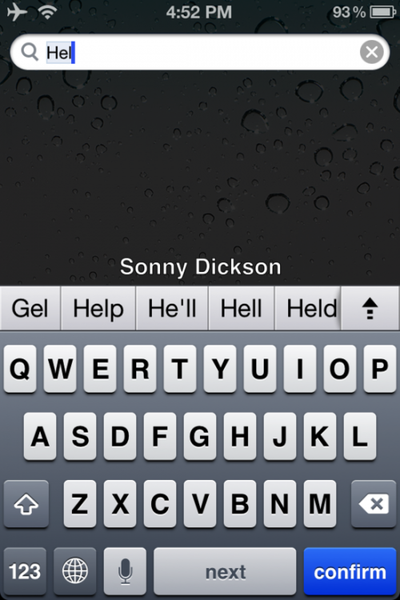
Beyond the Panorama view, it seems Apple left out another small feature in the final version of iOS 5. The bar appears while typing into the field as shown above, giving you a number of autocorrection options. Per 9to5mac, the feature can reportedly be enabled on a non-jailbroken phone with the following procedure :

1. Download iBackupBot
2. Backup your iPhone/iPod in iTunes
3. Open iBackupBot and find the backup, then load it.
4. Find Library/Preferences/com.apple.keyboard.plist and open the file. (if your software isn’t registered you’ll have to press cancel and then it will open)
5. Add in the following code: KeyboardAutocorrectionListsYES
6. Save your modifications, and then restore from backup from within iBackupbot.

Based on comments, it seems a little unstable, so it seems there are reasons that this was never enabled for the final version. Still, it's interesting to see what other features Apple explored.


Top Rated Comments

jclardy Avatar
188 months ago
Hmmm....
*sigh* well before Android, the inventor of all things.

/s

Score: 7 Votes (Like | Disagree)
188 months ago
I have a feeling these left out features will be released with iOS 5.1
Don't you mean "Just a few of the hundreds of new features in iOS 6"

Haha ;)
Score: 7 Votes (Like | Disagree)
GenesisST Avatar
188 months ago
What's up with the hidden features?

Oh, it seems to work a bit like the autocorrection bar in Android.

Google obviously stole it with their time machine! :D
Score: 6 Votes (Like | Disagree)
188 months ago
Several places, including the Wii on screen keyboard.
Image (http://media.wiley.com/Lux/20/162720.image9.jpg)
(not a great image, but it's what I could find with a google search)

That keyboard is ugly as sin... I'm sorry, but I just had to point that out. What on earth were they thinking? I wouldn't be shocked if that keyboard alone tanks the company. It's an eyesore.
Score: 5 Votes (Like | Disagree)
adder7712 Avatar
188 months ago
What's up with the hidden features?

Oh, it seems to work a bit like the autocorrection bar in Android.
Score: 5 Votes (Like | Disagree)
188 months ago
This is the autocorrect bar Japanese input now uses (without a hack) to suggest words or to convert kana into kanji. I don't like it. I think the old system was much, much better and allowed there to be more screen space.
Score: 5 Votes (Like | Disagree)

Popular Stories

iOS 26

iOS 26.4 Adds Two New Features to CarPlay

Tuesday March 24, 2026 1:55 pm PDT by
iOS 26.4 was released today, and it includes a couple of new features for CarPlay: an Ambient Music widget and support for voice-based chatbot apps. To update your iPhone 11 or newer to iOS 26.4, open the Settings app and tap on General → Software Update. CarPlay will automatically offer the new features so long as the iPhone connected to your vehicle is running iOS 26.4 or later....
Apple Business hero

Apple Unveils 'Apple Business' All-in-One Platform

Tuesday March 24, 2026 8:53 am PDT by
Apple today announced Apple Business, a new all-in-one platform that unifies device management, productivity tools, and customer outreach features. The service is designed to be a consolidated replacement for several of Apple's existing business-focused offerings, including Apple Business Essentials, Apple Business Manager, and Apple Business Connect. It provides organizations with a single...
AirPods Pro Firmware Feature

Apple Releases New Firmware for AirPods Pro 3, AirPods Pro 2 and AirPods 4

Tuesday March 24, 2026 12:31 pm PDT by
Apple today released new firmware for the AirPods Pro 2, AirPods Pro 3, and the AirPods 4. The firmware has a version number of 8B39, up from 8B34 on the AirPods Pro 3, 8B28 on the AirPods Pro 2, and 8B21 on the AirPods 4. There is no word on what's included in the firmware, but Apple has a support document with limited notes. Most updates are limited to bug fixes and performance...















