
OS X 10.7.3 Beta Reveals Active Work on 'Retina' Display Support for Mac - MacRumors
Skip to Content

OS X 10.7.3 Beta Reveals Active Work on 'Retina' Display Support for Mac

Several times earlier this year, we covered Apple's work on "HiDPI" modes in OS X Lion for supporting ultra high-resolution displays offering greater pixel density with a similar increase in image quality to that seen with the iPhone's transition to a "Retina" display.

With new claims that Apple is set to release a new 15" MacBook Pro offering a resolution of 2880x1800 early next year, Apple's work on its HiDPI software support has also been gaining renewed attention. By doubling the resolution in each dimension over the existing 1440x900 MacBook Pro, Apple would achieve four times the number of pixels and provide developers with an easy way to scale existing artwork.

Evidence of Apple's continued work on HiDPI has shown up in developer builds of OS X 10.7.3, with the "Get Info" window for applications seeing the addition of an "Open in HIDPI mode" checkbox. But while that checkbox would presumably automatically use higher-resolution fonts and graphics that would display at the same absolute size as existing elements, it has not been functional in developer builds where it is present.
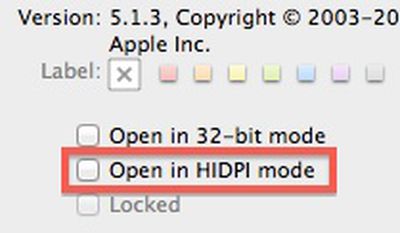
hidpi 10 7 3
With yesterday's release of Build 11D36 to developers, Apple has now removed that checkbox from the "Get Info" window entirely. While its removal may suggest a step backward in Apple's implementation of HiDPI support, it is routine for Apple to activate and deactivate portions of features as it works on them. Consequently, the mere change in the checkbox's visibility in the new build indicates that Apple is indeed likely actively working on the feature.


Popular Stories

iOS 26

iOS 26.4 Adds Two New Features to CarPlay

Tuesday March 24, 2026 1:55 pm PDT by
iOS 26.4 was released today, and it includes a couple of new features for CarPlay: an Ambient Music widget and support for voice-based chatbot apps. To update your iPhone 11 or newer to iOS 26.4, open the Settings app and tap on General → Software Update. CarPlay will automatically offer the new features so long as the iPhone connected to your vehicle is running iOS 26.4 or later....
Apple Business hero

Apple Unveils 'Apple Business' All-in-One Platform

Tuesday March 24, 2026 8:53 am PDT by
Apple today announced Apple Business, a new all-in-one platform that unifies device management, productivity tools, and customer outreach features. The service is designed to be a consolidated replacement for several of Apple's existing business-focused offerings, including Apple Business Essentials, Apple Business Manager, and Apple Business Connect. It provides organizations with a single...
AirPods Pro Firmware Feature

Apple Releases New Firmware for AirPods Pro 3, AirPods Pro 2 and AirPods 4

Tuesday March 24, 2026 12:31 pm PDT by
Apple today released new firmware for the AirPods Pro 2, AirPods Pro 3, and the AirPods 4. The firmware has a version number of 8B39, up from 8B34 on the AirPods Pro 3, 8B28 on the AirPods Pro 2, and 8B21 on the AirPods 4. There is no word on what's included in the firmware, but Apple has a support document with limited notes. Most updates are limited to bug fixes and performance...

Top Rated Comments

WildCowboy Avatar
186 months ago
I wish people would stop saying "provide developers with an easy way to scale existing artwork" when it's about computers, that's just nonsense.

That might be true for devices with known, fixed resolutions that are upgraded (ex: iPhone's 320x480 upgraded to the iPhone 4's 640x960), but it's completely pointless for computers which have various resolutions to begin with.

Nobody out there makes software that targets exactly 1440x900. Computer users use anything between 640x480 up to 2560x2048 (http://en.wikipedia.org/wiki/Computer_display_standard). Even the aspect ratio isn't fixed.
The statement refers primarily to onscreen elements. Buttons, icons, and other user interface elements need to be scaled up so that they appear at the same relative size as on current-resolution displays.

While applications target a range of resolutions, displays generally have roughly the same pixel density, so user interface elements remain roughly the same size regardless of the resolution. So it's about the pixel density, not the absolute resolution.

The move to "Retina" display on computers dramatically increases the pixel density, and that's what needs to be accounted for so that user interface elements don't become unusably small.

By going with a doubling of pixels in each dimension, it becomes easy for the system to display a pixel-doubled version of a small element at the appropriate real-life size if the developers have not provided those elements at sufficient resolution within the application.
Score: 14 Votes (Like | Disagree)
Small White Car Avatar
186 months ago
This is what the kids today refer to as awesome-sause.

Oh, they don't? It's just me?

Ok...well...this is awkward.
Score: 8 Votes (Like | Disagree)
Yvan256 Avatar
186 months ago
By doubling the resolution in each dimension over the existing 1440x900 MacBook Pro, Apple would achieve four times the number of pixels and provide developers with an easy way to scale existing artwork.
I wish people would stop saying "provide developers with an easy way to scale existing artwork" when it's about computers, that's just nonsense.

That might be true for devices with known, fixed resolutions that are upgraded (ex: iPhone's 320x480 upgraded to the iPhone 4's 640x960), but it's completely pointless for computers which have various resolutions to begin with.

Nobody out there makes software that targets exactly 1440x900. Computer users use anything between 640x480 up to 2560x2048 (http://en.wikipedia.org/wiki/Computer_display_standard). Even the aspect ratio isn't fixed.
Score: 8 Votes (Like | Disagree)
186 months ago
I wish people would stop saying "provide developers with an easy way to scale existing artwork" when it's about computers, that's just nonsense.

That might be true for devices with known, fixed resolutions that are upgraded (ex: iPhone's 320x480 upgraded to the iPhone 4's 640x960), but it's completely pointless for computers which have various resolutions to begin with.

Nobody out there makes software that targets exactly 1440x900. Computer users use anything between 640x480 up to 2560x2048 (http://en.wikipedia.org/wiki/Computer_display_standard). Even the aspect ratio isn't fixed.
It's still a lot more convenient to scale interface elements in multiples (ie 2X) then to scale them some awkward resolution. It's lot easier to scale a 2X2 image to 4X4, instead of scaling some weird increment.

Additionally, the resolution doubling makes it a practical move for the development environment for Retina iPhone and iPad displays. For instance a Retina iPad graphic on a Retina MBP, will look the same as a non-Retina iPad graphic on a non-retina MBP. By consistently doubling the resolution of all products the only perceived difference for developers will be the clarity of the graphics.
Score: 6 Votes (Like | Disagree)
186 months ago
2012 is shaping up to be the year of the retina.
Score: 6 Votes (Like | Disagree)
nagromme Avatar
186 months ago
I wish people would stop saying "provide developers with an easy way to scale existing artwork" when it's about computers, that's just nonsense.

That might be true for devices with known, fixed resolutions that are upgraded (ex: iPhone's 320x480 upgraded to the iPhone 4's 640x960), but it's completely pointless for computers which have various resolutions to begin with.
Not relevant: you’re thinking about the “working area”—or whatever you want to call it: the size of windows and buttons as seen and experience by the user. That varies and always has.

This feature is nothing to do with the size of the display itself, but rather the pixel density. That matters just as much when the display size is unknown as when it is known. Your own quote makes the point: “scale existing artwork.” Not scale entire apps and UIs—we’ve met that challenge long ago. But scale the artwork, specifically.

The statement refers primarily to onscreen elements. Buttons, icons, and other user interface elements need to be scaled up so that they appear at the same relative size as on current-resolution displays.
Exactly! The challenges of a desktop app are NOT the same as for an iOS app.

Desktop apps already have to adapt to different “working area” sizes. Doubling the res doesn’t add that much to that challenge: the app doubles automatically and the “working area” remains the same. The app often need not even be aware that each pixel now means two. The OS will handle most of that.

It’s the assets within the app that are a challenge to scale, and using an even double IS a big help.
Score: 5 Votes (Like | Disagree)















