
OS X Mountain Lion's Documents in the Cloud Simplifies File Access Across Devices - MacRumors
Skip to Content

OS X Mountain Lion's Documents in the Cloud Simplifies File Access Across Devices

One of the major new features in OS X Mountain Lion is greater integration with iCloud, with one of the additions being new Documents in the Cloud functionality. As noted by John Gruber, the feature expands significantly on the existing feature that allows limited syncing and transfer of iWork documents across their iOS devices and Macs.

iCloud document storage, and the biggest change to Open and Save dialog boxes in the 28-year history of the Mac. Mac App Store apps effectively have two modes for opening/saving documents: iCloud or the traditional local hierarchical file system. The traditional way is mostly unchanged from Lion (and, really, from all previous versions of Mac OS X). The iCloud way is visually distinctive: it looks like the iPad springboard — linen background, iOS-style one-level-only drag-one-on-top-of-another-to-create-one “folders”. It’s not a replacement of traditional Mac file management and organization. It’s a radically simplified alternative.
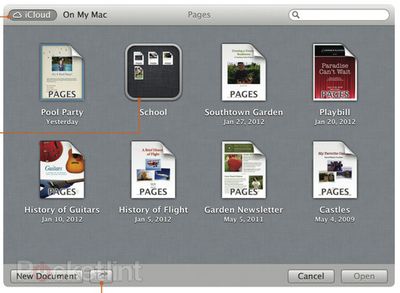
mountain lion icloud documents
iCloud Documents in Pages (Source: Pocket-lint)

Apple is of course already extending this functionality beyond iWork in OS X Mountain Lion, with the iCloud file storage showing up in other apps such as TextEdit. Apple is also releasing APIs to allow third-party apps to take advantage of the feature.
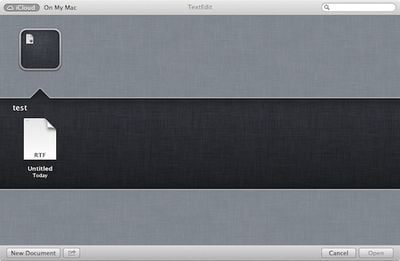
mountain lion icloud document textedit
iCloud Document within a folder in TextEdit

The functionality is naturally being compared to that of Dropbox, which allows users to save files directly to their Dropbox accounts for access anywhere, but Apple's new iCloud solution offers the advantage of displaying only those files intended for use with the app being used, helping to filter the list of documents and offering iOS-like folder organization of files.


Popular Stories

iOS 26

iOS 26.4 Adds Two New Features to CarPlay

Tuesday March 24, 2026 1:55 pm PDT by
iOS 26.4 was released today, and it includes a couple of new features for CarPlay: an Ambient Music widget and support for voice-based chatbot apps. To update your iPhone 11 or newer to iOS 26.4, open the Settings app and tap on General → Software Update. CarPlay will automatically offer the new features so long as the iPhone connected to your vehicle is running iOS 26.4 or later....
Apple Business hero

Apple Unveils 'Apple Business' All-in-One Platform

Tuesday March 24, 2026 8:53 am PDT by
Apple today announced Apple Business, a new all-in-one platform that unifies device management, productivity tools, and customer outreach features. The service is designed to be a consolidated replacement for several of Apple's existing business-focused offerings, including Apple Business Essentials, Apple Business Manager, and Apple Business Connect. It provides organizations with a single...
AirPods Pro Firmware Feature

Apple Releases New Firmware for AirPods Pro 3, AirPods Pro 2 and AirPods 4

Tuesday March 24, 2026 12:31 pm PDT by
Apple today released new firmware for the AirPods Pro 2, AirPods Pro 3, and the AirPods 4. The firmware has a version number of 8B39, up from 8B34 on the AirPods Pro 3, 8B28 on the AirPods Pro 2, and 8B21 on the AirPods 4. There is no word on what's included in the firmware, but Apple has a support document with limited notes. Most updates are limited to bug fixes and performance...

Top Rated Comments

184 months ago
Let us access this 'shared' cloud space from third-party iOS apps and it will be a big thing.
Score: 14 Votes (Like | Disagree)
AdeFowler Avatar
184 months ago
I'd like the iCloud version to get simultaneously saved to my local disk in case my internet goes down.
Score: 13 Votes (Like | Disagree)
184 months ago
Makes me wonder if they're getting rid of Terminal.app too...

NOoooooooOOOOOO
Score: 12 Votes (Like | Disagree)
Bubba Satori Avatar
184 months ago
Apple is soo moving in the right direction.

It's just great.

And if you can't access the Cloud or have bumped into a data cap?
Score: 10 Votes (Like | Disagree)
ugahairydawgs Avatar
184 months ago
Anybody with a copy of this....is iCloud still limited to just iWork files only? My biggest gripe so far is that you can't use it for other file types (most notably PDFs).
Score: 10 Votes (Like | Disagree)
184 months ago
Very exciting

But I wonder how well it will work for those of us who organize our files by project rather than by application...
Score: 7 Votes (Like | Disagree)















