
OnLive Launches Premium 'Desktop Plus' with Flash and PDF-Enabled Web Browser

Last month, OnLive introduced its free OnLive Desktop service that allows users to run virtual instances of Microsoft Office apps streamed from OnLive's remote PCs to the users' iPads. The company has now added Adobe Acrobat Reader support to the service and introduced a paid "Desktop Plus" subscription service to provide enhanced functionality including priority access and a Flash- and PDF-enabled browser experience. OnLive Desktop Plus is priced at $4.99 per month.

The free OnLive Desktop App, currently available on iPad—and coming soon to Android, PC, Mac, TVs and monitors—delivers no-compromise, media-rich, instant-response Windows applications including Microsoft Word, Excel and PowerPoint software, and as of today, Adobe Reader for PDFs, along with 2GB of cloud storage. OnLive Desktop Plus, available for $4.99/month at www.desktop.onlive.com, provides all OnLive Desktop Standard features plus OnLive’s gigabit-speed accelerated browsing experience with full Flash player capability. With OnLive Desktop Plus, the iPad not only becomes 100% Flash compatible, it becomes the world’s fastest mobile Flash player.

As with the original OnLive Desktop service, there is some lag in responding to touch input and visual artifacts when moving quickly through documents or web pages. The lag made it somewhat difficult to work with interactive Flash-based content such as games in our testing, but the service does allow for decent viewing of Flash video content on the web.
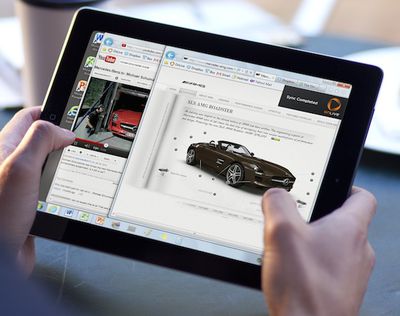
onlive desktop plus
While that slight lag is a function of the time needed for data to transfer between OnLive's servers and the user's iPad, OnLive's PCs themselves are connected to the Internet with gigabit connections, making for very fast loading of content and data transfers, which is then optimized for the iPad's display and passed along to the user.

OnLive is planning yet another tier of service, a $9.99/month "Pro" level that will offer additional PC applications for use from the iPad and an upgrade from to 50 GB of storage, up from 2 GB on the regular and Plus levels.


Related Roundup: iPad
Tag: OnLive
Buyer's Guide: iPad (Don't Buy)
Related Forum: iPad

Popular Stories

Apple Logo Zoomed

Tim Cook Teases Plans for Apple's Upcoming 50th Anniversary

Thursday February 5, 2026 12:54 pm PST by
Apple turns 50 this year, and its CEO Tim Cook has promised to celebrate the milestone. The big day falls on April 1, 2026. "I've been unusually reflective lately about Apple because we have been working on what do we do to mark this moment," Cook told employees today, according to Bloomberg's Mark Gurman. "When you really stop and pause and think about the last 50 years, it makes your heart ...
wwdc sans text feature

Apple Rumored to Announce New Product on February 19

Thursday February 5, 2026 12:22 pm PST by
Apple plans to announce the iPhone 17e on Thursday, February 19, according to Macwelt, the German equivalent of Macworld. The report, citing industry sources, is available in English on Macworld. Apple announced the iPhone 16e on Wednesday, February 19 last year, so the iPhone 17e would be unveiled exactly one year later if this rumor is accurate. It is quite uncommon for Apple to unveil...
Finder Siri Feature

Why Apple's iOS 26.4 Siri Upgrade Will Be Bigger Than Originally Promised

Friday February 6, 2026 3:06 pm PST by
In the iOS 26.4 update that's coming this spring, Apple will introduce a new version of Siri that's going to overhaul how we interact with the personal assistant and what it's able to do. The iOS 26.4 version of Siri won't work like ChatGPT or Claude, but it will rely on large language models (LLMs) and has been updated from the ground up. Upgraded Architecture The next-generation...
iOS 26

iOS 26.3 and iOS 26.4 Will Add These New Features to Your iPhone

Tuesday February 3, 2026 7:47 am PST by
While the iOS 26.3 Release Candidate is now available ahead of a public release, the first iOS 26.4 beta is likely still at least a week away. Following beta testing, iOS 26.4 will likely be released to the general public in March or April. Below, we have recapped known or rumored iOS 26.3 and iOS 26.4 features so far. iOS 26.3 iPhone to Android Transfer Tool iOS 26.3 makes it easier...
iphone 17 pro dark blue 1

iPhone 18 Pro Max Rumored to Deliver Next-Level Battery Life

Friday February 6, 2026 5:14 am PST by
The iPhone 18 Pro Max will feature a bigger battery for continued best-in-class battery life, according to a known Weibo leaker. Citing supply chain information, the Weibo user known as "Digital Chat Station" said that the iPhone 18 Pro Max will have a battery capacity of 5,100 to 5,200 mAh. Combined with the efficiency improvements of the A20 Pro chip, made with TSMC's 2nm process, the...

Top Rated Comments

WiiDSmoker Avatar
182 months ago
"We tried to shoe-horn a desktop OS onto a tablet. It didn't work when we did it, so we're going to have someone else do it for us."
- Some guy at Microsoft, as he swims around in red tape.

All I can say is "LOL", and "Get the hell off my iPad."

You try way too hard.
Score: 17 Votes (Like | Disagree)
PeterQVenkman Avatar
182 months ago
Awesome product, but should be catering to the HTML5 wave of the future.

The iPad does that natively with Safari. This fills a different need for those that have it. Our old timesheet software was only in flash.... the horror.
Score: 10 Votes (Like | Disagree)
Code.Red Avatar
182 months ago
How is this app different from SplashTop?

Instead of connecting to your computer at home, you connect to OnLive's computers. One of the benefits of this, as stated in the article, is that OnLive's computers are connected with ultrafast Internet connections..
Score: 9 Votes (Like | Disagree)
Unggoy Murderer Avatar
182 months ago
Cool, roll-over over that Flash menu with your curs... oh wait. :cool:
Score: 6 Votes (Like | Disagree)
SteveAbootman Avatar
182 months ago
Instead of connecting to your computer at home, you connect to OnLive's computers. One of the benefits of this, as stated in the article, is that OnLive's computers are connected with ultrafast Internet connections..

And one of the downsides of this is that you don't have full control over the VM. For 5 bucks you get the standard image and can't change it. Sounds like for 10 a month you can install additional programs, though I'd guess this is limited.

With Splashtop you connect to your local PC and can do whatever you want. I'd much rather pay the 3 bucks up front for that program than shell out 10 a month for OnLive.
Score: 6 Votes (Like | Disagree)
a.gomez Avatar
182 months ago
Awesome product, but should be catering to the HTML5 wave of the future.

some of us live (and work) in the present
Score: 4 Votes (Like | Disagree)















