
Apple Launches iPhoto for iPad with Photo Editing and Organization Features - MacRumors
Skip to Content

Apple Launches iPhoto for iPad with Photo Editing and Organization Features

With the introduction of a Retina display on the new iPad, Apple has updated all of its stock applications to support the higher resolution, also adding updates to several of its applications including GarageBand and iMovie. But the company has also filled out the remainder of its iPad versions of its iLife suite with the launch of iPhoto for iPad, a new application offering photo editing capabilities right on the device.
iphoto ipad
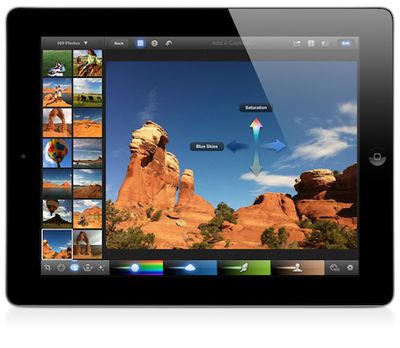
iPhoto for iPad offers a broad array of photo editing and comparison features, including auto-enhancements such as straightening photos and fixing contrast. Brush palettes offer a number of editing tools including red-eye removal, lighten, sharpen, soften, and darken. iPhoto can handle images up to 19 megapixels.

iPhoto, Apple’s popular photography app, has been completely reimagined for iOS to take full advantage of the Retina display and intuitive Multi-Touch gestures on iPad and iPhone. Simple gestures can be used to select and compare photos side by side and flag your best shots. iPhoto gives you full control over color, exposure and contrast, and you simply touch the parts of the image you want to change. You can enhance pictures by adding beautiful Apple-designed effects with just a tap, or apply adjustments exactly where you want them with fingertip brushes. In addition to posting photos to Facebook, Flickr and Twitter, you can beam photos between your iPhone and iPad; stream photos and slideshows to your Apple TV with AirPlay; and use iCloud to publish photo journals to the web and share your stories with friends and family in a whole new way.

iPhoto for iPad launches today and is priced at $4.99.

Related Roundup: iPad
Tag: iPhoto
Buyer's Guide: iPad (Don't Buy)
Related Forum: iPad

Popular Stories

iOS 26

iOS 26.4 Adds Two New Features to CarPlay

Tuesday March 24, 2026 1:55 pm PDT by
iOS 26.4 was released today, and it includes a couple of new features for CarPlay: an Ambient Music widget and support for voice-based chatbot apps. To update your iPhone 11 or newer to iOS 26.4, open the Settings app and tap on General → Software Update. CarPlay will automatically offer the new features so long as the iPhone connected to your vehicle is running iOS 26.4 or later....
Apple Business hero

Apple Unveils 'Apple Business' All-in-One Platform

Tuesday March 24, 2026 8:53 am PDT by
Apple today announced Apple Business, a new all-in-one platform that unifies device management, productivity tools, and customer outreach features. The service is designed to be a consolidated replacement for several of Apple's existing business-focused offerings, including Apple Business Essentials, Apple Business Manager, and Apple Business Connect. It provides organizations with a single...
AirPods Pro Firmware Feature

Apple Releases New Firmware for AirPods Pro 3, AirPods Pro 2 and AirPods 4

Tuesday March 24, 2026 12:31 pm PDT by
Apple today released new firmware for the AirPods Pro 2, AirPods Pro 3, and the AirPods 4. The firmware has a version number of 8B39, up from 8B34 on the AirPods Pro 3, 8B28 on the AirPods Pro 2, and 8B21 on the AirPods 4. There is no word on what's included in the firmware, but Apple has a support document with limited notes. Most updates are limited to bug fixes and performance...

Top Rated Comments

183 months ago
Can you send iOS iPhoto photos to OSX iPhoto easily and keep the structure you've create on iOS?

----------

Is iPhoto available for iPhone too?

Yes. Universal application.
Score: 5 Votes (Like | Disagree)
nutmac Avatar
183 months ago
Sadly, it seems to be missing one feature that would be most valuable to me: ability to rate and tag photos then synchronize against Aperture and iPhoto for Mac.
Score: 4 Votes (Like | Disagree)
183 months ago
Bad Icon

The iPhoto icon is awful. It looks like a screenshot of the OSX icon sitting on a dock.
Score: 3 Votes (Like | Disagree)
183 months ago
My Sony has 24 MP, so this kind of sucks and makes no sense for me then....

Are you printing your images onto billboards? If not why are you wasting the disk space to shoot 24 MP?
Score: 3 Votes (Like | Disagree)
Lesser Evets Avatar
183 months ago
Does it let us make cards/books/etc??

I think iPhoto is an OK program. iPhotos card/book printing is SUPERLATIVE; that is the true strength of the program, beating to death all Hallmark stores and print services worldwide forever and ever.
Score: 3 Votes (Like | Disagree)
BJMRamage Avatar
183 months ago
Would be really cool to use your iPhoto or Aperture Library and have available to make edits and Tag/Rate the photos and they'd go back to the main library.

Then if you wanted, you could save them locally on the iPad/iPhone.

and then be able to view them online would be terrific too.
Score: 3 Votes (Like | Disagree)















