

Additionally, updates to iMovie and GarageBand are now live as well.
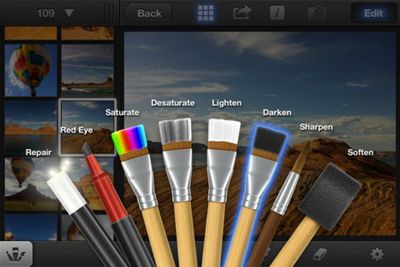
With iPhoto for iOS, Apple brings Multi-Touch to photography in a breakthrough way. Browse, edit, and share your photos from your iPad or iPhone, like never before – all the powerful tools you need are at your fingertips. And with iCloud, you can share your experiences as stunning photo journals.
Use simple gestures to quickly sort through photos and find your best shots. A powerful set of Multi-Touch tools helps you perfect color and exposure, crop, straighten, and retouch images. Enhance pictures by adding beautiful, Apple-designed effects with just a tap. Or use fingertip brushes to apply adjustments exactly where you want them. In addition to posting photos to Facebook, Flickr, and Twitter, you can beam photos between your iPhone and iPad, stream photos and slideshows to your Apple TV with AirPlay, and use iCloud to publish photo journals to the web to share your stories with friends and family in a whole new way.
Thursday February 5, 2026 12:54 pm PST by Joe Rossignol
Apple turns 50 this year, and its CEO Tim Cook has promised to celebrate the milestone. The big day falls on April 1, 2026.
"I've been unusually reflective lately about Apple because we have been working on what do we do to mark this moment," Cook told employees today, according to Bloomberg's Mark Gurman. "When you really stop and pause and think about the last 50 years, it makes your heart ...
Thursday February 5, 2026 12:22 pm PST by Joe Rossignol
Apple plans to announce the iPhone 17e on Thursday, February 19, according to Macwelt, the German equivalent of Macworld.
The report, citing industry sources, is available in English on Macworld.
Apple announced the iPhone 16e on Wednesday, February 19 last year, so the iPhone 17e would be unveiled exactly one year later if this rumor is accurate. It is quite uncommon for Apple to unveil...
Friday February 6, 2026 3:06 pm PST by Juli Clover
In the iOS 26.4 update that's coming this spring, Apple will introduce a new version of Siri that's going to overhaul how we interact with the personal assistant and what it's able to do.
The iOS 26.4 version of Siri won't work like ChatGPT or Claude, but it will rely on large language models (LLMs) and has been updated from the ground up.
Upgraded Architecture
The next-generation...
Tuesday February 3, 2026 7:47 am PST by Joe Rossignol
While the iOS 26.3 Release Candidate is now available ahead of a public release, the first iOS 26.4 beta is likely still at least a week away. Following beta testing, iOS 26.4 will likely be released to the general public in March or April.
Below, we have recapped known or rumored iOS 26.3 and iOS 26.4 features so far.
iOS 26.3
iPhone to Android Transfer Tool
iOS 26.3 makes it easier...
Saturday February 7, 2026 9:26 am PST by Joe Rossignol
Apple today shared an ad that shows how the upgraded Center Stage front camera on the latest iPhones improves the process of taking a group selfie.
"Watch how the new front facing camera on iPhone 17 Pro takes group selfies that automatically expand and rotate as more people come into frame," says Apple. While the ad is focused on the iPhone 17 Pro and iPhone 17 Pro Max, the regular iPhone...
My question is...with the iPad 3....will you FINALLY be able to transfer HD 1080p video shot with a canon dslr like the T3i to the ipad via the Apple cam kit....and then BE ABLE TO EDIT THAT VIDEO IN IMOVIE?!!!! Lol
Thats all i wanna know. Love my ipad 1st gen....but skipped the ipad 2nd gen cause it couldnt do this. I am a photographer/videographer/blogger who travels alot, and I LOVE the form factor of the ipad and all it does.
But this is the one sticking point for me. I know there will always be things a laptop or desktop can do that an ipad isnt meant for....however...Tim Cook keeps stressing about a "Post PC world"....and this is a real world application. People shoot high quality video with dslrs and would like to edit that video while on the road. It seems like the umbilical cord has been cut btwn the ios devices and computers with the icloud and syncing....but not being able to load and edit video directly onto your ipad keeps the device stuck in the umbilical cord days. I find it very annoying.
The new retina display and faster speed make it the perfect device to edit videos while on the road.
You can do this, they updated iMovie a few months ago to support this.
Just a heads up, apparently you can't run iPhoto on the iPad 1:
"Requirements: Compatible with iPhone 4, iPhone 4S, iPad 2 Wi-Fi, and iPad 2 Wi-Fi + 3G.Requires iOS 5.1 or later."
Didn't want someone to buy it over the desktop iTunes and then find out after the fact.
Thank you for mentioning it. You just saved me wasting some money.
----------
This is bloody annoying. If you try to install it on an iPad 1st Gen it produces a pop-up stating that you need a front facing camera - Why /
Are we expected to believe that all the photos used in the Apple demo were taken on an iPad ? No, of course not - they were up loaded onto the iPad the same as the 1000's on mine, - so why can't I have use of the app ?
I'd say the "front facing camera" requirement is Apple-speak for "the iPad 1 is far too crippled in the RAM department for you to even think about running this app. But lol, as if we're just going to come right out and say that".
Just a heads up, apparently you can't run iPhoto on the iPad 1:
"Requirements: Compatible with iPhone 4, iPhone 4S, iPad 2 Wi-Fi, and iPad 2 Wi-Fi + 3G.Requires iOS 5.1 or later."
Didn't want someone to buy it over the desktop iTunes and then find out after the fact.
This is bloody annoying. If you try to install it on an iPad 1st Gen it produces a pop-up stating that you need a front facing camera - Why /
Are we expected to believe that all the photos used in the Apple demo were taken on an iPad ? No, of course not - they were up loaded onto the iPad the same as the 1000's on mine, - so why can't I have use of the app ?
















