
'Air Display' to Let You Use the New iPad as a HiDPI 'Retina' Display for Your Mac - MacRumors
Skip to Content

'Air Display' to Let You Use the New iPad as a HiDPI 'Retina' Display for Your Mac

Avatron, the makers of the popular Air Display app for iOS, revealed today that they will be updating their utility to fully support the 3rd Generation iPad.

Air Display allows you to use your iPad (or iPhone/iPod Touch) as an extra display for your Mac or Windows computer. This old video shows how the app works.


The iPad acts as a wireless second screen that can be used by OS X in the same manner as any other monitor.

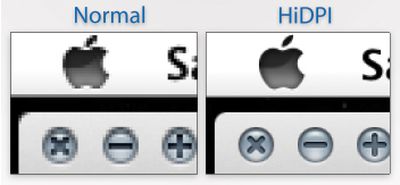
The developers were able to get their screen-extending app working with the new iPad with good performance. But using a 2048x1536 iPad as a secondary screen computer screen would result in very small windows, text and user interface elements. So, the team has also included support for Lion's new HiDPI mode. We've covered HiDPI mode in the past. HiDPI mode allows OS X to support high resolution monitors while retaining the same relative size for user interface elements, such as windows and buttons.
tumblr m17x2zcevC1r6vkzl
HiDPI mode will let the new iPad act like a 1024x768 point screen where each point is made up of 4 pixels. Apple has already built in support for HiDPI and some of their Apps, such as Messages, already include Retina-sized artwork that work in this mode. Users simply have to choose "1024x768 (HiDPI)" mode in their System Preferences to take advantage of the new mode.

Air Display is a $9.99 Universal App in the App Store. [iTunes] The Retina-enabled version will be included in a forthcoming update.


Popular Stories

iOS 26

iOS 26.4 Adds Two New Features to CarPlay

Tuesday March 24, 2026 1:55 pm PDT by
iOS 26.4 was released today, and it includes a couple of new features for CarPlay: an Ambient Music widget and support for voice-based chatbot apps. To update your iPhone 11 or newer to iOS 26.4, open the Settings app and tap on General → Software Update. CarPlay will automatically offer the new features so long as the iPhone connected to your vehicle is running iOS 26.4 or later....
Apple Business hero

Apple Unveils 'Apple Business' All-in-One Platform

Tuesday March 24, 2026 8:53 am PDT by
Apple today announced Apple Business, a new all-in-one platform that unifies device management, productivity tools, and customer outreach features. The service is designed to be a consolidated replacement for several of Apple's existing business-focused offerings, including Apple Business Essentials, Apple Business Manager, and Apple Business Connect. It provides organizations with a single...
AirPods Pro Firmware Feature

Apple Releases New Firmware for AirPods Pro 3, AirPods Pro 2 and AirPods 4

Tuesday March 24, 2026 12:31 pm PDT by
Apple today released new firmware for the AirPods Pro 2, AirPods Pro 3, and the AirPods 4. The firmware has a version number of 8B39, up from 8B34 on the AirPods Pro 3, 8B28 on the AirPods Pro 2, and 8B21 on the AirPods 4. There is no word on what's included in the firmware, but Apple has a support document with limited notes. Most updates are limited to bug fixes and performance...

Top Rated Comments

183 months ago
I have Air Display, but my stupid ass didn't read the description fully and I didn't realize that my Macbook Pro isn't compatible with it. BLAH!
Score: 6 Votes (Like | Disagree)
Macman45 Avatar
183 months ago
Bring this to me NOW!!!:)
Score: 5 Votes (Like | Disagree)
garylapointe Avatar
183 months ago
This is one of those apps that need to be free and have an in app purchase to activate it.

It could have a huge flashing watermark in the middle of the screen, but at least you'd know if it worked or not. If you minded the refresh rate or not.

Then, they'd probably only get good feedback.

I'd try it if it was free, but otherwise $10 for something I might not be happy with?

(And if it used USB, wouldn't that be faster than WiFi and it would charge your device at the same time?)

Gary
Score: 3 Votes (Like | Disagree)
MRU Avatar
183 months ago
I just wish they could increase the refresh rate and reduce the noticeable lag that the app has.

I would use it a lot more if it wasn't so laggy.
Will pushing more pixels to it over the air result in further lag ?
Score: 3 Votes (Like | Disagree)
183 months ago
Just what I need... a 9.5" third monitor for my Mac :p
Score: 3 Votes (Like | Disagree)
183 months ago
I use this all the time. Whenever I'm not accessing iOS my iPad is a secondary, portable touchscreen display for OSX, and it's hugely useful.

...however, wifi can barely handle the bandwidth of the 1024x768 display streaming over it. I can't imagine how it's going to cope with 4 times as many pixels. It requires a clean ad-hoc connection as it is.

Jailbroken + a jumble of tricky tweaks, you can get AirDisplay to run via the cable, and it is perfectly fast. The lag is gone and the performance is smooth and steady. If Apple would get over their impractical wireless fetish and allow Avatron access to the USB bus, this app could be the most useful app in the store. + it'd leave your net connection open to proper network traffic.

But no, instead we have another "could be awesome" with the iPad. It's selling great, sure, but Apple's still content to restrict its usefulness...

I'd be interested in such tweaks. Please do share them.
Score: 2 Votes (Like | Disagree)














