
Apple Releases Flashback Removal Tool for Macs Running OS X Lion without Java

Following yesterday's release of fresh Java updates to remove the Flashback malware system from Macs running OS X Lion and Snow Leopard, Apple today released a standalone Flashback malware removal tool to clean infections from OS X Lion systems without Java installed.

About Flashback malware removal tool

This Flashback malware removal tool that will remove the most common variants of the Flashback malware.

If the Flashback malware is found, a dialog will be presented notifying the user that malware was removed.

In some cases, the Flashback malware removal tool may need to restart your computer in order to completely remove the Flashback malware.

This update is recommended for all OS X Lion users without Java installed.

While the most dangerous method of attack for Flashback exploits a security hole in Java that Apple has now patched, various versions of the malware have also used social engineering and other tricks in attempting to gain access to users' systems.
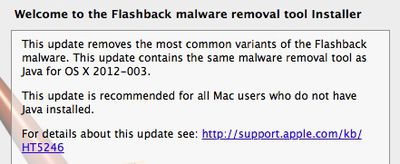
flashback malware removal tool
With OS X Lion not having Java included by default, users of Apple's latest operating system who have found themselves infected through other means and do not have Java installed can use the new tool to clean their systems without needing to install Java.

The update weighs in at 356 KB and requires OS X Lion without Java installed.

Popular Stories

Apple Logo Zoomed

Tim Cook Teases Plans for Apple's Upcoming 50th Anniversary

Thursday February 5, 2026 12:54 pm PST by
Apple turns 50 this year, and its CEO Tim Cook has promised to celebrate the milestone. The big day falls on April 1, 2026. "I've been unusually reflective lately about Apple because we have been working on what do we do to mark this moment," Cook told employees today, according to Bloomberg's Mark Gurman. "When you really stop and pause and think about the last 50 years, it makes your heart ...
wwdc sans text feature

Apple Rumored to Announce New Product on February 19

Thursday February 5, 2026 12:22 pm PST by
Apple plans to announce the iPhone 17e on Thursday, February 19, according to Macwelt, the German equivalent of Macworld. The report, citing industry sources, is available in English on Macworld. Apple announced the iPhone 16e on Wednesday, February 19 last year, so the iPhone 17e would be unveiled exactly one year later if this rumor is accurate. It is quite uncommon for Apple to unveil...
Finder Siri Feature

Why Apple's iOS 26.4 Siri Upgrade Will Be Bigger Than Originally Promised

Friday February 6, 2026 3:06 pm PST by
In the iOS 26.4 update that's coming this spring, Apple will introduce a new version of Siri that's going to overhaul how we interact with the personal assistant and what it's able to do. The iOS 26.4 version of Siri won't work like ChatGPT or Claude, but it will rely on large language models (LLMs) and has been updated from the ground up. Upgraded Architecture The next-generation...
iOS 26

iOS 26.3 and iOS 26.4 Will Add These New Features to Your iPhone

Tuesday February 3, 2026 7:47 am PST by
While the iOS 26.3 Release Candidate is now available ahead of a public release, the first iOS 26.4 beta is likely still at least a week away. Following beta testing, iOS 26.4 will likely be released to the general public in March or April. Below, we have recapped known or rumored iOS 26.3 and iOS 26.4 features so far. iOS 26.3 iPhone to Android Transfer Tool iOS 26.3 makes it easier...
iphone 17 pro dark blue 1

iPhone 18 Pro Max Rumored to Deliver Next-Level Battery Life

Friday February 6, 2026 5:14 am PST by
The iPhone 18 Pro Max will feature a bigger battery for continued best-in-class battery life, according to a known Weibo leaker. Citing supply chain information, the Weibo user known as "Digital Chat Station" said that the iPhone 18 Pro Max will have a battery capacity of 5,100 to 5,200 mAh. Combined with the efficiency improvements of the A20 Pro chip, made with TSMC's 2nm process, the...

Top Rated Comments

likemyorbs Avatar
180 months ago
Why do you say it 'weighs in at' 356 KB?

Why don't you just say it 'is' 365 KB

I don't see how writing 'it weighs in at' adds any information or style especially as you have used this phrase at least 100 times in the exact same way. That seems to reveal a certain lack of style. Or perhaps I am just being a curmudgeon.

You're a virgin aren't you?
Score: 6 Votes (Like | Disagree)
GGJstudios Avatar
180 months ago
Oh, and opening "safe" files after downloading isn't dangerous. What's it going to do, infect your computer by opening a ZIP or DMG? Just don't agree to any installations that randomly appear when you're browsing some shady site, loading plugins on the site.
This is how many were caught by the MacDefender malware. Granted, they should have closed the installer when it launched, but unchecking that option in Safari prevents even the installer from launching. It never should have been checked in the first place.

Macs are not immune to malware, but no true viruses exist in the wild that can run on Mac OS X, and there never have been any since it was released over 10 years ago. The only malware in the wild that can affect Mac OS X is a handful of trojans, which can be easily avoided by practicing safe computing (see below). Also, Mac OS X Snow Leopard and Lion have anti-malware protection (http://support.apple.com/kb/ht4651) built in, further reducing the need for 3rd party antivirus apps.
Mac Virus/Malware FAQ (https://guides.macrumors.com/Mac_Virus/Malware_FAQ)
[LIST=1]
* Make sure your built-in Mac firewall is enabled in System Preferences > Security > Firewall


* Uncheck "Open "safe" files after downloading" in Safari > Preferences > General


* Uncheck "Enable Java" in Safari > Preferences > Security. This will protect you from malware that exploits Java in your browser, including the recent Flashback trojan (http://support.apple.com/kb/HT5244). Leave this unchecked until you visit a trusted site that requires Java, then re-enable only for your visit to that site. (This is not to be confused with JavaScript, which you should leave enabled.)


* Change your DNS servers to OpenDNS servers by reading this (https://guides.macrumors.com/Mac_Virus/Malware_FAQ#Why_am_I_being_redirected_to_other_sites.3F).


* Be careful to only install software from trusted, reputable sites. Never install pirated software. If you're not sure about an app, ask in this forum before installing.


* Never let someone else have access to install anything on your Mac.


* Don't open files that you receive from unknown or untrusted sources.


* For added security, make sure all network, email, financial and other important passwords are long and complex, including upper and lower case letters, numbers and special characters.


* Always keep your Mac and application software updated. Use Software Update for your Mac software. For other software, it's safer to get updates from the developer's site or from the menu item "Check for updates", rather than installing from any notification window that pops up while you're surfing the web.

That's all you need to do to keep your Mac completely free of any virus, trojan, spyware, keylogger, or other malware. You don't need any 3rd party software to keep your Mac secure.

If you still want to run antivirus for some reason, ClamXav (http://www.clamxav.com/) (which is free) is one of the best choices, since it isn't a resource hog, detects both Mac and Windows malware and doesn't run with elevated privileges. You can run scans when you choose, rather than leaving it running all the time, slowing your system. ClamXav has a Sentry feature which, if enabled, will use significant system resources to constantly scan. Disable the Sentry feature. You don't need it. Also, when you first install ClamXav, as with many antivirus apps, it may perform an initial full system scan, which will consume resources. Once the initial scan is complete, periodic on-demand scans will have much lower demands on resources.
Score: 5 Votes (Like | Disagree)
macsmurf Avatar
180 months ago
Agreed. Now go bitch at the folks at Adobe and Oracle because it was THEIR software that was the issue that allowed this threat to happen. Not Apple.
Apple maintain and is responsible for Java for OS X which is a port of Java from Oracle. Moreover, Apple have a responsibility towards their customers.

Oracle DID fix the vulnerability 8 weeks before Apple. Apple just had to port the patch.

Even if that was to big a job for Apple they could have disabled the Java plugin on their platform as long as Java was unpatched. That amounts to making a software update that unchecks an option in the Safari preferences.

Even if that was too much of an effort they could have recommend to their customers to disable Java until further notice.
Score: 5 Votes (Like | Disagree)
roadbloc Avatar
180 months ago
But was that infection caused by a flaw in OS X. No, it was a flaw in Java. Which Apple doesn't own or operate. You act like porting a software and setting up the installers etc for it to download via their Software Update system is this easy piece of cake that would take 5 minutes to set up. Which is likely very far from the truth.

Sigh. Okay, this is going to take a little more explaining it seems.

Imagine I have make a recipe for a wonderful cake. I call this cake the Java-Cake. I make these Java-Cakes and sell them to cake stalls/shops.

Okay, now this is where you come in. You want to sell my cakes in your cake shop, a shop you call the Apple-Cake-Shop. But you wish to bake them yourself so they arrive on the shelf fresh and perfect. I agree to give you access the latest recipe as long as people are aware that it is a Java-Cake and not an Apple-Cake-Shop Cake.

For a few weeks everything is great. Then I notice that some people are having an allergic reaction to a certain ingredient in my Java-Cake. I improve the recipe and remove the offensive ingredient. By default, you get a copy of the new recipe, because it is part of the agreement that you have access to the latest recipe.

Unfortunately, you fail to take notice and continue to use my old Java-Cake recipe. Your consumers begin sending complaints of allergic reactions. Naturally, because it is a Java-Cake and made by me, the initial reaction is to blame me. Unfortunately, everyone else but you has the safe version of the Java-Cake, putting you at fault, because you (for whatever reason) failed to use the latest recipe.

When you agree to do something on behalf of your consumers, it is your responsibility. It is your fault as the owner of the Apple-Cake-Shop as you failed to update the recipe. You either need to pick up the game a bit or let me bake your Java-Cakes for you to ensure you have the latest recipe.

And that is exactly what Apple needs to do. Either accept its responsibility that it took on or let Oracle bake their Java-Cakes for them.

Get it now?
Score: 4 Votes (Like | Disagree)
Roc P. Avatar
180 months ago
So those of you who ran this update, what happened? Did it just install and then nothing happened? I found it odd to not even be told that I at least DIDNT have this Trojan.
Score: 4 Votes (Like | Disagree)
faroZ06 Avatar
180 months ago
I've had Java running all this time and never had a problem...

Same. I don't see how so many people are getting this.

Also, Apple didn't release anything for Leopard, right?
Score: 4 Votes (Like | Disagree)
















