
New Dropbox SDK Satisfies App Store Review Guidelines - MacRumors
Skip to Content

New Dropbox SDK Satisfies App Store Review Guidelines

Last week, we noted that several iOS developers were seeing their apps being rejected from the App Store for their inclusion of Dropbox integration that could allow users to sign up for Dropbox accounts and purchase extra Dropbox space. Dropbox moved quickly in attempting to roll out a new SDK to avoid the issue and noted that it was "working with Apple" on a solution, but developers continued to experience problems with their apps being rejected.

Dropbox has continued to tweak its SDK in order to fully comply with Apple's requirements, and while Apple has not officially given the latest SDK its blessing, it appears to be satisfying App Store reviewers.

So we didn't get an official verdict (imagine the worst game of telephone you've ever played), but we do have reason to believe that this build is more likely to get approved than the previous build I posted earlier. [...]

What has changed is if the Dropbox app is not installed, it opens a login view directly in your app rather than going to Safari, and there is no option to create an account.

Filip Radelic, the developer behind Cambox, quickly incorporated the new SDK into his app and submitted it to Apple yesterday. The app was quickly approved by Apple's reviewers and it is now available in the App Store.
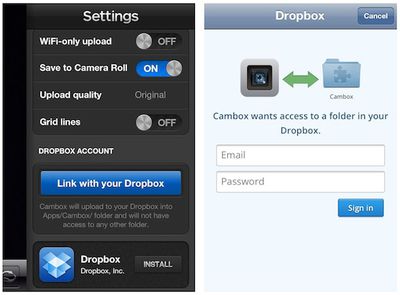
cambox dropbox settings
Cambox's settings page with Dropbox options and login webview

Dropbox notes that the new SDK does not allow for account creation through the login webview if the Dropbox app is not installed on the user's device, but the company is hopeful that it will be able to add that feature as it continues to work with Apple to ensure the SDK's compliance.


Popular Stories

iOS 26

iOS 26.4 Adds Two New Features to CarPlay

Tuesday March 24, 2026 1:55 pm PDT by
iOS 26.4 was released today, and it includes a couple of new features for CarPlay: an Ambient Music widget and support for voice-based chatbot apps. To update your iPhone 11 or newer to iOS 26.4, open the Settings app and tap on General → Software Update. CarPlay will automatically offer the new features so long as the iPhone connected to your vehicle is running iOS 26.4 or later....
Apple Business hero

Apple Unveils 'Apple Business' All-in-One Platform

Tuesday March 24, 2026 8:53 am PDT by
Apple today announced Apple Business, a new all-in-one platform that unifies device management, productivity tools, and customer outreach features. The service is designed to be a consolidated replacement for several of Apple's existing business-focused offerings, including Apple Business Essentials, Apple Business Manager, and Apple Business Connect. It provides organizations with a single...
AirPods Pro Firmware Feature

Apple Releases New Firmware for AirPods Pro 3, AirPods Pro 2 and AirPods 4

Tuesday March 24, 2026 12:31 pm PDT by
Apple today released new firmware for the AirPods Pro 2, AirPods Pro 3, and the AirPods 4. The firmware has a version number of 8B39, up from 8B34 on the AirPods Pro 3, 8B28 on the AirPods Pro 2, and 8B21 on the AirPods 4. There is no word on what's included in the firmware, but Apple has a support document with limited notes. Most updates are limited to bug fixes and performance...

Top Rated Comments

181 months ago
How so?
Well for a start Dropbox can be used on any device on any platform with anyone ...
Score: 17 Votes (Like | Disagree)
181 months ago
Great!

Dropbox is better than iCloud - love it!
Score: 12 Votes (Like | Disagree)
181 months ago
People should stop comparing iCloud and Dropbox. Dropbox is for sharing (as evidenced by their awesome new link feature), and iCloud is for keeping all YOUR devices synced up seamlessly.

I use both extensively, but for entirely different things.
Score: 10 Votes (Like | Disagree)
OllyW Avatar
181 months ago
Cool. Windows 7 and Vista?

What about Android, Windows XP/2003, Linux, Blackberry ...

Snow Leopard, Leopard, Tiger...
Score: 8 Votes (Like | Disagree)
Renzatic Avatar
181 months ago
How so?

Flexibility. iCloud is great for uploading and distributing files across all my devices. But that only works with apps that take advantage of it. And what if I want to distribute these files to someone else? I could email em, I guess. But that's a bit clunky. What if I want to set up a project folder for people to grab and add their own files to my iCloud account? What if I want to use my iCloud account to save files from an older app that doesn't directly support it? I can't do it.

Dropbox can. There's really no limit to it. I can put whatever I want to in there. Do whatever I want to with it. I can even launch apps from it, or use it as a webserver.

As of right now, Dropbox is considerably more powerful than iCloud, and not any more difficult to use.
Score: 7 Votes (Like | Disagree)
garylapointe Avatar
181 months ago
Excellent! I want more software supporting DropBox!

Gary
Score: 6 Votes (Like | Disagree)















