
iOS 6 Beta Adds 'Wi-Fi Plus Cellular' Option to Increase Data Reliability - MacRumors
Skip to Content

iOS 6 Beta Adds 'Wi-Fi Plus Cellular' Option to Increase Data Reliability

by

As we noted earlier this week when iOS 6 Beta 4 was released to developers, one of the newest features in the release was the addition of a "Wi-Fi Plus Cellular" setting to the General/Cellular control panel.

The setting appears to allow apps to fall back on the iPhone's cellular data connection when having difficulties moving data via the Wi-Fi connection, something that can happen with a weak Wi-Fi signal or a temperamental Internet connection.
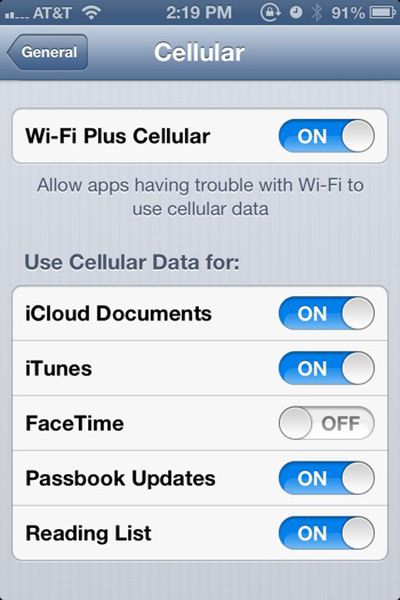
Wifipluscellular

Less clear is the purpose of the series of controls below that. There are individual On/Off switches to use cellular data for iCloud Documents, iTunes, FaceTime, Passbook Updates and Reading List. Some believe these are a submenu setting for the Wi-Fi Plus Cellular control, allowing tasks such as downloading music from iTunes or syncing iCloud Documents to require the use of Wi-Fi -- forbidding some apps from connecting via Cellular Data while others are allowed to.

We've reached out to Apple for clarification and as it's still a beta release, restricted to 'developers', the settings could always change to be made more clear or removed entirely.


Top Rated Comments

ajcadoo Avatar
178 months ago
YES! No more sitting in your driveway, with a 1 bar WiFi connection, seeing the spinny loading icon while loading the Maps app!
Score: 20 Votes (Like | Disagree)
178 months ago
This is a welcome addition for anyone who finds that it takes wifi way too long to realize it actually doesn't have a signal.

Walk out the door on my way out of the house, it takes a good minute or two to kick itself off wifi.
Score: 12 Votes (Like | Disagree)
Kaibelf Avatar
178 months ago
"Less clear is the purpose of the series of controls below that. There are individual On/Off switches to use cellular data for iCloud Documents, iTunes, FaceTime, Passbook Updates and Reading List."

Ever heard of a data cap?
Score: 7 Votes (Like | Disagree)
Agent OrangeZ Avatar
178 months ago
Welcome edition! :)

It's a welcome addition too! ;)
Score: 6 Votes (Like | Disagree)
178 months ago
So anyone know if this will work if you've got a good Wifi signal but internet access is blocked?

The problem I have is that I use free Wifi in McDonalds and Starbucks a lot. But you have to sign in to use it and due to them using BT OpenZone it also connects to any of their Wifi points it finds (which is like millions).

So I'll often totally lose the data connection as it switches to a Wifi connection that it can't actually connect to the internet over. It is a complete pain in backside and easily my biggest gripe with the iPhone.
Score: 4 Votes (Like | Disagree)
178 months ago
Hallelujah! I really hope this works as advertised. For anyone who walks around a "campus" environment could tell you, wandering just on the fringe of access points when going outdoors kills functionality of programs like iTunes Match.
Score: 4 Votes (Like | Disagree)

Popular Stories

iOS 26

iOS 26.4 Adds Two New Features to CarPlay

Tuesday March 24, 2026 1:55 pm PDT by
iOS 26.4 was released today, and it includes a couple of new features for CarPlay: an Ambient Music widget and support for voice-based chatbot apps. To update your iPhone 11 or newer to iOS 26.4, open the Settings app and tap on General → Software Update. CarPlay will automatically offer the new features so long as the iPhone connected to your vehicle is running iOS 26.4 or later....
Apple Business hero

Apple Unveils 'Apple Business' All-in-One Platform

Tuesday March 24, 2026 8:53 am PDT by
Apple today announced Apple Business, a new all-in-one platform that unifies device management, productivity tools, and customer outreach features. The service is designed to be a consolidated replacement for several of Apple's existing business-focused offerings, including Apple Business Essentials, Apple Business Manager, and Apple Business Connect. It provides organizations with a single...
AirPods Pro Firmware Feature

Apple Releases New Firmware for AirPods Pro 3, AirPods Pro 2 and AirPods 4

Tuesday March 24, 2026 12:31 pm PDT by
Apple today released new firmware for the AirPods Pro 2, AirPods Pro 3, and the AirPods 4. The firmware has a version number of 8B39, up from 8B34 on the AirPods Pro 3, 8B28 on the AirPods Pro 2, and 8B21 on the AirPods 4. There is no word on what's included in the firmware, but Apple has a support document with limited notes. Most updates are limited to bug fixes and performance...















