
Camera+ Comes to the iPad with iCloud Sync Support - MacRumors
Skip to Content

Camera+ Comes to the iPad with iCloud Sync Support

by

NewImageCamera+, the top-selling non-game app for the iPhone, has made its way to the iPad.

The app, which has sold more than 9 million copies, is a full-featured replacement for the standard Camera app that comes with the iPhone. It includes a plethora of options for editing and sharing pictures, as well as a variety of different shooting modes.

The new version of Camera+ adds support for iCloud, as well as the new iPad app that will sync photos between the iPhone and iPad versions of the app to make editing easier.

Together, the iPad and iPhone apps should pose a challenge to Adobe, which offers a suite of Photoshop apps for editing photos on the iPad, as well as its own cloud storage service.

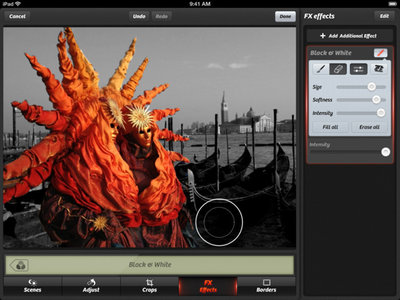
Like the iPhone version, the iPad app was designed to make editing photos quick and easy. It has five basic tools: Scenes for applying automatic touch-ups for photos taken in certain light conditions, like in low light or indoor areas; Adjust for making basic adjustments like rotating the image or removing red eye; Crops for cropping portions of a photo; FX Effects for applying fancy filters; and Borders for adding stylized borders.
NewImage
The New York Times spoke with the developers behind Camera+, hearing how difficult it was to make iCloud work the way they wanted it to. They said Apple's iCloud API's were inadequate and that it took their developers "twice as long as it should because of the problems with it."

Regardless of the difficulties in developing it, Camera+ is now available on the both the iPhone and iPad for $0.99 each. [Direct Links: iPhone, iPad]


Top Rated Comments

176 months ago
It seems iOS 6's Camera app takes different looking picture than third party apps.

According to Gruber's Flickr stream (http://www.flickr.com/photos/gruber/sets/72157631638585684/), the built-in app has wider ISO range (up to 3200), whereas third party apps are restricted to 800. ISO 800 might be a plus to some (less noisy), but it is a difference worth noting.

From Gruber: (http://daringfireball.net/linked/2012/09/27/consumer-reports-iphone-5)
I posted three photos taken with an iPhone 5: one using the built-in Camera app, and two taken with third party apps (Camera Plus Pro and VSCO Cam). I included one taken with the built-in Camera app on an iPhone 4S.

Looking at the EXIF data, the big difference is that the photo shot with the built-in Camera app on the iPhone 5 had an ISO speed of 2500; the other three all maxed out at 800. It appears the iPhone 5 can go up to ISO 3200. That’s the two-stop difference Apple is promoting.
No, the iPhone 5 takes a different looking picture than third party apps that were made for the iPhone 4S; in other words, the iPhone 4S had a maximum ISO of 800, so third party camera apps were made to take advantage of that. Now with the iPhone 5, the max is 3200 ISO, so third party apps simply need to be updated; Camera+ was updated today (not to be confused with Camera Plus Pro which is a completely different app/company.)
Score: 4 Votes (Like | Disagree)
randallking Avatar
176 months ago
I use the lock screen shortcut to access my iPhone's Camera app almost always. Even if the phone is unlocked, I will lock it and access Camera through the lock screen because it's faster. Not having lock screen access to Camera+ would probably keep me from using it as my primary camera app. So that's one disadvantage I can think of immediately.
Score: 4 Votes (Like | Disagree)
176 months ago
It seems iOS 6's Camera app takes different looking picture than third party apps... <snip>
No, the iPhone 5 takes a different looking picture than third party apps that were made for the iPhone 4S; in other words, the iPhone 4S had a maximum ISO of 800, so third party camera apps were made to take advantage of that. Now with the iPhone 5, the max is 3200 ISO, so third party apps simply need to be updated; Camera+ was updated today (not to be confused with Camera Plus Pro which is a completely different app/company.)
Developers have no control over what ISO is used... unfortunately it's not a simple matter of updating a camera app to support up to ISO 3200.
I was going to say, "maybe they just didn't update the ISO part yet in today's update"
Actually, it looks like I spoke too soon. Apple provides some properties developers can set to support the iPhone 5's "low light boost mode"... I just missed it because it's not fully documented yet:

http://blog.crushapps.com/2012/09/the-iphone-5s-low-light-boost-mode/
Looks like my original statement stands then; Camera+ was updated again TODAY (October 3, 2012) with the ability to use the 3200 ISO mode on the iPhone 5 when in a very low light situation...
Score: 2 Votes (Like | Disagree)
Staindsoul Avatar
176 months ago
Not to sound like a troll, but do folks really take a lot of pictures with the iPad? I have an iPad 2 and the camera on the back is lousy.

I think it's mainly for taking pics with your iPhone and then being able to edit them on the iPad. Am I missing something?
Score: 2 Votes (Like | Disagree)
176 months ago
iCloud API blows!

Apple REALLY needs to streamline their iCloud API, especially since much of so much of their future depends on developers integrating iCloud

You are sooooo right, I've had to abandon planned functionality because the codebase was dominated by recovery code - too many exceptions and not enough reliability. I think the API must work because Apple's apps work but the sample app and the provided docs blows beyond belief.
Score: 1 Votes (Like | Disagree)
somethingelsefl Avatar
176 months ago
Apple REALLY needs to streamline their iCloud API, especially since much of so much of their future depends on developers integrating iCloud
Score: 1 Votes (Like | Disagree)

Popular Stories

iOS 26

iOS 26.4 Adds Two New Features to CarPlay

Tuesday March 24, 2026 1:55 pm PDT by
iOS 26.4 was released today, and it includes a couple of new features for CarPlay: an Ambient Music widget and support for voice-based chatbot apps. To update your iPhone 11 or newer to iOS 26.4, open the Settings app and tap on General → Software Update. CarPlay will automatically offer the new features so long as the iPhone connected to your vehicle is running iOS 26.4 or later....
Apple Business hero

Apple Unveils 'Apple Business' All-in-One Platform

Tuesday March 24, 2026 8:53 am PDT by
Apple today announced Apple Business, a new all-in-one platform that unifies device management, productivity tools, and customer outreach features. The service is designed to be a consolidated replacement for several of Apple's existing business-focused offerings, including Apple Business Essentials, Apple Business Manager, and Apple Business Connect. It provides organizations with a single...
AirPods Pro Firmware Feature

Apple Releases New Firmware for AirPods Pro 3, AirPods Pro 2 and AirPods 4

Tuesday March 24, 2026 12:31 pm PDT by
Apple today released new firmware for the AirPods Pro 2, AirPods Pro 3, and the AirPods 4. The firmware has a version number of 8B39, up from 8B34 on the AirPods Pro 3, 8B28 on the AirPods Pro 2, and 8B21 on the AirPods 4. There is no word on what's included in the firmware, but Apple has a support document with limited notes. Most updates are limited to bug fixes and performance...















