
Yahoo Launches New Streamlined Mail Client for iPhone - MacRumors
Skip to Content

Yahoo Launches New Streamlined Mail Client for iPhone

by

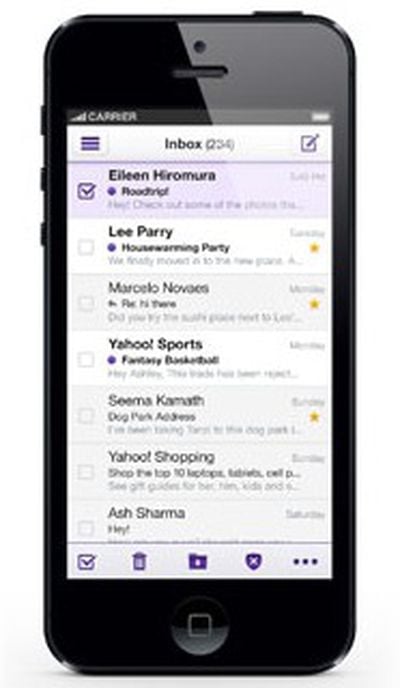
yahoomailYahoo today launched an all new mail client across several platforms, including iOS, Windows 8, Android, and the Web.

According to Yahoo CEO Marissa Meyer, speed and ease of use were the focus during the redesign of Yahoo! Mail.

You've told us loud and clear that you want fewer distractions when it comes to email. You want to quickly login, communicate, and get on with your day. And we've listened. Starting today, the new Yahoo! Mail is fast, easy and available anywhere you go. These improvements will be available on all major platforms: Web, Windows 8, iPhone/iPod touch and Android.

We've redesigned the new version of Yahoo! Mail with speed in mind – getting through your emails is faster than ever before. We've also made your inbox more intuitive and easier to navigate, allowing you to focus on what matters most: your messages. And, because mobile is everything these days, Yahoo! Mail now has a consistent look and feel across devices.

The new Yahoo! Mail app features a simple, clean interface with Yahoo's signature purple accents. It is similar in design to Sparrow, with an uncluttered inbox and a collapsible folder pane on the left side of the screen. The app has push notifications, infinite scroll, and quick photo insertion.

An additional blog post from from Vivek Sharma, General Manager of Yahoo! Mail and Messenger, states that Yahoo! Mail's underlying performance has been enhanced, making it faster to read and compose messages.

Our new, native apps have been built for speed. You can easily scan your inbox and quickly triage – starring important messages that need follow-up, filing messages to folders and deleting unimportant ones – all from the inbox. With infinite scroll, you can quickly find emails from last month or even, last year.

We've also reduced steps to save you time. When you log into Yahoo! Mail on the Web, it'll take you directly to your inbox. We've tweaked the underlying performance so it's faster to compose and read messages. After you send a message, we now take you right back to the inbox. Collectively, that works out to 36 million minutes saved every day.

Yahoo! Mail for iOS, which launched today in the App Store, is available for iPhone users. Yahoo! Mail apps for Windows 8 and Android are also available today, and the web version will roll over the next few days.


Top Rated Comments

173 months ago
People who are still using Yahoo as their main email client, should be disconnected from the Internet for life.
Score: 4 Votes (Like | Disagree)
kirky29 Avatar
173 months ago
All these other mail apps are making the default app look so crappy and dated!

I wish Apple would add their stock apps to the App Store and just do more regular updates! Once or twice a year just isn't good enough now!

Or at least....let us select default apps! I'm using Chrome and Gmail on my iPhone/iPad all the time now!
Score: 3 Votes (Like | Disagree)
John.B Avatar
173 months ago
Marissa, what we'd really like is access to our Yahoo mailboxes from desktop IMAP/POP clients. You know, like every other email provider on the planet?
Score: 2 Votes (Like | Disagree)
173 months ago
The only reason I have a Yahoo account is because of Flickr.
Score: 2 Votes (Like | Disagree)
Scrumper Avatar
173 months ago
Whenever I try to log in to my account it just refuses and says "Authentication unavailable". Same thing with both my accounts. Pretty much what I've come to expect from Yahoo these days.:rolleyes:
Score: 1 Votes (Like | Disagree)
bketchum Avatar
173 months ago
My biggest complaint about Yahoo mail is that every few weeks my password stops working. The only solution I have found is to delete my Yahoo account in Apple mail and then add it back with the same password. This sometimes doesn't even work and I have to wait for something to occur on the Yahoo side before I get mail again. This can take as long as a day.
Score: 1 Votes (Like | Disagree)

Popular Stories

iOS 26

iOS 26.4 Adds Two New Features to CarPlay

Tuesday March 24, 2026 1:55 pm PDT by
iOS 26.4 was released today, and it includes a couple of new features for CarPlay: an Ambient Music widget and support for voice-based chatbot apps. To update your iPhone 11 or newer to iOS 26.4, open the Settings app and tap on General → Software Update. CarPlay will automatically offer the new features so long as the iPhone connected to your vehicle is running iOS 26.4 or later....
Apple Business hero

Apple Unveils 'Apple Business' All-in-One Platform

Tuesday March 24, 2026 8:53 am PDT by
Apple today announced Apple Business, a new all-in-one platform that unifies device management, productivity tools, and customer outreach features. The service is designed to be a consolidated replacement for several of Apple's existing business-focused offerings, including Apple Business Essentials, Apple Business Manager, and Apple Business Connect. It provides organizations with a single...
AirPods Pro Firmware Feature

Apple Releases New Firmware for AirPods Pro 3, AirPods Pro 2 and AirPods 4

Tuesday March 24, 2026 12:31 pm PDT by
Apple today released new firmware for the AirPods Pro 2, AirPods Pro 3, and the AirPods 4. The firmware has a version number of 8B39, up from 8B34 on the AirPods Pro 3, 8B28 on the AirPods Pro 2, and 8B21 on the AirPods 4. There is no word on what's included in the firmware, but Apple has a support document with limited notes. Most updates are limited to bug fixes and performance...















