
Mailbox is an upcoming email management app developed by the team that designed collaborative task management app Orchestra, which was lauded for its simple design.

Mailbox, which is designed to work with Gmail, features a clean, simple design that uses intuitive touch gestures, much like list-making app Clear. Quick swiping emails to the right removes them from the inbox and archives them, while a longer slide and hold deletes them.
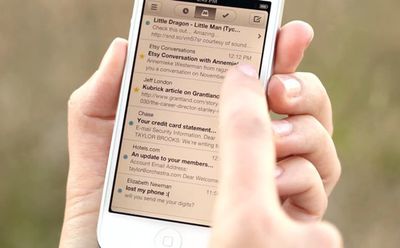
mailbox

Reorganization of the inbox is also a simple task with drag gestures, and the app also allows users swipe left to "Snooze" emails, putting them out of sight and out of mind until later.

TechCrunch has an early hands-on review of the app:

Mailbox takes a very stripped-down approach, providing a limited set of options for dealing with email. It breaks incoming emails into three basic categories: Those you’d like to keep in your inbox, those you'd like to save for later, and those you'd like to get rid of as quickly as possible.

The whole thing is built on the concept of gestures, basically swiping left or swiping right over an email in your inbox to do something with it. Want to archive an email? A short swipe to the right will do that, clearing it from view. Want to delete? Try a longer swipe right.

But the most interesting aspect is the save-for-later option. Don’t have time for an email right now but want to respond at some point? Just swipe to the left. Once you do, you’ll be met with a few options for when you want that email to appear in your inbox: later in the day (three hours later), tomorrow, on the weekend, next week, etc. It then clears those emails from the inbox but makes them easily accessible from the menu screen. It works the same for adding emails to lists, like a "read later" or "watch later" list. It just needs a longer swipe.

The Verge has also had the opportunity to test Mailbox, calling the app "nothing short of spectacular."


Though there are a slew of emailing apps available, including Apple's own Mail app, Google's Gmail app, and third party alternatives like Sparrow, no email client offers the innovative quick-swipe interface of Mailbox.

Mailbox is in closed beta at this time, but the website states that it will be available for iPhone + Gmail after the new year.


Top Rated Comments

jasheeky Avatar
172 months ago
Video shows her using a white iPhone 5, but the phone she puts in her back pocket is an iPhone 4/4S.

Gotcha ! /coolstory
Score: 4 Votes (Like | Disagree)
BinaryTim Avatar
172 months ago
Too lazy to read; will it support iCloud, Gmail, notifications, etc.? Ta.

If you are too lazy to read, how are you going to know if/what someone responds to your question? :rolleyes:

Oh, and no, I'm not going to give you the answer even though I'm wasting my time writing this.
Score: 4 Votes (Like | Disagree)
petsounds Avatar
172 months ago
All e-mail goes through their servers. Not only does this mean you're putting the trust of your personal communications and/or business communications in the hands of a small company and hope they won't 1) read it, and 2) have insecure servers which could allow other people to read it, but if their service has an outage, you won't get any mail.

Also no Exchange support.

So, no thanks. Design looks nice, and some nice UX ideas there, but going through their servers is a non-starter for me.
Score: 3 Votes (Like | Disagree)
robotphood Avatar
172 months ago
Eww!!!
Sorry that just looks brutal. Those half/full swipe gestures would drive me nuts. Going to delete instead of read by mistake. Seems like in trying to make mail more streamlined all they did is make it bloated and less intuitive.


The colored indicators are quite clear when you swipe but I think it's just a matter of getting used to it. My first thought from this demo is how intuitive and simple it was. I already use and prefer apps that use gestures like tweetbot, reeder, pocket, sparrow, chrome, etc... It did not take long to gain that muscle memory. A quick swipe is always faster and less tedious than 2-3 taps. If you thought this looks brutal you should see the gestures I have with bettertouchtool on my macbook air :p
Score: 2 Votes (Like | Disagree)
Karma*Police Avatar
172 months ago
Looks interesting. I'd probably check it out except I only use my gmail account for spam.
Score: 2 Votes (Like | Disagree)
sniffies Avatar
172 months ago
If you are too lazy to read, how are you going to know if/what someone responds to your question? :rolleyes:

Oh, and no, I'm not going to give you the answer even though I'm wasting my time writing this.
That's what we have forum notifications for. :rolleyes:
Score: 2 Votes (Like | Disagree)

Popular Stories

Apple Logo Zoomed

Tim Cook Teases Plans for Apple's Upcoming 50th Anniversary

Thursday February 5, 2026 12:54 pm PST by
Apple turns 50 this year, and its CEO Tim Cook has promised to celebrate the milestone. The big day falls on April 1, 2026. "I've been unusually reflective lately about Apple because we have been working on what do we do to mark this moment," Cook told employees today, according to Bloomberg's Mark Gurman. "When you really stop and pause and think about the last 50 years, it makes your heart ...
wwdc sans text feature

Apple Rumored to Announce New Product on February 19

Thursday February 5, 2026 12:22 pm PST by
Apple plans to announce the iPhone 17e on Thursday, February 19, according to Macwelt, the German equivalent of Macworld. The report, citing industry sources, is available in English on Macworld. Apple announced the iPhone 16e on Wednesday, February 19 last year, so the iPhone 17e would be unveiled exactly one year later if this rumor is accurate. It is quite uncommon for Apple to unveil...
Finder Siri Feature

Why Apple's iOS 26.4 Siri Upgrade Will Be Bigger Than Originally Promised

Friday February 6, 2026 3:06 pm PST by
In the iOS 26.4 update that's coming this spring, Apple will introduce a new version of Siri that's going to overhaul how we interact with the personal assistant and what it's able to do. The iOS 26.4 version of Siri won't work like ChatGPT or Claude, but it will rely on large language models (LLMs) and has been updated from the ground up. Upgraded Architecture The next-generation...
iOS 26

iOS 26.3 and iOS 26.4 Will Add These New Features to Your iPhone

Tuesday February 3, 2026 7:47 am PST by
While the iOS 26.3 Release Candidate is now available ahead of a public release, the first iOS 26.4 beta is likely still at least a week away. Following beta testing, iOS 26.4 will likely be released to the general public in March or April. Below, we have recapped known or rumored iOS 26.3 and iOS 26.4 features so far. iOS 26.3 iPhone to Android Transfer Tool iOS 26.3 makes it easier...
iphone 17 pro dark blue 1

iPhone 18 Pro Max Rumored to Deliver Next-Level Battery Life

Friday February 6, 2026 5:14 am PST by
The iPhone 18 Pro Max will feature a bigger battery for continued best-in-class battery life, according to a known Weibo leaker. Citing supply chain information, the Weibo user known as "Digital Chat Station" said that the iPhone 18 Pro Max will have a battery capacity of 5,100 to 5,200 mAh. Combined with the efficiency improvements of the A20 Pro chip, made with TSMC's 2nm process, the...















