
Apple Increases Account Security With Optional Two-Step Verification System for Apple IDs

Apple has implemented a new two-step verification system for Apple IDs (via 9to5Mac), adding an additional layer of protection for Apple accounts with an extra security code and a "trusted" device.

Two-step verification will require you to verify your identity using one of your devices before you can make changes to your account or make an iTunes or App Store purchase from a new device. You will also get a Recovery Key for safekeeping which you can use to access your account if you ever forget your password or lose your device.

Once enabled, the new system replaces the standard security questions that are asked before users make purchases on a new device and password resets can only be done from the designated iPhone or iPad.
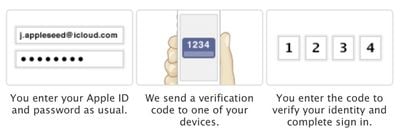
twostepverification
As the recovery key is used in place of security questions, keeping it secure is of the utmost importance. A lost or forgotten key can be recovered with a trusted device and a password, just as a password can be recovered with a trusted device and a recovery key.

The verification system will request a password that has one letter, one number, one capital letter, and at least eight characters. If such a password is not already in use, users will need to wait three days to fully enable two-step verification. Users with an already compliant password can move on immediately to the next step.

A security code will be sent through SMS or using the Find My iPhone app, and during setup, users can choose a single trusted device. To begin the process, users can visit the Apple ID website to implement two-step verification.


Popular Stories

maxresdefault

Apple Shows Off a Key Reason to Upgrade to the iPhone 17

Saturday February 7, 2026 9:26 am PST by
Apple today shared an ad that shows how the upgraded Center Stage front camera on the latest iPhones improves the process of taking a group selfie. "Watch how the new front facing camera on iPhone 17 Pro takes group selfies that automatically expand and rotate as more people come into frame," says Apple. While the ad is focused on the iPhone 17 Pro and iPhone 17 Pro Max, the regular iPhone...
wwdc sans text feature

Apple Rumored to Announce New Product on February 19

Thursday February 5, 2026 12:22 pm PST by
Apple plans to announce the iPhone 17e on Thursday, February 19, according to Macwelt, the German equivalent of Macworld. The report, citing industry sources, is available in English on Macworld. Apple announced the iPhone 16e on Wednesday, February 19 last year, so the iPhone 17e would be unveiled exactly one year later if this rumor is accurate. It is quite uncommon for Apple to unveil...
Apple Logo Zoomed

Tim Cook Teases Plans for Apple's Upcoming 50th Anniversary

Thursday February 5, 2026 12:54 pm PST by
Apple turns 50 this year, and its CEO Tim Cook has promised to celebrate the milestone. The big day falls on April 1, 2026. "I've been unusually reflective lately about Apple because we have been working on what do we do to mark this moment," Cook told employees today, according to Bloomberg's Mark Gurman. "When you really stop and pause and think about the last 50 years, it makes your heart ...
Finder Siri Feature

Why Apple's iOS 26.4 Siri Upgrade Will Be Bigger Than Originally Promised

Friday February 6, 2026 3:06 pm PST by
In the iOS 26.4 update that's coming this spring, Apple will introduce a new version of Siri that's going to overhaul how we interact with the personal assistant and what it's able to do. The iOS 26.4 version of Siri won't work like ChatGPT or Claude, but it will rely on large language models (LLMs) and has been updated from the ground up. Upgraded Architecture The next-generation...
iOS 26

iOS 26.3 and iOS 26.4 Will Add These New Features to Your iPhone

Tuesday February 3, 2026 7:47 am PST by
While the iOS 26.3 Release Candidate is now available ahead of a public release, the first iOS 26.4 beta is likely still at least a week away. Following beta testing, iOS 26.4 will likely be released to the general public in March or April. Below, we have recapped known or rumored iOS 26.3 and iOS 26.4 features so far. iOS 26.3 iPhone to Android Transfer Tool iOS 26.3 makes it easier...

Top Rated Comments

dannyyankou Avatar
168 months ago
Can apple make it anymore annoying...geeez

Perhaps you missed the part that it's optional?

:rolleyes:
Score: 19 Votes (Like | Disagree)
Jsameds Avatar
168 months ago
1234.....how did Apple know my security code!!???

John Appleseed? Is that really you?
Score: 17 Votes (Like | Disagree)
0858131 Avatar
168 months ago
Can apple make it anymore annoying...geeez
Seriously? Google introduces (http://www.google.com/search?q=google+introduces+two+step+verification&hl=en&biw=1727&bih=1304&sa=X&ei=j2RLUd_cIauu2gXGuYHABQ&ved=0CB0QpwUoBg&source=lnt&tbs=cdr%3A1%2Ccd_min%3A2%2F1%2F2011%2Ccd_max%3A3%2F1%2F2011&tbm=#hl=en&tbs=cdr:1%2Ccd_min%3A2%2F1%2F2011%2Ccd_max%3A3%2F1%2F2011&sclient=psy-ab&q=google+two+step+verification&oq=google+two+step+verification&gs_l=serp.3...4165.4165.0.4334.1.1.0.0.0.0.0.0..0.0...0.0...1c.1.7.psy-ab.QFMX0pozUkw&pbx=1&bav=on.2,or.r_qf.&bvm=bv.44158598,d.b2I&fp=5055737f513ba032&biw=1727&bih=1304) two-step verification and everyone goes gaga.

Apple introduces two-step verification and people complain.

Really sick of the anti-Apple everything happening these days. Sheesh.
Score: 15 Votes (Like | Disagree)
kbt1020 Avatar
168 months ago
1234.....how did Apple know my security code!!???
Score: 15 Votes (Like | Disagree)
rbrian Avatar
168 months ago
1234.....how did Apple know my security code!!???

That's the kind of code only an idiot would have on his luggage... //www.youtube.com/watch?v=a6iW-8xPw3k :D
Score: 8 Votes (Like | Disagree)
Xe89 Avatar
168 months ago
Lot of confusion about Google Authenticator in this thread. It doesn't store anything on Google's servers, it gives you one time codes. You need this code AND your account password to login. Just read the Wikipedia article about it.

It works with other services like Dropbox, Lastpass, Amazon Web Services and Facebook because it is based on some standard method of creating codes. You don't even have to use the official Google Authenticator app, there are several others like Authenticator for Windows Phone and a version for so called Java dumb phones.

Someone asked about Facebook and Google Authenticator. They are telling you to use their own code generator but they are really just using the same method as Google and Dropbox. Just click the help button when you are setting it up and look for a 16 digit code (or something), this you type in Google Authenticator and it will give you one time codes back. I can confirm this is working. Also, nothing stops you from using several devices with Google Authenticator (or third-party alternatives) as long as you set them up at the same time.

You should of course have auto lock enabled on your phone if you are using a phone application like Google Authenticator to create codes. And it is still a good idea, even with 2 step activated, to use a password manager to create passwords for most accounts and Diceware for accounts where you have to remember the password.


Too bad Apple did not choose to support Google Authenticator.
Score: 4 Votes (Like | Disagree)















