
Adobe Shows Off Lightroom-Style Photo Editing for iPad - MacRumors
Skip to Content

Adobe Shows Off Lightroom-Style Photo Editing for iPad

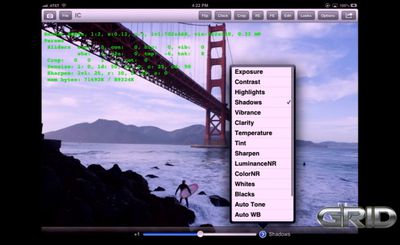
CNET reports on a sneak peek from Adobe product manager Tom Hogarty showing off the company's concept for Lightroom-style photo editing on the iPad. The app would rely on cloud-based connections to serve as a companion app to the full Lightroom software, but offer a number of higher-end features for on-the-go photo editing.
lightroom_ipad

He wouldn't promise when the app would ship or what exactly it would do, but he did demonstrate some features of the prototype software running on an iPad 2. He also offered several details about its features:

- The ability to edit photos taken in raw photo formats, including Lightroom develop-module parameters like exposure, clarity, shadows, highlights, and white balance.

- Cloud-synchronized editing so that changes made on a tablet arrive on the same photo on the PC.

- The ability to zoom all the way to 100 percent for checking photo focus and details.

Hogarty also noted that he would like to bring features such photo sorting and flagging to the app, although other features such as brushes for tweaking photos have not been included.


The app is clearly a work in progress, with the feature set still yet to be finalized and performance issues remaining, but Adobe has made clear that it wants to make some of the same powerful photo editing tools from Lightroom available to photographers on the go. For photographers who travel and spend significant amounts of time in the field, an iPad capable of performing some Lightroom-style editing on raw images could significantly improve their efficiency and workflows.


Popular Stories

iOS 26

iOS 26.4 Adds Two New Features to CarPlay

Tuesday March 24, 2026 1:55 pm PDT by
iOS 26.4 was released today, and it includes a couple of new features for CarPlay: an Ambient Music widget and support for voice-based chatbot apps. To update your iPhone 11 or newer to iOS 26.4, open the Settings app and tap on General → Software Update. CarPlay will automatically offer the new features so long as the iPhone connected to your vehicle is running iOS 26.4 or later....
Apple Business hero

Apple Unveils 'Apple Business' All-in-One Platform

Tuesday March 24, 2026 8:53 am PDT by
Apple today announced Apple Business, a new all-in-one platform that unifies device management, productivity tools, and customer outreach features. The service is designed to be a consolidated replacement for several of Apple's existing business-focused offerings, including Apple Business Essentials, Apple Business Manager, and Apple Business Connect. It provides organizations with a single...
AirPods Pro Firmware Feature

Apple Releases New Firmware for AirPods Pro 3, AirPods Pro 2 and AirPods 4

Tuesday March 24, 2026 12:31 pm PDT by
Apple today released new firmware for the AirPods Pro 2, AirPods Pro 3, and the AirPods 4. The firmware has a version number of 8B39, up from 8B34 on the AirPods Pro 3, 8B28 on the AirPods Pro 2, and 8B21 on the AirPods 4. There is no word on what's included in the firmware, but Apple has a support document with limited notes. Most updates are limited to bug fixes and performance...

Top Rated Comments

MattJessop Avatar
168 months ago
I hope this isn't what deforstallization looks like...

"Icons were too flashy, so we flattened them out and just put text.... pure text.."
Score: 3 Votes (Like | Disagree)
ThunderSkunk Avatar
168 months ago
Hm. Regarding doing our edits on calibrated monitors. If your images are destined for print, then of course it's necessary, but if your images will be viewed on screen, then 1, for desktop users, considering that most people don't have a calibrated desktop/laptop monitor, they'll be seeing your work off-kilter anyway, and 2, for the increasingly commonplace tablet viewers, at least they'll all be looking at consistent displays you can match.

It may make sense to just do start the workflow doing quick organization & edits on ipad for iPad, then, since those edits are automatically sync'd to your desktop anyway, continue those that warrant futher work on a calibrated display for print. Since you invariably wind up doing a separate edit for print anyway, it's not an increase of work overall, but a decrease on the front end.

Nice.

Now if only Apple would bump the connection to Thunderbolt, we'd be able to efficiently transfer the huge raw files from our Leica S2 to the iPad in the first place.
Score: 2 Votes (Like | Disagree)
AQUADock Avatar
168 months ago
THAT is dedication. Thanks Adobe! If only more companies were like Adobe, maybe the Mac would sell in significant numbers!

Why do you always go on about mac sales, and what has that got to do with an iPad app?
Score: 2 Votes (Like | Disagree)
DJsteveSD Avatar
168 months ago
without any proper file system, even "Load" and "Save" are complicated.
Thanks to Apple we'll be usuing iTunes to organize our images,
how convenient :(
iPad is capable of doing great things, the silly iOS is a limitation...

I still don't get why Apple makes it so difficult to deal with photos/folders.
Score: 2 Votes (Like | Disagree)
Mr. Retrofire Avatar
168 months ago
What I like about seeing higher end apps becoming available on the iPad is the evidence of the industry moving into the post-PC era.
No. This is NOT the full application. Btw, Lightroom, PS or Aperture are impossible on non-calibrated displays.

Post-PC era is a marketing term. An iPad is a Personal Computer (PC).

The app would rely on cloud-based connections to serve as a companion app to the full Lightroom software, but offer a number of higher-end features for on-the-go photo editing.
Score: 2 Votes (Like | Disagree)
Small White Car Avatar
168 months ago
While I'm glad that Adobe is doing this it is truly shameful that both Aperture and Final Cut Pro have not done anything at all like this yet. They're the 2 teams that should be leading the way with this kind of "companion app." And it's not because those programs need iPad integration so much as they're the teams that could have lead the way and show 3rd party developers what's possible. Even if few people used them just having them out there would put the iPad on a lot more developer's radars.

Adobe should be playing catch-up to Apple with stuff like this but instead they seem to be all alone.
Score: 2 Votes (Like | Disagree)















