
There are a number of Markdown-based apps that are designed to facilitate simple writing and text editing on the iPad, including options like iA Writer and Byword.

Editorial, from developer Ole Zorn, is another app that falls into this category, but in addition to offering many of the features of the aforementioned text editing apps, it also includes an array of useful scripting and automation tools that speed up repetitive tasks.
editorial1
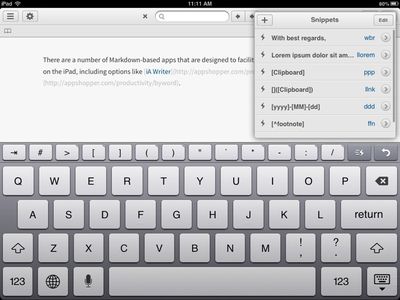
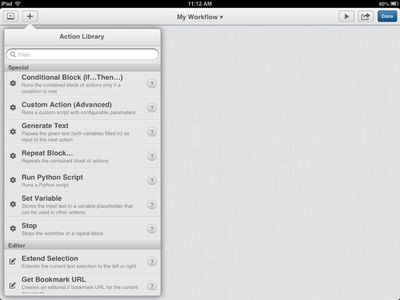
Along with multiple pre-installed workflow options and snippets to allow links, frequent phrases, dates, footnotes, and more to be inserted into text quickly, Editorial also allows users to create entirely customized workflows (this functions similarly to OS X Automator) with a fully equipped action library and support for custom actions via a Python interpreter. Snippets can also be fully edited and customized.

Editorial is not a simple app, but the interface is intuitive which means it can be picked up and used without having to read through a detailed instruction manual. It does, however, have such a manual for users who want to get the most out of the app.
editorial2
Federico Viticci of MacStories has written an extremely detailed, in-depth review of Editorial, which is worth a read for users interested in the app. It also includes a number of workflows that he crafted and included for download.

As a text editor with automation features for power users, Editorial is incredible. It has, admittedly, an initial learning curve, but that’s quickly overcome thanks to the app’s intuitive drag & drop interface and Automator-like UI that is well-designed and easy to use.

Even without any knowledge of Python or regular expressions, iPad users moderately interested in text automation will find great utility in Editorial’s workflow actions; as I demonstrated above, Editorial provides tools to create workflows that can speed up common tasks related to text, list-making and management, web research, and sharing.

While creating complex workflows isn’t necessary, it’s fun to become more comfortable with the workflow system and the URL scheme to explore the possibilities of chaining apps and web services together with text.

Editorial can be downloaded from the App Store for $4.99. [Direct Link]

Top Rated Comments

BC2009 Avatar
163 months ago
This can't be true! I was told that iPad was just a media tablet for consumption! Even the Microsoft commercials said it was missing productivity software.

/s
Score: 2 Votes (Like | Disagree)

Popular Stories

wwdc sans text feature

Apple Rumored to Announce New Product on February 19

Thursday February 5, 2026 12:22 pm PST by
Apple plans to announce the iPhone 17e on Thursday, February 19, according to Macwelt, the German equivalent of Macworld. The report, citing industry sources, is available in English on Macworld. Apple announced the iPhone 16e on Wednesday, February 19 last year, so the iPhone 17e would be unveiled exactly one year later if this rumor is accurate. It is quite uncommon for Apple to unveil...
Apple Logo Zoomed

Tim Cook Teases Plans for Apple's Upcoming 50th Anniversary

Thursday February 5, 2026 12:54 pm PST by
Apple turns 50 this year, and its CEO Tim Cook has promised to celebrate the milestone. The big day falls on April 1, 2026. "I've been unusually reflective lately about Apple because we have been working on what do we do to mark this moment," Cook told employees today, according to Bloomberg's Mark Gurman. "When you really stop and pause and think about the last 50 years, it makes your heart ...
Finder Siri Feature

Why Apple's iOS 26.4 Siri Upgrade Will Be Bigger Than Originally Promised

Friday February 6, 2026 3:06 pm PST by
In the iOS 26.4 update that's coming this spring, Apple will introduce a new version of Siri that's going to overhaul how we interact with the personal assistant and what it's able to do. The iOS 26.4 version of Siri won't work like ChatGPT or Claude, but it will rely on large language models (LLMs) and has been updated from the ground up. Upgraded Architecture The next-generation...
maxresdefault

Apple Shows Off a Key Reason to Upgrade to the iPhone 17

Saturday February 7, 2026 9:26 am PST by
Apple today shared an ad that shows how the upgraded Center Stage front camera on the latest iPhones improves the process of taking a group selfie. "Watch how the new front facing camera on iPhone 17 Pro takes group selfies that automatically expand and rotate as more people come into frame," says Apple. While the ad is focused on the iPhone 17 Pro and iPhone 17 Pro Max, the regular iPhone...
iOS 26

iOS 26.3 and iOS 26.4 Will Add These New Features to Your iPhone

Tuesday February 3, 2026 7:47 am PST by
While the iOS 26.3 Release Candidate is now available ahead of a public release, the first iOS 26.4 beta is likely still at least a week away. Following beta testing, iOS 26.4 will likely be released to the general public in March or April. Below, we have recapped known or rumored iOS 26.3 and iOS 26.4 features so far. iOS 26.3 iPhone to Android Transfer Tool iOS 26.3 makes it easier...
















