

A third-party developer has released a new Mac app that allows control of Philips Hue light bulbs from a menulet in the Mac menu bar. Hue Menu, available on the Mac App Store, uses the Hue API to change the colors, brightness and more of Hue lights.
A year ago, Philips released its Hue iOS-controlled LED light bulbs exclusively on the Apple Store. More recently, the company released new LED 'LightStrips' and an accent lamp called 'Bloom'.
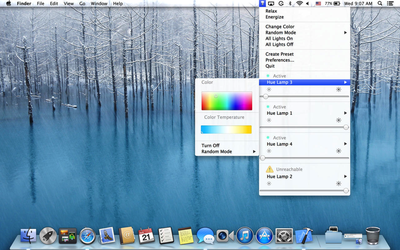
Hue Menu is a simple and delightful way to control your Philips Hue light bulbs right from your Mac's Menu Bar.
This 3rd party App is the best companion for your Philips Hue light bulbs striking the perfect balance between ease of use and powerful features, making it as delightful to use as the official iOS Apps
Hue Menu is available for $2.99 on the Mac App Store. [Direct Link]





















Top Rated Comments
Does everything, except it doesn't have random modes, presets, or relax/energize modes Philips includes.
This is correct.
agreed on the wattage.
as for security I think you're mistaken. I think any client must 1) be on your network, 2) have paired with your bridge.
Couple of reasons:
- Handicap: My father is a 77 year old double leg amputee from diabetes [neglect], I installed these throughout my family's home which allows them to control lights he couldn't normally reach
- Deaf: IFTTT recipes allow for a myriad of actions, and some are coming around that may allow the deaf to be alerted if an alarm is sounded (fire or break-in)
- Geo-fencing: Turn lights on when arriving at home and soon lights will be able to track your presence through the device currently connected and controlling the system (walking through rooms turns lights on and off)
- Monitoring: Control lighting away from home, saves energy and possible burglary attempts
- Energy: LED lights last a long time and are much more energy efficient, unlike most LED lights these allow for warmer whites in addition to colors (I've had mine since day 1, not one needing replacing, however a friend busted his and Philips sent him a free replacement)
- IFTTT recipes allow for certain lights to activate based on changes in weather forecast, stocks, emails from specific people, alerts - just about anything.
- Recipes: Install and name each light, then create recipes. Recipes can be made as one touch macros, select which lights, their colors and brightness, then decide if the lights should turn on automatically at dusk/dawn, a set time, through geofencing, etc. and save. The recipes will be available across all iOS and OS X attached devices.
There's a lot more, but it goes well beyond a novelty. I also installed a second gen Nest for my parents' and my own 2 and 3 stage HVAC Trane systems, saved money/paid for itself while simplifying home energy control.
A possible use, though I'm not sure if it's implemented yet, setting timers, so you can simulate someone being home, ie turning the lights on and off at random intervals, when you're on vacation or away on a business trip.
Laziness. I wouldn't mind it if I didn't have to run downstairs to turn off a light I left on by mistake when I am comfy in bed. :)