Apple Adds Major League Soccer and Disney Junior Channels to Apple TV
Continuing its expansion of content offerings on the Apple TV, Apple today rolled out two new channels for the set-top box: MLS (Major League Soccer) and Disney Junior.
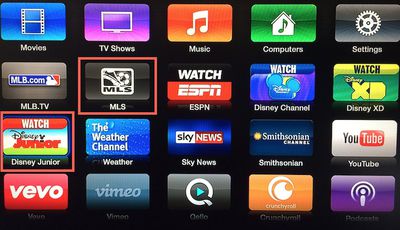
The MLS channel offers scores, standings, and video content from Major League Soccer, while also offering access to the MLS Live subscription program for live video of matches. MLS Live is priced at $24.99 for the season and a subscription can be used not only on the Apple TV but also on iPhone and iPad.
The new Disney Junior channel is similar to Disney Channel and Disney XD offerings added last month. All three channels require authentication through a participating cable provider for access to live and on-demand content.
Today's additions are the latest in a long line of new channels introduced to the Apple TV in recent months. In June, WatchESPN, HBO GO, Sky News, Crunchyroll, and Quello were added, and last month Apple debuted channels for Vevo, the Smithsonian, and the first two Disney channels. Deals with TWC and The CW are also said to be in the works.
Popular Stories
iOS 26.4 was released today, and it includes a couple of new features for CarPlay: an Ambient Music widget and support for voice-based chatbot apps.
To update your iPhone 11 or newer to iOS 26.4, open the Settings app and tap on General → Software Update. CarPlay will automatically offer the new features so long as the iPhone connected to your vehicle is running iOS 26.4 or later....
Apple today released new firmware for the AirPods Pro 2, AirPods Pro 3, and the AirPods 4. The firmware has a version number of 8B39, up from 8B34 on the AirPods Pro 3, 8B28 on the AirPods Pro 2, and 8B21 on the AirPods 4.
There is no word on what's included in the firmware, but Apple has a support document with limited notes. Most updates are limited to bug fixes and performance...
Apple this week released tvOS 26.4, and the software update includes a handful of new features and changes for the Apple TV.
tvOS 26.4 is compatible with all Apple TV 4K and Apple TV HD models released since 2015. To update your Apple TV, open the Settings app on the device, navigate to System → Software Updates, and select Update Software.
Below, we have recapped what is new in tvOS...























