
Flickr for iOS Updated with Auto Upload Capability and Straightening Tool - MacRumors
Skip to Content

Flickr for iOS Updated with Auto Upload Capability and Straightening Tool

by

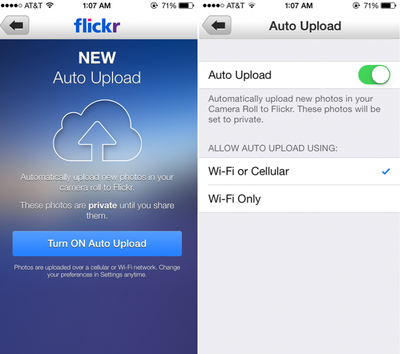
Yahoo's image and video hosting website Flickr has released an update to its iOS app, which contains a new "Auto Upload" feature that saves images in their original resolution and uploads them directly to the service. Auto Upload can also be toggled to save images only when connected to a Wi-Fi network or enabled on both Wi-Fi and cellular connections, and all saved images are marked as private by default. The update also contains a new auto-straighten tool and fixes for users signing in with Google.
flickr_autoupload
Flickr received attention earlier this year when it began offering 1 TB of free photo storage space and underwent a major design overhaul. As previously speculated, Flickr is also now integrated within iOS 7, as users can choose to share photos directly to Flickr from the Photos app or various third-party apps with the functionality.

The last major update to Flickr for iOS came in August, when live filters and professional editing capabilities were added to the app. Flickr is a free download on the App Store. [Direct Link]


Top Rated Comments

ArtOfWarfare Avatar
163 months ago
Still looks like iOS 6. Not going on my phone.

Ew, iOS 6; that's so 5 weeks ago.
Score: 2 Votes (Like | Disagree)
163 months ago
So if I do burst mode, does it upload the full burst or just the "best of the bunch"?
Score: 1 Votes (Like | Disagree)
163 months ago
Why is there no iPad app? I'd love to just grab my iPad, open flickr and show people my photos. Is that really too much to ask?

Best I can do is load up flickr in the iOS version of Chrome, which fails to load properly.
Score: 1 Votes (Like | Disagree)
163 months ago
Can't see a way to upload existing stuff on Camera Roll.
Doesn't seem there's such an option at the moment, would be handy though.

Other than that it's a nice way to back everything up, especially if you take lots of pics and in a possession with a 16GB device only.
If you click on the camera icon in the middle of the bottom toolbar you should be able to go to your existing photos (and Camera Roll) by selecting the photo thumbnail on the bottom left of the camera screen, and from there you should be able to select photos to upload.

Or, as one of the in-app tips mentions, simply double tap the camera icon in the middle of the bottom toolbar and that should take you directly to Camera Roll to select photos to upload.
Score: 1 Votes (Like | Disagree)
163 months ago
Still no universal app? :-(
Score: 1 Votes (Like | Disagree)

Popular Stories

iOS 26

iOS 26.4 Adds Two New Features to CarPlay

Tuesday March 24, 2026 1:55 pm PDT by
iOS 26.4 was released today, and it includes a couple of new features for CarPlay: an Ambient Music widget and support for voice-based chatbot apps. To update your iPhone 11 or newer to iOS 26.4, open the Settings app and tap on General → Software Update. CarPlay will automatically offer the new features so long as the iPhone connected to your vehicle is running iOS 26.4 or later....
Apple Business hero

Apple Unveils 'Apple Business' All-in-One Platform

Tuesday March 24, 2026 8:53 am PDT by
Apple today announced Apple Business, a new all-in-one platform that unifies device management, productivity tools, and customer outreach features. The service is designed to be a consolidated replacement for several of Apple's existing business-focused offerings, including Apple Business Essentials, Apple Business Manager, and Apple Business Connect. It provides organizations with a single...
AirPods Pro Firmware Feature

Apple Releases New Firmware for AirPods Pro 3, AirPods Pro 2 and AirPods 4

Tuesday March 24, 2026 12:31 pm PDT by
Apple today released new firmware for the AirPods Pro 2, AirPods Pro 3, and the AirPods 4. The firmware has a version number of 8B39, up from 8B34 on the AirPods Pro 3, 8B28 on the AirPods Pro 2, and 8B21 on the AirPods 4. There is no word on what's included in the firmware, but Apple has a support document with limited notes. Most updates are limited to bug fixes and performance...















