
Microsoft Launches 'Remote Desktop' Apps for Mac and iOS - MacRumors
Skip to Content

Microsoft Launches 'Remote Desktop' Apps for Mac and iOS

by

Along with Windows 8.1, Microsoft today launched new Microsoft Remote Desktop apps for iOS and OS X, designed to give users access to a Windows PC via RemoteFX on their Macs, iPhones, and iPads. News of a potential Remote Desktop app for Apple devices first surfaced last week.
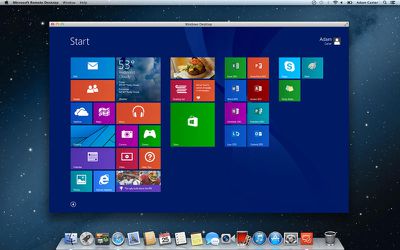
remotedesktopmac
The iOS app offers a secure connection to data and applications through NLA technology along with multi-touch capabilities. It supports high quality video and sound streaming and connects to external monitors or protectors to for presentations. The Mac version also includes the ability to access local Mac files from Windows applications and printer capabilities.

iOS Features:

- Access to remote resources through the Remote Desktop Gateway
- Rich multi-touch experience with remote desktop protocol (RDP) and RemoteFX supporting Windows gestures
- Secure connection to your data and applications with breakthrough Network Layer Authentication (NLA) technology
- Simple management of all remote connections from the connection center
- High quality video and sound streaming with improved compression and bandwidth usage
- Easy connection to external monitors or projectors for presentations

Mac Features:

- Access to remote resources through the Remote Desktop Gateway
- Secure connection to your data and applications with breakthrough Network Layer Authentication (NLA) technology
- Simple management of all remote connections from the connection center
- High quality video and sound streaming with improved compression and bandwidth usage
- Easy connection to multiple monitors or projectors for presentations
- Print from Windows applications to any printer configured on your Mac
- Access local files on your Mac from your Windows applications

In addition to Remote Desktop tools for iOS and OS X, Microsoft is said to be developing similar tools for Android and Windows RT. Earlier this month, former Microsoft CEO Steve announced that the company also plans to expand its iOS offerings with an iPad version of Office to be released after the launch of the next major version of its Office suite.

Microsoft Remote Desktop for iOS is a universal app that can be downloaded from the App Store for free. [Direct Link]

Microsoft Remote Desktop for Mac is a free app that can be downloaded from the Mac App Store. [Direct Link]


Top Rated Comments

162 months ago
I will be getting this for the sole purpose of being able to fix my parents computers remotely ever time the call me. This will be immensly simpler than having them tell me what is wrong -- "the thing said something and i pressed the button and now nothing happens, what should I do?"
Score: 9 Votes (Like | Disagree)
162 months ago
I'll install it... but I hope I never have to use it.
Score: 6 Votes (Like | Disagree)
162 months ago
Please, for the love of god don't allow direct connections to your PC from the Internet. Anyone who opens port 3389 on their router or firewall is asking for a world of pain.
Score: 5 Votes (Like | Disagree)
162 months ago
I see nothing here that would draw me away from using TeamViewer (www.teamviewer.com), which is free for personal use and works with Windows, Mac OS X, Linux, Ubuntu, iPhone, iPad, etc. It's very secure and quite simple to set up and use (no messing around with ports), which comes in handy if providing remote support to those who aren't very computer literate. You can talk them through the setup on their end and be connected to them in less than a minute.

I see no advantage at all in using a Microsoft product for this.
It really is a business tool rather than a consumer application especially since RDP is only available on the Pro or higher versions of Windows.

Using this Microsoft app to remote admin servers from a Mac is a lot cheaper than the £439 it would cost for TeamViewer. I've been using CoRD and while it works well it does seem to have stagnated in development.
Score: 2 Votes (Like | Disagree)
nicroma Avatar
162 months ago
I just installed it and tried it for my iPhone. I'll be sticking with alternatives for RDP. It was not very user friendly.
Score: 2 Votes (Like | Disagree)
162 months ago
But can you access a Remote Desktop of a Windows PC that's actually served through a Virtual Machine on your Mac? Would love to be able to do this from my iPad to use Windows 8 since it's pretty good for touch based devices.
Score: 2 Votes (Like | Disagree)

Popular Stories

iOS 26

iOS 26.4 Adds Two New Features to CarPlay

Tuesday March 24, 2026 1:55 pm PDT by
iOS 26.4 was released today, and it includes a couple of new features for CarPlay: an Ambient Music widget and support for voice-based chatbot apps. To update your iPhone 11 or newer to iOS 26.4, open the Settings app and tap on General → Software Update. CarPlay will automatically offer the new features so long as the iPhone connected to your vehicle is running iOS 26.4 or later....
Apple Business hero

Apple Unveils 'Apple Business' All-in-One Platform

Tuesday March 24, 2026 8:53 am PDT by
Apple today announced Apple Business, a new all-in-one platform that unifies device management, productivity tools, and customer outreach features. The service is designed to be a consolidated replacement for several of Apple's existing business-focused offerings, including Apple Business Essentials, Apple Business Manager, and Apple Business Connect. It provides organizations with a single...
AirPods Pro Firmware Feature

Apple Releases New Firmware for AirPods Pro 3, AirPods Pro 2 and AirPods 4

Tuesday March 24, 2026 12:31 pm PDT by
Apple today released new firmware for the AirPods Pro 2, AirPods Pro 3, and the AirPods 4. The firmware has a version number of 8B39, up from 8B34 on the AirPods Pro 3, 8B28 on the AirPods Pro 2, and 8B21 on the AirPods 4. There is no word on what's included in the firmware, but Apple has a support document with limited notes. Most updates are limited to bug fixes and performance...















