

 Image editing software Pixelmator was today updated to version 3.0, adding several new enhancements including OS X Mavericks support, new liquify tools, non-destructive Layer Styles, and a new image editing engine.
Pixelmator has been designed to take advantage of OS X Mavericks features like App Nap and Compressed Memory, making it more responsive and power efficient. The app’s new image editing engine is also designed to take advantage of multiple OS X technologies to make file manipulation faster than before.
Pixelmator 3.0 FX became dramatically faster and more powerful. Pixelmator’s development team took an extra step to build a truly modern and innovative image editing engine that takes advantage of the full power of OS X, by combining technologies like Core Image, OpenCL, OpenGL, 64-bit architecture, and Grand Central Dispatch, giving you the speed you need to keep pace with your creativity.
Layer Styles allow users to quickly apply shadows, gradients, outlines, and reflections to their images, while Liquify provides a new way to manipulate images. Layer Styles are non destructive, and the Liquify tools include Warp, Bump, Pinch, and Twirl.
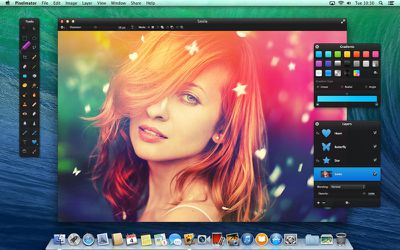
Pixelmator 3.0 FX is the most advanced version of Pixelmator to date, introducing lots of new features and improvements, including the following:
- Layer Styles: Thanks to non-destructive Layer Styles, creating polished and advanced compositions is now so much simpler, faster, and more enjoyable
- Liquify Tools: Shape images in multiple ways—slightly twist an element, add an artistic detail, or completely distort an entire image
- New Image Editing Engine: The new state-of-the-art image editing engine harnesses the full power of the latest OS X technologies making Pixelmator feature rich, yet blistering fast
- OS X Mavericks support: Tags, Multiple-Displays, App Nap support and more
Pixelmator is only third-party app mentioned on Apple’s Mac Pro performance page, where it is used to demonstrate the new tower's blazingly fast performance.
Pixelmator 3.0 is a free upgrade for existing users, while new users can download the app from the Mac App Store for $29.99. [Direct Link]




















Top Rated Comments
P.S. I haven't had any problems mentioned above, except the awkward lack of a "crop to selection" feature. I use "crop off transparent pixels" to do the same thing but that does take more steps.
Now give me some useful resizing on export features so i can use it to easily create assets, and I'll switch over to it full time.
For what it's worth, I updated iMovie 3 times on my computer this morning :p