
Chat-Like OS X Email App 'Unibox' Now Available in Mac App Store - MacRumors
Skip to Content

Chat-Like OS X Email App 'Unibox' Now Available in Mac App Store

by

Unibox, a Messages-style email client that entered public beta back in September, is now available for download from the Mac App Store.

Aiming to revolutionize the email experience, Unibox is designed to make email more personal through an organizational system that groups emails by contacts. The app's interface is divided into two panes, with the left side displaying contacts and the right side displaying all messages that have been exchanged with a particular person or website.
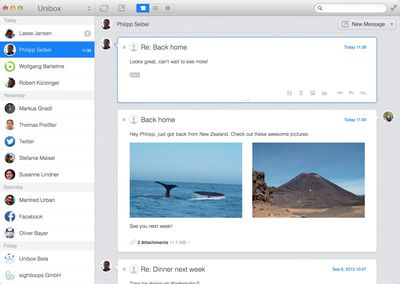
uniboxemail1

Unibox is a people centric email client that organizes your messages by person. In contrast to the tedious to-do list that email is today, Unibox allows you to concentrate on actual communication and makes email fun again. Once you got used to it you'll never want to go back.

Emails are composed within a single window, eliminating the concept of separate compose windows utilized by existing apps like Mail. Received attachments are readily available, displayed in a grid view, and the app also supports additional features like simple account switching and multiple aliases.

Unibox supports all IMAP accounts and works with both Mountain Lion and Mavericks. It can be downloaded from the Mac App Store for $9.99. [Direct Link]


Top Rated Comments

162 months ago
Just what the industry needed. Enforce the use of e-mail as an IM client.
Score: 2 Votes (Like | Disagree)
spazzcat Avatar
162 months ago
Cool way to look at email, but not $10 cool...
Score: 2 Votes (Like | Disagree)
162 months ago
Love Unibox

I was in the beta test and bought my $10 copy. They're trying something really hard-- rethinking email -- and in my case, the reorientation to people, and not conversation threads, works really well to keep in mind who I'm communicating with over the day.
Score: 1 Votes (Like | Disagree)
kmpoboy2 Avatar
162 months ago
This is what I have:

Thanks for that man, I've been trying to set it up since i got the app a while back and it never occurred to me to set it up as exchange.
Score: 1 Votes (Like | Disagree)
c0ppo Avatar
162 months ago
After Sparrow I've switched to AirMail. One 8GB account, and one at 5GB. Everything works like a charm. AirMail is fast, beautiful and with a lot of features.

At 2$ its a no brainer for me :)
Score: 1 Votes (Like | Disagree)
162 months ago
My problem with these third party email clients is that yes, they provide quite good features, but if you have a large mailbox, they bog down really quickly.

I loved Sparrow, but it was pretty much unusable most of the time. Whilst there are features that I'd love in the native Mavericks mail app - it's the only Mac mail client I've been able to find which can cope with my 15GB mailbox.
Score: 1 Votes (Like | Disagree)

Popular Stories

iOS 26

iOS 26.4 Adds Two New Features to CarPlay

Tuesday March 24, 2026 1:55 pm PDT by
iOS 26.4 was released today, and it includes a couple of new features for CarPlay: an Ambient Music widget and support for voice-based chatbot apps. To update your iPhone 11 or newer to iOS 26.4, open the Settings app and tap on General → Software Update. CarPlay will automatically offer the new features so long as the iPhone connected to your vehicle is running iOS 26.4 or later....
Apple Business hero

Apple Unveils 'Apple Business' All-in-One Platform

Tuesday March 24, 2026 8:53 am PDT by
Apple today announced Apple Business, a new all-in-one platform that unifies device management, productivity tools, and customer outreach features. The service is designed to be a consolidated replacement for several of Apple's existing business-focused offerings, including Apple Business Essentials, Apple Business Manager, and Apple Business Connect. It provides organizations with a single...
AirPods Pro Firmware Feature

Apple Releases New Firmware for AirPods Pro 3, AirPods Pro 2 and AirPods 4

Tuesday March 24, 2026 12:31 pm PDT by
Apple today released new firmware for the AirPods Pro 2, AirPods Pro 3, and the AirPods 4. The firmware has a version number of 8B39, up from 8B34 on the AirPods Pro 3, 8B28 on the AirPods Pro 2, and 8B21 on the AirPods 4. There is no word on what's included in the firmware, but Apple has a support document with limited notes. Most updates are limited to bug fixes and performance...














