New 24-Inch 4K Monitor Detailed on Dell's Website [Update: $1399] - MacRumors
Skip to Content

New 24-Inch 4K Monitor Detailed on Dell's Website [Update: $1399]

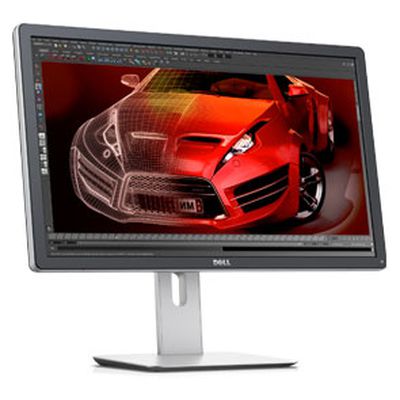
Dell up2414q heroDell has posted details of a new 24-inch monitor sporting a 3840x2160 "4K" Ultra HD resolution at 185 pixels per inch on its website (via Anandtech), suggesting the company may soon be selling 4K monitors to its consumer and business customers. No pricing or release date information, however, was included in the listing.

The development could provide insight into future Apple 4K monitor offerings as the two companies have historically used the same supplier for their display panels.

From Dell's listing:

See more of everything — down to the smallest detail

Whether it’s video editing, CGI animation or application and game development, the Dell UltraSharp 24 Monitor – UP2414Q gives you an up-close-and-personal view.

- Our highest pixel density sharpens the tiniest details in videos and images for stunning results.
- Ultra HD 3840 x 2160 packs in four times the resolution of Full HD.
- Get a clear and consistent view with an ultrawide 178°/178° viewing angle.

Diagonally Viewable Size: 60.47 cm 23.8" (23.8-inch wide viewable image size)
Aspect Ratio: Widescreen (16:9)
Panel Type, Surface: In-plane switching, anti glare with hard coat 3H
Optimal resolution: 3840 x 2160 at 60 Hz (DP1.2*)
3840 x 2160 at 30 Hz HDMI
Contrast Ratio: 1000: 1 (typical) 2 Million:1 (Max) (Dynamic Contrast Ratio)
Brightness: 350 cd/m2 (typical)
Response Time: 8 ms (gray to gray)
Viewing Angle: (178° vertical / 178° horizontal)
Color Support: Color Gamut (typical): Adobe RGB 99%, sRGB 100%
1.07 Billion colors (8 Bits +AFRC)
Pixel Pitch: 0.137 mm
Pixel Per Inch (PPI): 185
Backlight Technology: LED
Display Type: Widescreen Flat Panel Display
Display Screen Coating: Antiglare with hard-coating 3H

It is unknown if Apple would use the same 16:9 3840 x 2160 panels for a 4K display, as some have suggested that the company may prefer to push Thunderbolt 2 to its limit and support the wider 4096 x 2160 "Cinema 4K" standard given that the display will undoubtedly be targeted at professionals, many of whom in the film industry will be working with content using that resolution standard adopted for film production.

With the new Mac Pro, expected sometime this month, supporting up to three 4K displays simultaneously, there had been hopes that Apple would release updated Thunderbolt displays with 4K displays in the near future. Though these new 4K display panels have been announced from a number of potential suppliers, we have heard no firm details about new Thunderbolt displays from Apple.

Update: Dell has now officially announced the UP2414Q display, which launches in the Americas today for $1399 and will be available worldwide on December 16. A 32-inch UP3214Q model is also available for $3499 and a 28-inch model priced at under $1000 will follow in early 2014.


Related Roundup: Studio Display
Buyer's Guide: Displays (Buy Now)
Related Forum: Mac Accessories

Popular Stories

iOS 26

iOS 26.4 Adds Two New Features to CarPlay

Tuesday March 24, 2026 1:55 pm PDT by
iOS 26.4 was released today, and it includes a couple of new features for CarPlay: an Ambient Music widget and support for voice-based chatbot apps. To update your iPhone 11 or newer to iOS 26.4, open the Settings app and tap on General → Software Update. CarPlay will automatically offer the new features so long as the iPhone connected to your vehicle is running iOS 26.4 or later....
Apple Business hero

Apple Unveils 'Apple Business' All-in-One Platform

Tuesday March 24, 2026 8:53 am PDT by
Apple today announced Apple Business, a new all-in-one platform that unifies device management, productivity tools, and customer outreach features. The service is designed to be a consolidated replacement for several of Apple's existing business-focused offerings, including Apple Business Essentials, Apple Business Manager, and Apple Business Connect. It provides organizations with a single...
AirPods Pro Firmware Feature

Apple Releases New Firmware for AirPods Pro 3, AirPods Pro 2 and AirPods 4

Tuesday March 24, 2026 12:31 pm PDT by
Apple today released new firmware for the AirPods Pro 2, AirPods Pro 3, and the AirPods 4. The firmware has a version number of 8B39, up from 8B34 on the AirPods Pro 3, 8B28 on the AirPods Pro 2, and 8B21 on the AirPods 4. There is no word on what's included in the firmware, but Apple has a support document with limited notes. Most updates are limited to bug fixes and performance...

Top Rated Comments

161 months ago
It's ugly as heck too.
Score: 25 Votes (Like | Disagree)
Icaras Avatar
161 months ago
I like the resolution, but GPU options in apple computers has gone to *****. It used to be pretty bad.... now its next to non-existent.

I've gotta disagree. I must say I'm thoroughly impressed with the Iris Pro's performance in my wife's new 2013 iMac. It does pretty much everything last year's base model can do without having to be discreet whilst cutting down on noise (one less fan) and saving in energy. Base models may not be intended to drive 4K displays but its an achievement that Intel has finally caught up with entry level discreet graphics.

Meanwhile my 2012 iMac with the 680MX is handling Battlefield 4 just fine. And now we're up to 4GB of video memory? I'd say this is the best era for GPUs in all-in-one Macs.
Score: 12 Votes (Like | Disagree)
161 months ago
Wait, It's 4k and only 24"??? I'd want the darn thing to be 30" and have 3 of them...
Score: 10 Votes (Like | Disagree)
macaddiict Avatar
161 months ago
Assuming this is a decent price, I'll likely be buying one. After upgrading to a retina MacBook Pro, using a regular monitor is like sand in the eyes.
Score: 9 Votes (Like | Disagree)
161 months ago
Make it 27" or even 30" and maybe then it would be worth looking at
Score: 9 Votes (Like | Disagree)
161 months ago
Why does Dell always have to use ugly stands with their monitors?

At least they are slightly adjustable up and down, unlike Apple monitors. If you are over 6", you need to put it on a book or buy a booster stand for it, or throw the stand away and buy a complete VESA desktop mount for it.
Score: 7 Votes (Like | Disagree)