
Sunrise Calendar Updated with Full iPad Support, Background Updates - MacRumors
Skip to Content

Sunrise Calendar Updated with Full iPad Support, Background Updates

by

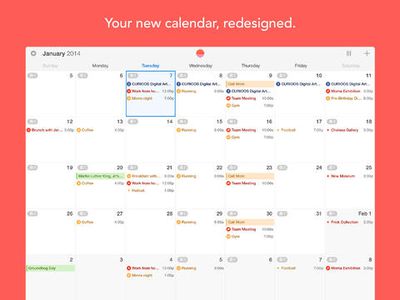
Smart calendar app Sunrise Calendar has received an update today, bringing full support for the iPad, a new week view for the iPhone that allows users to view three days at once, and automatic background refreshes for events and notifications.
sunrisecalendar_ipad1

iPad
We've worked hard to bring the best Sunrise experience to your iPad. It's the most beautiful calendar everywhere now.
We are introducing two new visualisations: Week and Month. They make it easier to make plans from your iPad and navigate in time quickly.

Week View (for iPhone too!)
This new visualisation makes it easier to see free-time between events, see your day at-a-glance, or find a time to get dinner with a friend next week.
Tap on the week icon next to the new event button to reveal it. The best part: it works perfectly in portrait mode.
A lot of people have tried to design a week view before, but we think that you'll enjoy the design of Sunrise better!

Background Updates
Sunrise will now update in the background (every hour by default), so you won't need to open Sunrise to get the latest changes. Notifications will always be up to date.

The app originally launched in February after being developed by former Foursquare engineers, and offers a feed populated with Google Calendar, iCloud, and Facebook events in addition to birthdays and weather information.

Users can also navigate around using swipe gestures for quick switching between calendar days, and like Fantastical, allows for colloquial language when entering events. For example, typing "Dinner with Michelle at 8pm tomorrow" will schedule the appropriate event in the calendar.


Sunrise Calendar is a free universal app and can be downloaded from the App Store. [Direct Link]

Top Rated Comments

mrgraff Avatar
159 months ago
No Exchange support :(

I think that at the very least, any new iOS calendar app, at the time of launch, should support any calendar that the iOS stock calendar app already supports. Then you can add all the cool functionality and features.
Score: 4 Votes (Like | Disagree)
159 months ago
I want to warn people to read the privacy policy before you download this software. Basically, nothing is off limits, including your personally identifiable information and schedule.
Score: 3 Votes (Like | Disagree)
159 months ago
why do we need to create a sunrise account to use this? with Fantastical, you just sign into your google calendar account.
Score: 2 Votes (Like | Disagree)
flottenheimer Avatar
159 months ago
I want to warn people to read the privacy policy before you download this software. Basically, nothing is off limits, including your personally identifiable information and schedule.

Just wondered how they make money. Guess you provided an answer.
Sad.

And what a shame — the app looked really nice.
Score: 2 Votes (Like | Disagree)

Popular Stories

iOS 26

iOS 26.4 Adds Two New Features to CarPlay

Tuesday March 24, 2026 1:55 pm PDT by
iOS 26.4 was released today, and it includes a couple of new features for CarPlay: an Ambient Music widget and support for voice-based chatbot apps. To update your iPhone 11 or newer to iOS 26.4, open the Settings app and tap on General → Software Update. CarPlay will automatically offer the new features so long as the iPhone connected to your vehicle is running iOS 26.4 or later....
AirPods Pro Firmware Feature

Apple Releases New Firmware for AirPods Pro 3, AirPods Pro 2 and AirPods 4

Tuesday March 24, 2026 12:31 pm PDT by
Apple today released new firmware for the AirPods Pro 2, AirPods Pro 3, and the AirPods 4. The firmware has a version number of 8B39, up from 8B34 on the AirPods Pro 3, 8B28 on the AirPods Pro 2, and 8B21 on the AirPods 4. There is no word on what's included in the firmware, but Apple has a support document with limited notes. Most updates are limited to bug fixes and performance...
apple tv 4k new orange

tvOS 26.4 Adds These New Features to Your Apple TV

Wednesday March 25, 2026 3:33 pm PDT by
Apple this week released tvOS 26.4, and the software update includes a handful of new features and changes for the Apple TV. tvOS 26.4 is compatible with all Apple TV 4K and Apple TV HD models released since 2015. To update your Apple TV, open the Settings app on the device, navigate to System → Software Updates, and select Update Software. Below, we have recapped what is new in tvOS...















