
Apple TV 6.1 Software Update Makes Hiding Channels Easier - MacRumors
Skip to Content

Apple TV 6.1 Software Update Makes Hiding Channels Easier

by

Alongside the launch of iOS 7.1, Apple today updated its Apple TV software to version 6.1, adding a much-requested feature that allows users to hide unwanted channel icons from the main screen without needing to access the Parental Controls menu. The hiding feature joins an already existing rearranging feature, letting users further customize their Apple TV home screens as the number of channels has grown significantly in recent months.
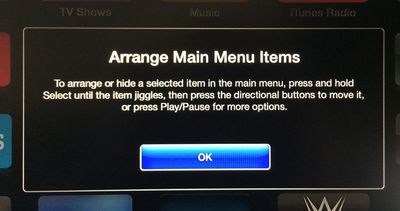
appletvarrange
Arranging or hiding icons can be initiated by selecting an item in the main menu and then pressing and holding on the Select button of the remote control until the icon jiggles, much as how icon rearranging functions within iOS. Icons can be moved using directional buttons, with Play/Pause available for more options.
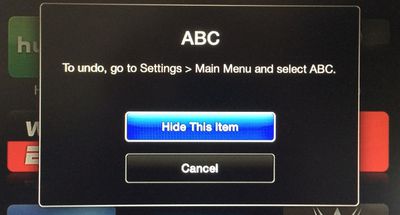
appletvhideitems
The Apple TV software was last updated to version 6.0.1 in October, following the release of the 6.0 software in September, which brought several new features including iTunes Radio and AirPlay from iCloud. Earlier this week, the Apple TV gained a new iTunes Festival channel ahead of SXSW.

Users can download the Apple TV 6.1 software through the Apple TV’s over-the-air update mechanism found in Settings --> General –-> Software Update.

Apple has also updated the Remote app for iOS devices to version 4.2, adding a feature that allows users to browse purchased movies and TV shows within the app and then play them on the Apple TV. The update also includes the ability to control iTunes Radio on the Apple TV and offers bug fixes and stability improvements. [Direct Link]


Top Rated Comments

dearfriendx Avatar
157 months ago
Sweet! An easy way for a grown man to hide 8 Disney channels
Score: 16 Votes (Like | Disagree)
musika Avatar
157 months ago
Add this feature to iOS for iPhone and iPad!
Score: 13 Votes (Like | Disagree)
GenesisST Avatar
157 months ago
Finally! No more annoying posts about not being able to hide apps (when you could, in a convoluted way)!
Score: 11 Votes (Like | Disagree)
Northgrove Avatar
157 months ago
BRB, hiding 80% of all icons...
Score: 8 Votes (Like | Disagree)
157 months ago
Safari feels.... oh sorry, wrong device.
Score: 8 Votes (Like | Disagree)
KylePowers Avatar
157 months ago
Neato.

Now release an App Store and a dope 4th gen AppleTV :D
Score: 5 Votes (Like | Disagree)

Popular Stories

iOS 26

iOS 26.4 Adds Two New Features to CarPlay

Tuesday March 24, 2026 1:55 pm PDT by
iOS 26.4 was released today, and it includes a couple of new features for CarPlay: an Ambient Music widget and support for voice-based chatbot apps. To update your iPhone 11 or newer to iOS 26.4, open the Settings app and tap on General → Software Update. CarPlay will automatically offer the new features so long as the iPhone connected to your vehicle is running iOS 26.4 or later....
Apple Business hero

Apple Unveils 'Apple Business' All-in-One Platform

Tuesday March 24, 2026 8:53 am PDT by
Apple today announced Apple Business, a new all-in-one platform that unifies device management, productivity tools, and customer outreach features. The service is designed to be a consolidated replacement for several of Apple's existing business-focused offerings, including Apple Business Essentials, Apple Business Manager, and Apple Business Connect. It provides organizations with a single...
AirPods Pro Firmware Feature

Apple Releases New Firmware for AirPods Pro 3, AirPods Pro 2 and AirPods 4

Tuesday March 24, 2026 12:31 pm PDT by
Apple today released new firmware for the AirPods Pro 2, AirPods Pro 3, and the AirPods 4. The firmware has a version number of 8B39, up from 8B34 on the AirPods Pro 3, 8B28 on the AirPods Pro 2, and 8B21 on the AirPods 4. There is no word on what's included in the firmware, but Apple has a support document with limited notes. Most updates are limited to bug fixes and performance...














