
Belkin today announced the availability of the QODE Thin Type for iPad Air, adding an ultra-slim keyboard option to its popular QODE line of tablet keyboards. QODE Thin Type for iPad Air features an anodized aluminum design, 79 hours of battery life and iOS specific keys that pair nicely with the iPad. The keyboard's main selling point is its 4mm thin profile that barely adds any heft to the already slender iPad Air.
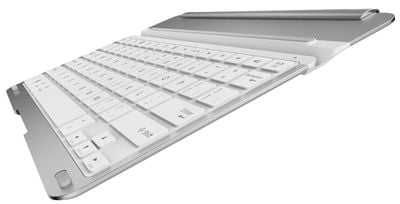
Belkin-QODE-Thin-Type
An early review of the device from ZDNet's James Kendrick is favorable, noting that the keyboard is "different in a good way" from competing iPad tablets from Logitech, Kensington and Annker.

The Belkin is a simple cover with a keyboard on one side. The metal cover is not flat like the competitors' models. There is a hump toward the back of the cover that gives the Belkin three advantages over the competition. The hump houses a large battery that Belkin claims gives six months of use on a charge. This is double that of other iPad keyboards. Having this hump on the cover provides an ergonomic tilt to the keyboard, perfect for typing. Last but not least, the protrusion provides a secure grip for handling the tablet in the cover.

The QODE Thin Type keyboard for iPad Air is available now for $99.99 at Belkin.com and will land soon at select retailers worldwide.


Top Rated Comments

oneMadRssn Avatar
153 months ago
It seems to me that an iPad + keyboard would weigh about as much as a Macbook Air 11", would be about as thick, if not thicker in some cases, than a Macbook Air, and would cost about as much total as a Macbook Air. Yet, it won't be able to run 2 or more apps side by side.

I like iPads; but I don't understand why anyone would prefer this keyboard + iPad route over a proper laptop.
Score: 7 Votes (Like | Disagree)
c0ppo Avatar
153 months ago
Nice keyboard. But 100$ is way to much. By the time this thing hits EU countries, it will cost about 150€. For that kinda of money I can pay someone to write things for me :D
Score: 7 Votes (Like | Disagree)
unplugme71 Avatar
153 months ago
$100 for a keyboard for iPad? I'll pass.

Even the $70 one from Apple is too much money. It's a freakin basic keyboard.
Score: 6 Votes (Like | Disagree)
nagromme Avatar
153 months ago
If it didn't have those goofy / and ? key locations I'd ditch my backlit ZAGGkeys Cover Keyboard (http://www.zagg.com/ipad-air-keyboard/8534) for this. But those non-standard locations would drive me insane.

A new video from Belkin shows the keys are indeed re-arranged badly, including number-row keys being just a bit narrow, placing the "1" and "=" keys a little oddly. But mainly the punctuation keys are all messed up. Too bad.

Logitech's new unit's layout still looks fully standard—and now with full-height number keys that earlier Ultrathins lacked..
Score: 1 Votes (Like | Disagree)
nagromme Avatar
153 months ago
It seems to me that an iPad + keyboard would weigh about as much as a Macbook Air 11", would be about as thick, if not thicker in some cases, than a Macbook Air, and would cost about as much total as a Macbook Air. Yet, it won't be able to run 2 or more apps side by side.

I like iPads; but I don't understand why anyone would prefer this keyboard + iPad route over a proper laptop.
I love my 11" MB Air, but an iPad keyboard is worth the money to me too:

- It is WAY thinner, lighter, and smaller in both flat dimensions than the MBA. I don't need that--I could survive with a bulky MB Pro even--but I very much like it. Plus, I can draw on the iPad (when keyboard is detached) better than on the laptop. And I'm a fan of touch gaming (though I haven't abandoned AAA Mac shooters).

- Not a factor for me, clearly, but an iPad plus keyboard usually comes to much less cost than a low-end MBA.

- MacBooks don't currently have an internal, nothing-to-carry cell modem. A niche option maybe, but one available on iPad for cheaper (pay only you when you need) than I can get tethering.

- OS X has many strengths, and multiple-app workflows are one, as you say (for those like you and I who need that). But iOS has other strengths. It's quicker, easier, simpler, and even downright fun to do a lot of very common and useful computing functions. My Mac and my iPad are usually both in reach, but it's the iPad I find myself grabbing much of the time. For many people, the difference is even more stark: Windows/OS X was never the best tool for them, and iOS opens up more computing and productivity--including text creation--than traditional laptops ever did.

- The top reason: the keyboard detaches. Most of the time I do NOT want it, and it just makes a handy video stand next to my couch. The Air alone is super light and has direct touch, and this style of keyboard doesn't clamp on annoyingly: one hand can grab the tablet and go. But when I do want to type a long email or an endless droning forum post or a text document, the keyboard is there to make an "iOS laptop" at the times I want that.

Keyboards are not for everyone, but they have their place.

The Tab and Q key are combined on the Ultrathin Folio case for the iPad Air. So to use the tab key you have to do Fn+Tab. I use the tab key a lot and it's a PITA when switching between a desktop/laptop and the iPad. A piece of the case also broke off, but I was happy to return it for the keyboard issue alone.
I see--I only looked at the Ultrathin Cover which is akin to this Belkin. I had forgotten Logitech even used the Ultrathin brand for their folios. Those folios also have different/worse key feel than the cover does, apparently. I'd have returned it too.

To clarify, then: Logitech's Ultrathin Cover for iPad Air (old Ultrathin models and the new one just coming out) appears to use a fully standard layout with a real Tab key, similar to this Belkin. I had one of the 2013 Air Ultrathin Keyboard Covers and although the construction was flawed, the keys were great!
Score: 1 Votes (Like | Disagree)
ProVideo Avatar
153 months ago

Logitech's Ultrathin keyboards for Air (not Mini) have a standard layout, don't they? What keys are different?

The Tab and Q key are combined on the Ultrathin Folio case for the iPad Air. So to use the tab key you have to do Fn+Tab. I use the tab key a lot and it's a PITA when switching between a desktop/laptop and the iPad. A piece of the case also broke off, but I was happy to return it for the keyboard issue alone.
Score: 1 Votes (Like | Disagree)

Popular Stories

Apple Logo Zoomed

Tim Cook Teases Plans for Apple's Upcoming 50th Anniversary

Thursday February 5, 2026 12:54 pm PST by
Apple turns 50 this year, and its CEO Tim Cook has promised to celebrate the milestone. The big day falls on April 1, 2026. "I've been unusually reflective lately about Apple because we have been working on what do we do to mark this moment," Cook told employees today, according to Bloomberg's Mark Gurman. "When you really stop and pause and think about the last 50 years, it makes your heart ...
iOS 26

iOS 26.3 and iOS 26.4 Will Add These New Features to Your iPhone

Tuesday February 3, 2026 7:47 am PST by
While the iOS 26.3 Release Candidate is now available ahead of a public release, the first iOS 26.4 beta is likely still at least a week away. Following beta testing, iOS 26.4 will likely be released to the general public in March or April. Below, we have recapped known or rumored iOS 26.3 and iOS 26.4 features so far. iOS 26.3 iPhone to Android Transfer Tool iOS 26.3 makes it easier...
imac video apple feature

Apple Makes Its Second-Biggest Acquisition Ever

Tuesday February 3, 2026 12:45 pm PST by
Apple recently acquired Israeli startup Q.ai for close to $2 billion, according to Financial Times sources. That would make this Apple's second-biggest acquisition ever, after it paid $3 billion for the popular headphone maker Beats in 2014. This is also the largest known Apple acquisition since the company purchased Intel's smartphone modem business and patents for $1 billion in 2019....
wwdc sans text feature

Apple Rumored to Announce New Product on February 19

Thursday February 5, 2026 12:22 pm PST by
Apple plans to announce the iPhone 17e on Thursday, February 19, according to Macwelt, the German equivalent of Macworld. The report, citing industry sources, is available in English on Macworld. Apple announced the iPhone 16e on Wednesday, February 19 last year, so the iPhone 17e would be unveiled exactly one year later if this rumor is accurate. It is quite uncommon for Apple to unveil...
Finder Siri Feature

Why Apple's iOS 26.4 Siri Upgrade Will Be Bigger Than Originally Promised

Friday February 6, 2026 3:06 pm PST by
In the iOS 26.4 update that's coming this spring, Apple will introduce a new version of Siri that's going to overhaul how we interact with the personal assistant and what it's able to do. The iOS 26.4 version of Siri won't work like ChatGPT or Claude, but it will rely on large language models (LLMs) and has been updated from the ground up. Upgraded Architecture The next-generation...















