Home Screen Widget 'Blocks' Imagined in New iOS Concept - MacRumors
Skip to Content

Home Screen Widget 'Blocks' Imagined in New iOS Concept

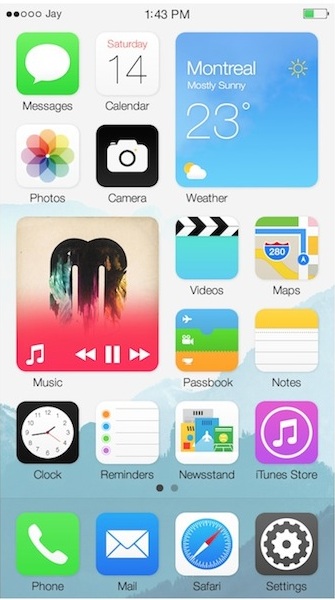
One of the more popular feature requests from iOS users has been live widgets for the home screen, similar to Live Tiles on Windows Phone and Widgets on Android. While there have been no specific rumors of widgets actually coming to iOS 8, a new concept from Jay Machalani (via The Verge) offers an excellent vision of how this could be implemented on iOS with the "iOS Block".

Here’s how it works. On your iOS device you have your list of icons like you know and love. They work and look the same way as before. But, if you want more information about an app, you can simply pinch the app icon bigger and it will now become an iOS Block. There’s no menu, no hidden options and no weird gestures to do. You literally make the icon bigger with your finger if you want more; it can’t be simpler and more intuitive than that.

When you pinch the icon, you will see the transformation/transition into a Block and at that point you have two choices: Either you pinch it back to an icon since you got the information you need or you release your fingers and the icon will remain a Block on your iOS screen.

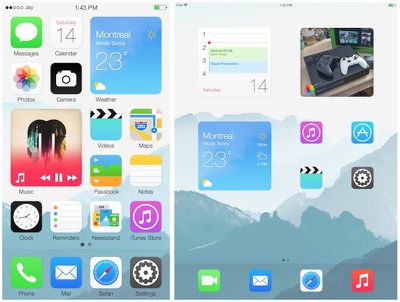
Malachani imagines three possible sizes for Blocks, designed to take up the space of a 2x2 grid of icons on the home screen for iPhone, iPad portrait, and iPad landscape.
ios_blocks_concept_screens
Malachani goes on to outline more details on how the Blocks would be constructed with a relative uniform layout consisting of an app icon in the lower left, a tap zone along the remainder of the bottom edge where buttons could be placed, and a content zone taking up the remainder of the Block. As examples, Malachani walks through how the stock Weather, Music, Calendar, Messages, and Photos apps might look as Blocks.

As Malachani notes, the concept is still a work in progress, as he is unsure exactly how iOS would handle moving other home screen icons to accommodate a new Block on a full home screen, as the normal method of pushing icons to the next page could be disruptive depending on how frequently Blocks are opened and closed.


Popular Stories

iOS 26

iOS 26.4 Adds Two New Features to CarPlay

Tuesday March 24, 2026 1:55 pm PDT by
iOS 26.4 was released today, and it includes a couple of new features for CarPlay: an Ambient Music widget and support for voice-based chatbot apps. To update your iPhone 11 or newer to iOS 26.4, open the Settings app and tap on General → Software Update. CarPlay will automatically offer the new features so long as the iPhone connected to your vehicle is running iOS 26.4 or later....
Apple Business hero

Apple Unveils 'Apple Business' All-in-One Platform

Tuesday March 24, 2026 8:53 am PDT by
Apple today announced Apple Business, a new all-in-one platform that unifies device management, productivity tools, and customer outreach features. The service is designed to be a consolidated replacement for several of Apple's existing business-focused offerings, including Apple Business Essentials, Apple Business Manager, and Apple Business Connect. It provides organizations with a single...
AirPods Pro Firmware Feature

Apple Releases New Firmware for AirPods Pro 3, AirPods Pro 2 and AirPods 4

Tuesday March 24, 2026 12:31 pm PDT by
Apple today released new firmware for the AirPods Pro 2, AirPods Pro 3, and the AirPods 4. The firmware has a version number of 8B39, up from 8B34 on the AirPods Pro 3, 8B28 on the AirPods Pro 2, and 8B21 on the AirPods 4. There is no word on what's included in the firmware, but Apple has a support document with limited notes. Most updates are limited to bug fixes and performance...

Top Rated Comments

sualpine Avatar
154 months ago
Should have been this way by now. You don't go through 7 VERSIONS without changing the homescreen. And I don't mean the icons.
Score: 55 Votes (Like | Disagree)
eric_n_dfw Avatar
154 months ago
I like it
Score: 34 Votes (Like | Disagree)
Populus Avatar
154 months ago


Someone said Windows phone?
Score: 30 Votes (Like | Disagree)
jrswizzle Avatar
154 months ago
Holy crap that looks terrible.....

At least center the wording under the "block".....
Score: 26 Votes (Like | Disagree)
154 months ago
I think it looks pretty nice.
Score: 15 Votes (Like | Disagree)
154 months ago
No, please no.

No.
Score: 15 Votes (Like | Disagree)