
iOS 8 Beta 2 Tidbits: Permanent Podcasts App, QuickType Keyboard for iPad, and More - MacRumors
Skip to Content

iOS 8 Beta 2 Tidbits: Permanent Podcasts App, QuickType Keyboard for iPad, and More

Apple today released the second beta of iOS 8, which brings a number of improvements, changes, and bug fixes to the beta software that was introduced on June 2.

iOS 8 beta 2 also includes several minor interface tweaks and modifications that make the beta feel both faster and more polished. We've gathered a list of the enhancements that have been bundled into the release below.

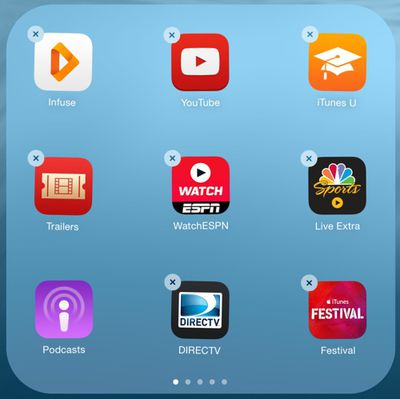
Podcasts: Following iOS 8 beta 2, the Podcasts app is a default iOS app that comes pre-installed on iOS devices. This means it can no longer be deleted.
podcasts
Safari: According to the release notes, Safari will now block ads from automatically redirecting to the App Store without user interaction. Safari also includes a new pinch to tab view.

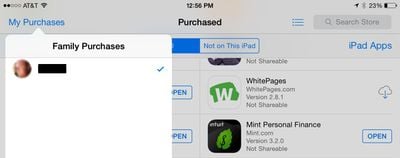
App Store Purchases: Apps in the App Store's purchased tab are once again sorted by purchase date. In iOS 8 beta 1, they were sorted alphabetically. It's also possible to leave reviews in the App Store again, a feature unavailable in beta 1 due to a bug, and the App Store now displays Family Purchases.
familypurchases
QuickType Keyboard: Apple's QuickType keyboard is now available on the iPad as well as the iPhone, but does not appear to be available on the iPad 2.

Brightness: In beta 1, the Brightness toggle in the Settings menu under Wallpaper and Brightness was broken. It is now functional again.

Messages: Icons for the camera and the microphone in Messages are now gray rather than blue and there's a new setting to mark all messages read.

messages
Settings: There's a new "Raise to Listen" setting for Messages.

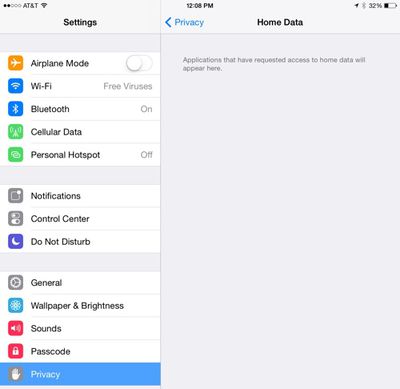
Privacy: There's a new Home Data section within the Privacy menu of the Settings app.
homedata
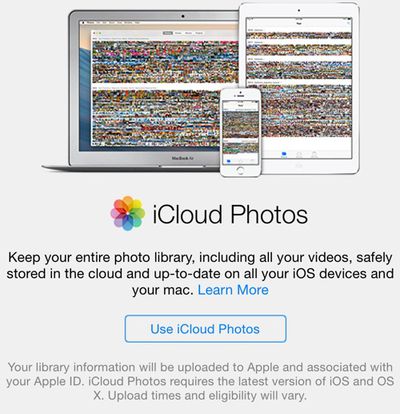
iCloud Photos: When entering the Photos app, there's a new "iCloud Photos" popup that activates Apple's new iCloud Photos feature, replacing a user's existing Photo Stream settings.
icloudphotos
Notifications: There's a new "Allow Notifications" setting available for each app, which works as a sort of global mute to let users to mute notifications from an app on an individual basis. Previously, there was only an option to disallow apps from showing notifications in Notification Center.
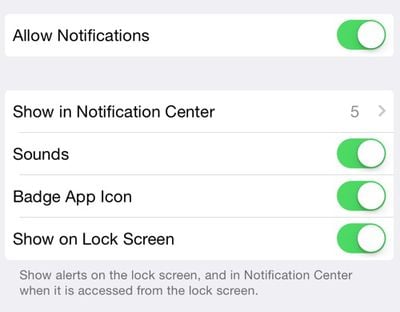
allownotifications
Battery Usage by App: The Battery Usage by App menu in the Settings menu now includes a setting that lets users know how much battery their phones used when no coverage was available.
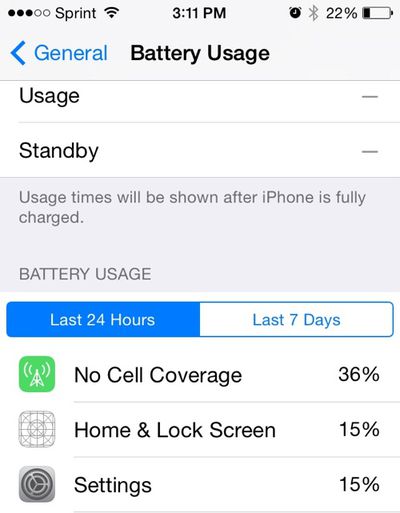
batteryusage
Handoff: According to several of our forum members, Handoff between iOS 8 and OS X Yosemite is now far more functional.

Additional features in iOS 8 beta 2 will be added here as they are discovered. Apple is likely to continue pushing regular updates to iOS 8, bringing minor performance boosts and changes ahead of the operating system's public release, which is expected to come in the fall. For more information on iOS 8's features, big and small, make sure to check out our roundups.


Related Forum: iOS 8

Popular Stories

iOS 26

iOS 26.4 Adds Two New Features to CarPlay

Tuesday March 24, 2026 1:55 pm PDT by
iOS 26.4 was released today, and it includes a couple of new features for CarPlay: an Ambient Music widget and support for voice-based chatbot apps. To update your iPhone 11 or newer to iOS 26.4, open the Settings app and tap on General → Software Update. CarPlay will automatically offer the new features so long as the iPhone connected to your vehicle is running iOS 26.4 or later....
Apple Business hero

Apple Unveils 'Apple Business' All-in-One Platform

Tuesday March 24, 2026 8:53 am PDT by
Apple today announced Apple Business, a new all-in-one platform that unifies device management, productivity tools, and customer outreach features. The service is designed to be a consolidated replacement for several of Apple's existing business-focused offerings, including Apple Business Essentials, Apple Business Manager, and Apple Business Connect. It provides organizations with a single...
AirPods Pro Firmware Feature

Apple Releases New Firmware for AirPods Pro 3, AirPods Pro 2 and AirPods 4

Tuesday March 24, 2026 12:31 pm PDT by
Apple today released new firmware for the AirPods Pro 2, AirPods Pro 3, and the AirPods 4. The firmware has a version number of 8B39, up from 8B34 on the AirPods Pro 3, 8B28 on the AirPods Pro 2, and 8B21 on the AirPods 4. There is no word on what's included in the firmware, but Apple has a support document with limited notes. Most updates are limited to bug fixes and performance...

Top Rated Comments

rorschach Avatar
154 months ago
Another default app that can't be deleted. Hurray!
Score: 34 Votes (Like | Disagree)
nepalisherpa Avatar
154 months ago
Ugh...more pre-installed apps! Just make them Appstore apps. Not only will you allow users to have a choice but you can also update these apps without pushing out a system update.
Score: 23 Votes (Like | Disagree)
UnseenLlama Avatar
154 months ago
Great new features, but we need apps to crash less.

Considering 3rd party apps need to be updated by, uh, the 3rd parties, I'm sure Apple will get right on that. :rolleyes:
Score: 16 Votes (Like | Disagree)
Carlanga Avatar
154 months ago
Yea are you new to iOS?

He is saying it because of newsstand inability to be hidden before iOS 7. Maybe you are the one "new" to iOS. :p
Score: 10 Votes (Like | Disagree)
154 months ago
Unbelievable. This is the final straw. I'm switching to Android. I can't understand why Apple feels it needs to force such a stupid app on to everyone. Podcasts is such an integral experience to iOS that it needs to be a stock app? Really? Who listens to podcasts? Nobody cares. Just like Health, Newsstand, Stocks, Compass, Phone, iMessage, Maps, Passbook, Reminders, FaceTime, Safari, iBooks. No. One. Cares, Cupertino. Just amazes me why they can't put in actual useful features.

Soo.. Goodbye and good luck!
Score: 8 Votes (Like | Disagree)
AngerDanger Avatar
154 months ago
You've gotta love how the thumbnail view of the photo stream looks like a corrupt analog broadcast.

Can the Podcast app be put in a folder at least?
Ah, I see you use the 'comment first, look at article later' strategy. ;)
Score: 8 Votes (Like | Disagree)















